Robonix

Robonix 具身智能操作系统
犀照世界 灵通万物 为机器筑心 为具身立智
Robonix 从系统层面构造具身智能的运行时底座,将 AI 模型与异构硬件软硬解耦,使模型成为可在运行时加载与组合的程序,朝“一次训练,任意机器部署运行“的方向演进。
围绕“感知–理解–规划–行动“全链路中的数据处理与环境交互等共性问题,Robonix 设计了“感知–互联–认知–控制“系统服务框架,降低模型与技能的开发及运行成本,推动软硬件独立演进的生态。
Robonix 是《具身智能操作系统技术白皮书》(CCF 泛在操作系统开放社区,2026)的参考实现。白皮书提出 EAIOS(Embodied AI Operating System)架构,采用“原语–服务–技能–任务“四级抽象体系。更多背景参阅白皮书原文及 EAIOS 架构背景。
本手册导读
- 快速上手——从克隆代码到运行 Tiago 仿真 Demo 的完整流程
- 系统组件——12 个系统组件的职责与当前实现状态(已实现 / stub)
- 命名空间与能力约定——namespace 树、能力约定 ID(
contract_id)、capabilities/与 robonix-codegen、多传输、通道协商 - 接口目录——primitive(原语)/ service(服务)/ system(系统)三类能力约定分目录说明
- 接入指南——硬件厂商与算法开发者将自身组件接入 Robonix 的完整流程
EAIOS 架构背景
Robonix 是 EAIOS(Embodied AI Operating System)架构的参考实现。EAIOS 由 CCF 泛在操作系统开放社区于 2026 年发布的《具身智能操作系统技术白皮书》中提出,其核心目标是在机器人系统层面建立统一的抽象体系,实现 AI 模型与硬件之间的软硬解耦。
白皮书原文:gitlink.org.cn/zone/uos/source/292
四级抽象
EAIOS 采用“原语–服务–技能–任务“四层抽象体系(白皮书 §3.2),实现从高层语义目标到底层硬件控制的系统化分层建模。
原语(Primitive)构成硬件抽象层,定义“抽象机器人“的标准化接口。白皮书将原语分为两类:感知原语(Perception Primitive)负责采集原始观测数据(相机 RGB/深度、IMU、关节编码器、力觉触觉等);动作原语(Action Primitive)定义确定性的执行指令(底盘速度控制、机械臂关节控制、夹爪开合等)。不同厂商的同类硬件实现同一套原语接口,上层应用与模型通过原语与抽象机器人交互,无需感知底层差异。
服务(Service)是由操作系统统一注册、调度与管理的功能组件,为任务的决策与执行提供全链路能力支撑。白皮书定义的典型服务包括:语义地图、空间地图、任务规划、方案推演、决策、数据采集、物体识别、校准、记忆、结果反馈,以及人机交互与协同服务。开发者遵循统一的接口规范开发并接入服务,系统在运行时根据任务需求动态完成服务的实例化与编排。
技能(Skill)封装具有特定语义的、可复用的行为操作序列,连接高层任务与底层原语。白皮书将技能分为两种形式:基本技能以独立执行单元注册到系统中(如预训练的 VLA 模型、ROS 2 执行算法等),具有固定运行实现的静态技能;RTDL 技能则是在任务执行过程中由系统动态生成的控制流程描述,在运行时由 RTDL 解释器调度与组合执行。当某类任务的执行流程在多次运行中被验证为稳定可靠时,系统可将其固化为可复用的技能存入技能库。
任务(Task)是具身智能系统运行的顶层逻辑单元,由用户或系统自主提出,具备明确的目标状态与终止条件。系统使用任务描述语言 RTDL(Robot Task Description Language)对任务方案进行形式化描述,经由完整的生命周期管理:任务规划(生成 RTDL 方案)→ 方案推演(世界模型验证可行性与安全性)→ 决策执行(调度器分配资源、协调技能与原语)→ 结果反馈(评估执行效果并反馈至系统闭环)。
Robonix 中的对应
Robonix 作为 EAIOS 架构的参考实现,其组件与四级抽象的对应关系如下:
| EAIOS 层 | 白皮书定义 | Robonix 对应 |
|---|---|---|
| 原语 | 硬件抽象接口:感知原语(相机、IMU 等)与动作原语(底盘、机械臂等) | robonix/primitive/* 下的接口能力约定与能力提供者实现(如差速底盘、相机、激光雷达原语,一个物理设备一个包) |
| 服务 | 操作系统统一注册与调度的功能组件:感知、认知、互联、控制等 | robonix/service/* 下的默认服务(Cognition / Memory / Map / 数据采集 / 系统监控等),以及按部署场景注册的场景服务节点 |
| 技能 | 可复用行为单元:基本技能(预训练 VLA 等)与 RTDL 技能(运行时动态生成) | 技能(进程形态的基本技能,如 VLA 策略,通过 MCP 暴露执行入口)+ 结构化技能图(对应 RTDL 技能,规划中),均独立于包注册到 Atlas |
| 任务 | 用户请求的结构化表达,经由规划→推演→决策→执行→反馈的完整生命周期 | Liaison 把客户端输入构造为任务(Task)发给 Pilot;Pilot 的 ReAct 推理循环把任务分解为 RTDL 方案下发 Executor;Executor 承担任务执行与工具分发;方案推演与结果反馈为规划中功能 |
Liaison 对应白皮书 §3.4.3 的人机交互与协同服务,负责多模态输入的语义解析与任务生成。Atlas 作为控制平面(节点注册、接口声明、通道协商、技能库),是 Robonix 特有的实现机制,不直接对应 EAIOS 四级抽象中的某一层,而是贯穿各层的基础设施。
系统作用域与非目标
Robonix 聚焦于具身智能系统的运行时框架。以下事项不在当前作用域内,或属于规划中的集成方向。
启动与上电
Robonix 的“启动“指功能启动:rbnx start 管理 Linux 进程生命周期,拉起对应本体的驱动(Primitive Node)、系统服务(Service)与技能节点(技能)。硬件级上电管理(例如主控板向关节控制板发送电源指令)不在当前作用域内,未来可由启动管理层或专用的电源管理原语承接。
训练与部署
Robonix 现阶段的核心目标是部署(inference / execution),即以 技能 形态运行预训练模型(VLA、RL 策略、VLM 等)。训练与数据采集链路不在当前作用域内。
规划中的集成方向为 LeRobot(Hugging Face)具身数据采集与微调框架。Robonix 的接口设计将与 LeRobot 数据规范对齐,使 Robonix 上运行的机器人可直接作为 LeRobot 数据源,并加载 LeRobot 训练产物作为 技能 部署。对应的系统服务为“数据采集服务“(robonix/service/common/data_collection,规划中)。
控制面定位
Atlas 仅承担注册、发现、协商与技能库功能,不参与数据面转发,亦不强制进程监控或编排调度。所有数据面通信由能力提供者与消费者在协商端点后直连完成。
快速上手
5 分钟跑起一个完整的 Tiago 仿真 + VLM 对话 demo。
1. 前置
需要:
- Linux x86_64 + Rust stable + Python ≥ 3.10
- Docker + Compose v2(仿真容器)
- 一个 OpenAI 兼容的 VLM API key(Qwen / GPT-4o / Gemini / Claude via 兼容网关 都行)
推荐:NVIDIA GPU + nvidia-container-toolkit(Webots 3D 渲染);只跑对话不跑仿真可跳过 Docker。
2. 构建
git clone --recursive https://github.com/syswonder/robonix
cd robonix
make install
make install 会:
- 编译并把
rbnx、robonix-atlas、robonix-pilot、robonix-executor、robonix-liaison、robonix-codegen装到~/.cargo/bin/ - 自动登记当前 clone 为 robonix 源码根目录,让其他位置的包做 codegen 时能找到 contracts/IDL(见 Build 与 Codegen)
Python 依赖按包内的
package_manifest.yaml自行管理;rbnx start在 spawn driver 子进程前会把包的rbnx-build/codegen/proto_gen加进PYTHONPATH。
3. 配 VLM
rbnx boot 通过环境变量读取 VLM endpoint(manifest 里以 ${VLM_*} 形式引用):
# OpenAI(或任意 OpenAI 兼容网关)
export VLM_API_KEY=sk-xxx
export VLM_BASE_URL=https://api.openai.com/v1
export VLM_MODEL=gpt-5.5

# Qwen(阿里 DashScope 提供 OpenAI 兼容网关)
export VLM_API_KEY=sk-xxx
export VLM_BASE_URL=https://dashscope.aliyuncs.com/compatible-mode/v1
export VLM_MODEL=qwen3-vl-plus
把这几行写进 ~/.bashrc / ~/.zshrc 或部署目录的 .env 都可以。
4. 跑起来
整个栈分两个终端,仿真和 Robonix 系统服务/驱动各占一个:
# T1:仿真容器(Webots + ROS 2 + 3 个 driver,docker compose 栈,Ctrl-C 停)
# sim/start.sh 末尾会自动启动 rviz2,所以不需要手动开。
export DISPLAY=:0
bash examples/webots/sim/start.sh

# T2:Robonix 系统服务 + 系统/服务/技能包
export VLM_BASE_URL=https://api.openai.com/v1
export VLM_API_KEY=sk-...
export VLM_MODEL=gpt-5.5
cd examples/webots
rbnx boot
T1 不是 Robonix 包——它就是个 docker compose 栈。Robonix 不管它的生命周期。
T2 的 rbnx boot 读 examples/webots/robonix_manifest.yaml,按声明顺序拉起所有组件。当前 webots 部署一共 13 个:
system块(5):atlas+scene+executor+pilot+liaisonprimitive块(4):tiago_chassis+tiago_camera+tiago_lidar+audio_driverservice块(3):mapping(rtabmap 2D + RGBD fusion)+simple_nav(Robonix 自家 A* + Pure-Pursuit,已替代 Nav2)+memory(向量记忆检索)skill块(1):explore(frontier 自主探索)
driver 进程跑在仿真容器里(docker exec),系统服务(scene、mapping)跑在它们各自的 docker 容器里加入主机 DDS 总线。host 上不需要 ROS 2 环境。
rbnx boot 报告全部组件 up 后即可进入下一步。具体启动时序见 系统部署与启动流程。
scene 第一次跑要预热:
scene容器构建时会拉 ~3 GB 的 torch+cu124 wheel、concept-graphs 源码,并预下 YOLO-World + MobileSAM 权重。第一次启 sim 之前先cd system/scene && bash scripts/build.sh把镜像建好(首次约 8–12 分钟)。之后打开 http://localhost:50107/ 看 scene 的 3 栏实时面板:左 = 2D occupancy + 物体定位,中 = 3D 点云 + bbox + Tiago 本体,右 = 相机 RGB + 深度直播流。
cache 注意:
rbnx boot第一次会把mapping、explore这些 URL 远端包克隆到examples/webots/rbnx-boot/cache/,以后默认走 cache。如果这两个仓库上游有更新,你需要手动cd examples/webots/rbnx-boot/cache/<pkg> && git pull,或者直接rm -rf rbnx-boot/cache让下一次 boot 重新克隆——目前 boot 不会主动 fetch(--build/--no-fetchflag 在 backlog 上)。
5. 跟机器人对话
第三个终端:
rbnx caps          # 列出所有注册的能力提供者 + 其每条 capability
rbnx tools         # LLM 看到的工具列表(MCP transport 子集)
rbnx chat          # 直连 pilot 的 ratatui TUI
rbnx chat 里输入问题即可。典型一轮:
You:   what can you see?
Pilot: I'll capture a current RGB camera snapshot to see what's in view.
       > [r0] camera_snapshot({})
Pilot: The camera shows a potted plant near a beige wall …
按 Esc 中断当前推理(AbortSession)。退出 chat:Ctrl+C。
自主探索并构建语义地图
explore 是自带的 frontier 探索 skill,pilot 会把它当 MCP 工具调用:
# 一次性 prompt,事件流打到 stdout,state 终止时退出
rbnx ask "请彻底探索整个房间,调用 explore 后等待其完成,每 5 秒查 status,期间不要 cancel"
跑起来之后:
rbnx-boot/logs/service_explore.log每跳 frontier 打一行driving to frontier (x,y) size=...,每个 sweep 步打sweep at (x,y) yaw=...°mapping_rbnx的 occupancy grid 会随机器人走过填空白scene的 3 栏 web UI 实时反映:物体进 registry、点云累计、地图扩张
默认 Tiago/Webots 场景完成一次完整探索(约 6 个 frontier hops)约需 3–4 分钟。rbnx ask 默认 timeout 30 s,长任务用 timeout 240 rbnx ask "..." 延长超时,或改用 rbnx chat 交互式运行。
清栈:
bash examples/webots/sim/stop.sh # 一键 kill 容器内 driver + rbnx boot + docker compose down
只起子集 / 调试
# 跳过 system 块(atlas/pilot 等已外部运行时)
rbnx boot --skip-system

# 单独起一个包(调试)
rbnx start -p ./primitives/tiago_chassis
运行时自省
栈跑起来之后:
rbnx caps                    # 所有注册的能力提供者及其 capability
rbnx tools                   # agent 可见的 MCP 工具
rbnx describe --provider <provider_id>   # 某个能力提供者的 CAPABILITY.md 全文
rbnx channels                # 当前活跃的 consumer→provider 通道
rbnx inspect                 # 完整 runtime 快照(JSON)
下一步
- 系统组件——12 个系统组件的职责与实现状态
- 接入指南——把自己的硬件或算法接入 Robonix
- Build 与 Codegen——包作者必读(
rbnx setup、rbnx codegen、自定义 contract) - 接口目录——
primitive/*原语与service/*服务的能力约定定义
常见问题
Webots 没显示 GUI:确认 echo $DISPLAY 非空,运行 xhost +local:docker。
Webots 卡顿:确认 nvidia-smi 可用且装了 nvidia-container-toolkit;否则跑在纯 CPU 软光栅上性能会显著下降。
MCP 工具暂时不可见(rbnx tools 空):T1 仿真 + T2 rbnx boot 全部就绪需 ~10 s,等一会儿;如果一直空,看 rbnx-boot/logs/<name>.log。
LLM 调工具被 422 拒绝:driver 端 schema 与函数签名不一致。driver 应该用 @<provider>.mcp(...) 装饰器 + codegen 出来的 IO dataclass,schema 由能力约定自动决定,不要手写。详见开发者指南 §14.9。
LLM 跑几轮就停了,但任务没完成:Pilot 的 system prompt 已经包含 “persistence” 段落要求 LLM 持续迭代直到任务可验证完成;如果还停,多半是 LLM 模型本身倾向短回合(换更强的 reasoner,或者 prompt 里追加任务可验证条件)。
VLM 报错但 pilot 未中断:符合预期——错误以普通消息出现在 chat 中,session 不会中断,继续发送下一条即可。
系统组件
Robonix 将操作系统职责拆分为 12 个系统组件,每个组件在 system/<name>/ 下有独立目录与 README。
本页描述的是 dev 分支当前真实的实现状态——哪些已落地、哪些还是 stub——而不是白皮书的目标蓝图。
总体架构与运行流程
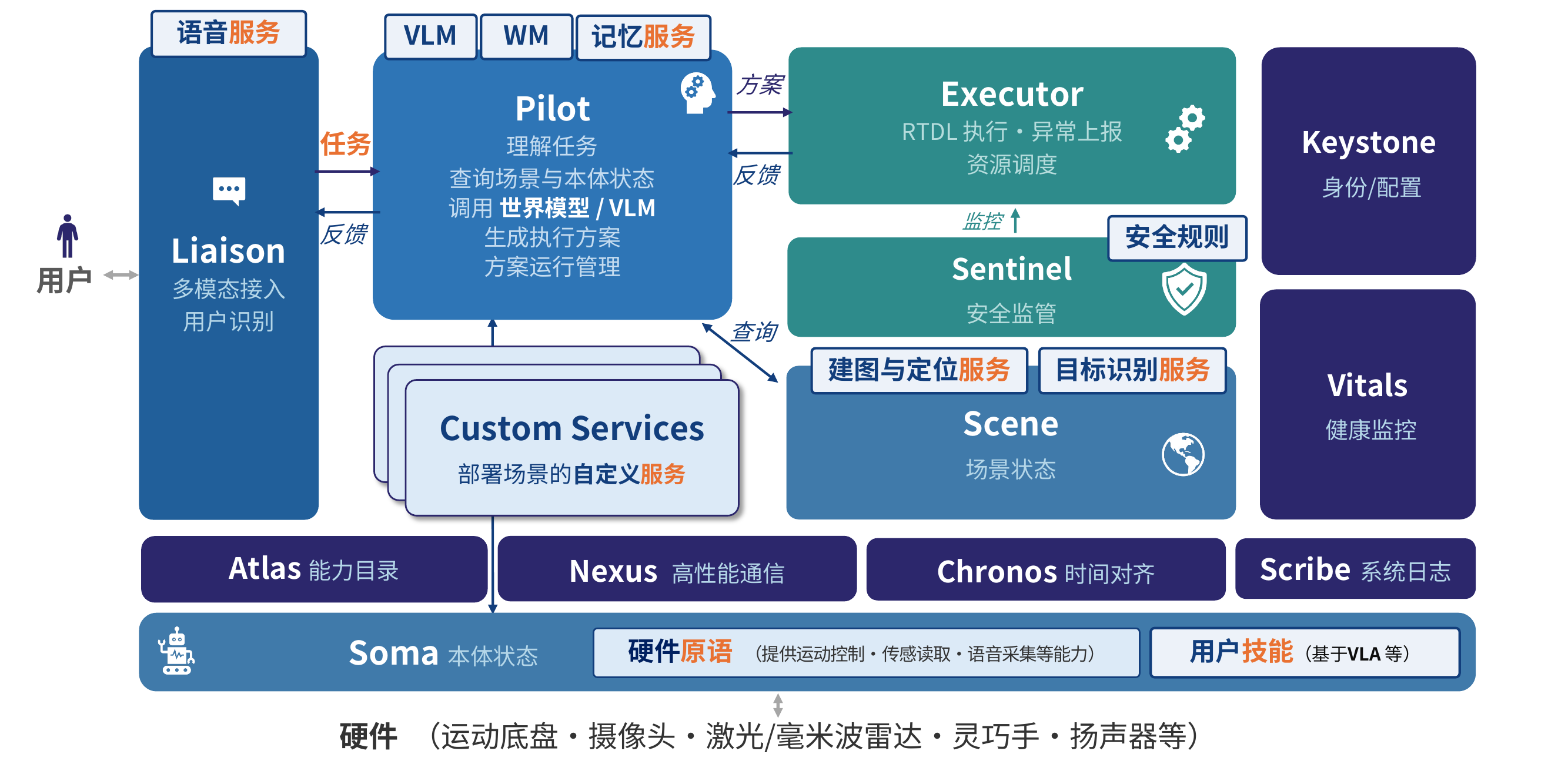
Robonix 以 能力(capability) 为统一抽象。每个能力由 契约(contract) 定义:ROS IDL 描述其输入输出,契约同时指定通信模型(请求响应、单向输出流)与承载(gRPC、ROS 2、MCP)。调用方不依赖具体组件,而是按 contract_id 经 Atlas 查询能力、解析 endpoint 后调用。能力由三类提供者实现:原语 primitive、服务 service、技能 skill。
任务流转
一次任务是 Pilot 驱动的多轮闭环。
- Liaison 接收文本或语音输入。语音链路经声纹完成识别与准入,将输入封装为 Task 提交给 Pilot,并以事件流向用户回传过程与结果。
- Pilot 每轮以 Scene 的场景状态、Soma 的本体描述与对话历史为上下文调用 VLM,生成一棵 RTDL 动作树,展平为 Plan 提交给 Executor。
- Executor 解释 RTDL 算子(
sequence、parallel、do),按contract_id经 Atlas 定位 provider 并调用能力。每次调用前由 Sentinel 依规则校验放行。同步能力直接返回终态,异步能力轮询status至终态;执行事件流式回传 Pilot。 - Pilot 依执行结果进入下一轮规划,直至 VLM 返回空方案,任务结束。
三个层次
- 基础设施:Atlas(能力注册与发现)、Nexus(gRPC、MCP、ROS 2 通信)、Chronos(统一时钟与源头时间戳)、Scribe(结构化日志)。所有系统组件共用。
- 支撑服务:Keystone(用户身份、偏好、准入)、Vitals(电源与部件健康)。由 Pilot、Sentinel、Liaison 按需查询。
- 本体层:Soma 提供与厂商无关的本体描述;
primitive将厂商 SDK 封装为统一能力(底盘、机械臂、相机、雷达、音频);skill封装模型类能力,如 VLA 动作策略。
12 个组件
| 组件 | 负责 | 状态 | 实现 |
|---|---|---|---|
| atlas | 能力发现 / 目录 | 已实现 | Rust(system/atlas) |
| chronos | 统一时间 / PTP 对齐 | stub | system/chronos(仅 README) |
| executor | 方案编排与能力分发 | 已实现 | Rust(system/executor) |
| keystone | 身份 / 配置 / 策略 | stub | system/keystone |
| liaison | 人机交互(chat / 语音 / TUI) | 已实现 | Rust(system/liaison) |
| nexus | gRPC / MCP / ROS 2 通信库的集合 | 库,非独立进程 | 现有 gRPC/MCP/ROS 2;未来加自研 ROS 2 零拷贝 |
| pilot | 规划 / 决策 / 记忆 / 世界模型 | 已实现 | Rust(system/pilot) |
| scene | 场景状态 / 语义地图 / 对象注册表 | 已实现 | Python(system/scene) |
| scribe | 结构化日志 / 回放 / 审计 | stub | system/scribe |
| sentinel | 安全监督 | 内嵌 executor(v0.1) | system/sentinel |
| soma | 本体状态 / 设备与原语抽象 | stub(能力约定已定) | system/soma |
| vitals | 健康监测 / 心跳 | 部分(经 atlas 心跳) | system/vitals |
实现 vs stub
v0.1 真正以独立进程跑起来的有 5 个:atlas / executor / pilot / liaison(Rust 二进制,make install 装到 ~/.cargo/bin)和 scene(Python 服务)。另外几个不是独立进程:
- nexus:不是进程,而是一套通信库的集合——gRPC、MCP、ROS 2 的客户端/服务端实现,每个组件直接链接使用(能力约定就投影到这三种 transport 上)。规划中还包括自研的 ROS 2 零拷贝库。它不是“待实现的 stub“,而是已经在用的那套传输代码。
- sentinel:安全监督作为 executor 的子模块跑(在能力分发链路上拦截),还没拆成独立组件。
- vitals:健康监测的心跳那一半在 atlas 里(provider 周期心跳、超时驱逐),独立的 vitals 组件未起。
其余 4 个——chronos / keystone / scribe / soma——是 v0.1 的 stub:目录和 README 占位,规划在后续版本落地(soma 的能力约定已经定义,见 Soma 接口,缺的是参考 provider)。
与能力约定层的关系
system 组件里对外暴露能力约定的有 pilot / executor / liaison / scene / soma(命名空间 robonix/system/*,见 系统接口)。atlas 用自己的 gRPC 控制面(不是能力约定,见 Atlas 能力目录)。其余 stub 暂无能力约定。
启动顺序见 系统部署与启动流程。
命名空间与能力约定
Robonix 的能力提供者(原语 / 服务 / 技能)都通过 contract 暴露自己提供的能力(capability)。contract 描述“是什么“——schema、IO、交互形态;具体由谁实现、绑哪种 transport、endpoint 在哪,是注册时再决定的。
命名空间
每个能力提供者注册时声明一个 namespace 前缀,所有它暴露的 capability 的 contract_id 必须从这个前缀开始。atlas 在 DeclareCapability 时强制校验。一级命名空间分四类:
| 前缀 | 含义 | 谁实现 |
|---|---|---|
robonix/primitive/* | 原语:低层硬件抽象(chassis、camera、lidar、gripper 等) | 设备驱动包 |
robonix/service/* | 服务:场景级算法/能力(slam、navigation、semantic_map 等) | Robonix 提供默认实现,可被替换或扩展 |
robonix/skill/* | 技能:封装特定语义功能、组合原语和服务来完成任务的可复用单元 | 用户/算法开发者自行定义 |
robonix/system/* | 系统服务:Robonix 自身的核心服务(pilot、executor、liaison、scene) | 仓库内置,不可替换 |
能力约定(contract)
contract 是一条 capability 的身份证——contract_id 在整个系统里全局唯一,提供方和消费方都按 contract_id 对话,跟具体进程、传输无关。每个 contract 由一份 TOML 描述:
# capabilities/primitive/chassis/move.v1.toml
[contract]
id      = "robonix/primitive/chassis/move"
version = "1"
kind    = "primitive"
idl     = "chassis/srv/ExecuteMoveCommand.srv"

[mode]
type = "rpc"
字段含义:
[contract]:身份与载荷。id采用 Path-style 命名空间,如robonix/primitive/chassis/move;version为能力约定版本;kind为对应大类;idl指向载荷的 ROS IDL(.msg/.srv)。官方 contract(robonix 源码树的capabilities/)的 IDL 解析到capabilities/lib/;包内 contract(package 自己的capabilities/)解析到包的capabilities/lib/。[mode]:交互形态:rpc:一元 RPC,如 ROS2 service 或 gRPC unary。rpc_server_stream/rpc_client_stream/rpc_bidirectional_stream:流式 RPC,目前仅 gRPC 支持,ROS2 不原生支持。topic_out:流式发布者,如 ROS2 topic publish 或 gRPC server-stream(request 为空)。topic_in:流式订阅者,如 ROS2 topic subscribe 或 gRPC client-stream(response 为空)。
contract 文件本身不包含传输信息——同一个 robonix/primitive/camera/rgb 既可以由 ROS 2 桥提供,也可以由 gRPC 服务提供,也可以由 MCP 工具提供。某些 mode 受限:rpc_server_stream/client_stream/bidirectional_stream 仅 gRPC,topic_out/topic_in 可走 ROS2 或 gRPC。
codegen:能力约定 → 代码
rbnx codegen(详见 Build 与 Codegen)从包的 capabilities: 列表读 contract,生成 stub:
- proto / Python stubs:把 ROS IDL 翻成 protobuf,再用
grpc_tools.protoc生成proto_gen/*_pb2.py。包代码from proto_gen.prm_chassis_pb2 import MoveCommand即可。 - MCP types(
--mcp):把 contract 的 IO 类型生成为 pydantic-like 类,含.json_schema()、.model_validate(dict)、.model_dump()。落到<pkg>/robonix_mcp_types/。
codegen 全部产出到
<pkg>/rbnx-build/codegen/(proto stubs)和<pkg>/robonix_mcp_types/(MCP types)。rbnx start在 spawn 子进程前会把这两个目录加进PYTHONPATH。
通道(channel)
consumer 要使用某条 capability 时,先调 Atlas 的 ConnectCapability(consumer_id, provider_id, contract_id, transport),Atlas 记录这条 consumer→provider 的 channel,并把 endpoint 返回给 consumer。consumer 拿到 endpoint 自己 dial(gRPC)或订阅(ROS)或起 HTTP client(MCP)。channel 在 Atlas 侧只是一条记账记录,可以用 rbnx channels 查看。
不需要走 Connect 也能用:所有的只读发现都用 Query 直接拿 endpoint。Connect 主要给系统服务用——pilot / executor 启动时连一次相关 provider,channel 帮 atlas 跟踪谁在用谁,方便 rbnx inspect 时给运维一个完整图。
Atlas 能力目录
Atlas 是 Robonix 的唯一控制平面——所有进程(不管是 Robonix 自身的系统服务,还是用户提供的 primitive / service / skill 包)启动时第一件事就是连 Atlas,把自己暴露的 capability 登记上去;其他进程要找它们,也只能通过 Atlas。Atlas 本身不转发数据面流量,它只做“目录 + 通道协商“。
数据模型:能力提供者 + capability
能力提供者(统称,对应内部类型 CapabilityProvider)只有三种且仅三种:primitive / service / skill。每个能力提供者注册一次,提供 ≥1 个 capability。
能力提供者字段:
id:能力提供者在 atlas 里的唯一 id(如tiago_chassis/mapping/explore)。空值时 atlas 分配com.robonix.ephemeral.<uuid>。namespace:归属命名空间前缀(如robonix/primitive/chassis)。该 provider 提供的所有 capability 的contract_id必须在此前缀下,atlas 强制校验。capability_md_path:可选。指向包根CAPABILITY.md的绝对路径。Pilot 把 path 列入 system prompt,LLM 通过 executorread_file按需懒加载。
capability 是能力提供者暴露的一条接口:(contract_id, transport, endpoint, params, description)。capability 没有自己的 id,反向通过 (provider_id, contract_id, transport) 唯一寻址。provider_id / provider_kind 直接拷在每条 capability 上,consumer 拿到 flat list 时不需要回查 provider 也能立刻定位。
典型注册流程:
RegisterPrimitive(id, namespace, capability_md_path)    # or RegisterService / RegisterSkill
  └─ DeclareCapability(provider_id, contract_id, transport, endpoint, params)
  └─ DeclareCapability(provider_id, contract_id, transport, endpoint, params)
  └─ ...
Heartbeat(id) ← 每 N 秒续约
同一个能力提供者下的多条 capability 可以走不同传输。例如 tiago_chassis 同时暴露 robonix/primitive/chassis/move(gRPC,给 service/skill 调用)和 robonix/primitive/chassis/odom(ROS 2,给 SLAM 订阅)。
三种传输
Atlas 不在乎传输细节,但它必须能把 provider 的 endpoint 完整告诉 consumer。TransportParams 是个 oneof,按传输各塞一份元数据:
| 传输 | TransportParams.kind | 典型 endpoint | 用途 |
|---|---|---|---|
Grpc | GrpcParams { proto_file, service_name, method } | host:port | 系统服务(pilot / executor)、原语的二进制流式接口 |
Ros2 | Ros2Params { qos_profile } | 冲突时采用 /rbnx/ch/<uuid>,其他情况直接用 provider 提供的 endpoint | 容器内 ROS 节点间通信 |
Mcp | McpParams { description, input_schema_json } | host:port (HTTP) 或 stdio://cmd | LLM 可调工具 |
RPC 接口一览
Atlas 服务定义在 system/atlas/proto/atlas.proto,关键 RPC:
| RPC | 调用方 | 作用 |
|---|---|---|
RegisterPrimitive / RegisterService / RegisterSkill | 能力提供者 | 登记 id + namespace + capability_md_path(按种类三个 typed RPC) |
DeclareCapability | 能力提供者 | 把一个 contract_id 绑到一种 transport+endpoint |
Heartbeat | 能力提供者 | 续约;续约间隔约 30 s,超时阈值默认 90 s(约漏 3 次)后该 provider 被标记 TERMINATED 并驱逐(ROBONIX_ATLAS_HEARTBEAT_TIMEOUT_MS 可调) |
Unregister | 能力提供者 | 主动注销(也可以让心跳超时) |
SetLifecycleState | 能力提供者 | 推送当前状态(REGISTERED / INACTIVE / ACTIVE / ERROR / TERMINATED) |
Query | 消费者 | 按 id / namespace_prefix / kind / contract_id / transport 过滤检索 |
ConnectCapability | 消费者 | 提交“我要用 provider X 的 contract Y 走 Z 传输“,atlas 记录通道并返回 endpoint |
DisconnectCapability | 消费者 | 释放通道(atlas 仅做记账) |
QueryContract / ListContracts | 消费者 | 拉能力约定 IDL(字段定义、Request/Response 形状) |
InspectAtlas | 调试 | 一次性 dump 当前所有 providers + capabilities + channels(JSON) |
Connect / Disconnect 只是 atlas 侧的记账:真正的数据面连接(gRPC dial、ROS topic sub、MCP HTTP 客户端)由 consumer 自己用拿到的 endpoint 建。
注册流程示例:tiago_chassis driver
examples/webots/primitives/tiago_chassis/chassis_driver/driver.py 的注册顺序(伪代码):
ATLAS.register_primitive(
    id                 = "tiago_chassis",
    namespace          = "robonix/primitive/chassis",
    capability_md_path = "/abs/path/to/tiago_chassis/CAPABILITY.md",
)

# 声明一条 MCP capability
ATLAS.declare_capability(
    provider_id       = "tiago_chassis",
    contract_id       = "robonix/primitive/chassis/move",
    transport         = Transport.MCP,
    endpoint          = "127.0.0.1:50112",
    params            = McpParams(
        description       = "Drive the chassis at (linear, angular).",
        input_schema_json = MoveCommand.json_schema(),
    ),
)

# 心跳由 robonix_api Provider 框架后台维护
contract_id(robonix/primitive/chassis/move、robonix/primitive/chassis/odom)必须在 namespace robonix/primitive/chassis 前缀下,atlas 在 DeclareCapability 时会校验。
capability 文档懒加载
每个包都鼓励在根目录写一份 CAPABILITY.md,描述:自己提供的工具、推荐使用模式(“先 snapshot 再 reason 再下指令“之类)、参数语义、典型陷阱(“navigate 是阻塞的,交互场景别用”)。
注册时通过 capability_md_path 字段把这份文档的绝对路径告诉 atlas。Pilot 在每个 turn 构造 system prompt 时拉一遍,把每条 provider 的 path 用一行列在 system prompt 末尾:
## Capability docs (lazy-load via `read_file`)
Each provider below ships a CAPABILITY.md ...

- `tiago_chassis` (robonix/primitive/chassis): `/.../tiago_chassis/CAPABILITY.md`
- `tiago_camera`  (robonix/primitive/camera):  `/.../tiago_camera/CAPABILITY.md`
- ...
具体内容不进 system prompt——LLM 只在确认要用某个 provider 时,通过 executor 的 read_file builtin 按需读。这种懒加载策略主要是为了控制 system prompt 大小(已经观察到 tool 描述本身就是大头 token 消耗);同时让 provider 作者可以写很长的文档而不用担心污染所有 turn 的 prompt。
系统部署与启动流程
本页讲清楚一次完整的 Robonix 部署在终端里发生了什么——从 rbnx boot 第一行 log 到 rbnx chat 收到第一个工具调用之间的所有事件。读完应该能:自己写一份 deploy manifest、看懂 rbnx-boot/logs/ 里的输出、定位“组件起不来“或“LLM 看不到工具“这类问题在哪个阶段。
两层 manifest
| 文件 | 谁读 | 范围 |
|---|---|---|
<deployment>/robonix_manifest.yaml | rbnx boot | 一次部署:列系统服务的配置、哪些设备、服务,对应的代码包路径,实例名…… |
<package>/package_manifest.yaml | rbnx start | 单个包:build 命令、start 命令、提供哪些 capability、依赖哪些其他包 |
Webots Tiago 例子的两个终端
examples/webots/ 是仓库内置的端到端样例——驱动在仿真容器里跑,Robonix 系统服务和 Pilot 在主机上跑。部署 layout 见 快速上手。整个栈分两个终端启动:
# T1:仿真环境(Ctrl-C 停)
bash examples/webots/sim/start.sh

# T2:Robonix(atlas + executor + pilot + 4 个 driver + nav2)
cd examples/webots
export VLM_BASE_URL=https://api.openai.com/v1
export VLM_API_KEY=sk-...
export VLM_MODEL=gpt-5.5
rbnx boot
仿真容器(Webots + ROS 2)不是 Robonix 包,它就是个 docker compose 栈。Robonix 不管它的生命周期;T1 终端 Ctrl-C 即可停。
driver 进程(chassis、camera、lidar、nav2)跑在仿真容器里面——
rbnx boot通过docker exec robonix_tiago_sim ...把 Python driver 起在容器进程空间,让它们与 Webots 共享同一份 DDS graph。host 上不需要 ROS 2 环境。
整个栈起来后开第三个终端:
rbnx caps        # 列出所有注册的 capability 和它们的 interface
rbnx tools       # LLM 看到的工具列表(MCP transport 子集)
rbnx chat        # ratatui TUI,直连 Pilot
清栈:bash examples/webots/sim/stop.sh——脚本会一并 kill 容器内 driver 进程、rbnx boot 子进程组、并 docker compose down 仿真栈。
rbnx boot 生命周期
rbnx boot 主流程在 tools/rbnx/src/cmd/deploy.rs,七步:
- 解析 manifest:读
robonix_manifest.yaml,展开${VAR}环境变量,校验声明的 package 存在、capability 引用合法。 - 初始化日志目录:默认
<manifest-dir>/rbnx-boot/logs/,每个组件一个<name>.log文件。可用--log-dir改路径。 - 起 system 块:按
system:下的字段顺序起 atlas → scene → executor → pilot → liaison。 - 轮询 atlas 就绪:调
Query(kind=Primitive,空过滤)直到返回非错(atlas 完全起来需 ~200 ms)。 - 逐个起 primitive / service / skill:按 manifest 声明顺序,一条一条 spawn,每条等它在 atlas 里完成
RegisterPrimitive/RegisterService/RegisterSkill才进入下一条。 - driver init dance:如果新注册的 provider 声明了
*/drivercapability(如robonix/primitive/lidar/driver),调一次Driver(CMD_INIT, config_json)(per-contract Driver gRPC 服务)完成硬件初始化。 - 守候:sit-on-Ctrl-C/SIGTERM 循环,收到信号后向所有子进程发 SIGTERM、等回收,再退出。
每个子进程的 stdout / stderr 重定向到 <log-dir>/<name>.log,前台终端只看 [deploy] 自己的状态行。组件 panic 或 register 超时时 rbnx boot 会打印失败摘要并指向对应 log 文件。
时间线大致如下(host = 主 Robonix 终端,sim = 仿真容器):
T+0     T1: bash sim/start.sh           # docker compose up,Webots GUI 弹出
T+10s   sim:  Webots + ROS 2 + Nav2 全部 up,DDS graph 准备好
T+15s   T2: rbnx boot                 # 读 robonix_manifest.yaml
T+15s   host: spawn robonix-atlas       # listen 50051
T+16s   host: atlas RegisterService "robonix/system/atlas"   # self-register
T+16s   host: spawn robonix-executor    # connect to atlas,RegisterService
T+17s   host: spawn robonix-pilot       # 加载 memory + LLM(VLM 由环境变量配置,非 atlas 注册)
T+18s   host: docker exec sim python chassis_driver/driver.py
T+19s   sim:  chassis driver RegisterPrimitive + DeclareCapability (state, move) MCP
T+19s   host: deploy 收到 register 通知 → 进入下一条 primitive
T+20s   ...重复 camera / lidar / nav2...
T+24s   host: ✓ 7 component(s) up
T+25s   T3: rbnx caps                  # 看到全部能力
T+25s   T3: rbnx chat                  # 直连 pilot SubmitTask
T+26s   user: "what can you see?"      # → pilot → vlm → tool_calls
T+27s   pilot: read_file CAPABILITY.md(懒加载) → camera_snapshot →
                 executor → docker exec MCP HTTP → driver → image
第一次部署慢主要在仿真容器拉镜像 + Webots 启动。后续 deploy 在已有容器上 docker exec,从 rbnx boot 到全部 ready 通常 5–8 秒。
接口目录
本目录罗列 Robonix 在 capabilities/ 下随仓库分发的标准能力约定(standard contracts)。能力约定描述一条能力“是什么“——contract_id、载荷 schema、交互形态(mode)——与具体由谁实现、绑哪种 transport、endpoint 在哪无关。能力约定的完整概念见 命名空间与能力约定。
每条能力约定由一份 TOML(capabilities/<kind>/<domain>/<leaf>.v1.toml)加一份 ROS IDL(capabilities/lib/<…>.msg / .srv)描述,rbnx codegen 据此投影到 gRPC / MCP / ROS 2 三种 transport(见 Package 构建与代码生成)。
按命名空间组织
标准能力约定按一级命名空间分三类(robonix/skill/* 没有随仓库分发的标准能力约定——技能由用户自定义):
| 命名空间 | 含义 | 域 |
|---|---|---|
robonix/primitive/* | 原语:低层设备抽象 | chassis · camera · lidar · imu · audio |
robonix/service/* | 服务:场景级算法/能力,可替换 | map · navigation · speech · voiceprint · memory |
robonix/system/* | 系统服务:Robonix 自身核心服务 | pilot · executor · liaison · scene · soma |
完整的 12 个系统组件(含不对外暴露能力约定的)见 系统组件。
怎么读每张表
每个域页面都是一张接口表:
- 能力约定 ID:全局唯一,提供方和消费方都按它对话。
- 模式(mode):交互形态——
rpc/rpc_server_stream/rpc_client_stream/rpc_bidirectional_stream/topic_out/topic_in。语义见 命名空间与能力约定。 - 载荷(IDL):消息/服务类型,解析到
capabilities/lib/下的.msg/.srv。std_msgs/geometry_msgs/sensor_msgs/nav_msgs这些“标准“消息也由 Robonix 在capabilities/lib/common_interfaces/提供,不取发行版定义——这样跨部署的数据结构严格一致。 - 能力约定 TOML:路径省略
capabilities/前缀;绝对路径见rbnx path capabilities。
每个原语/服务域里名为
driver的能力约定(<domain>/driver,载荷lifecycle/Driver)是生命周期入口——rbnx boot通过Driver(CMD_INIT/ACTIVATE/…)驱动该 provider 的状态机,不是数据接口。system 域以及声纹、记忆服务没有driver能力约定。
原语(primitive)
原语是低层设备抽象——一个物理设备一个包(one device = one package),把硬件统一成 robonix/primitive/* 能力约定。原语是能力图的叶子节点:只反馈自身的物理事实、只接受瞬时控制,不依赖任何上层服务(这条分层纪律见 底盘 页的历史变更说明)。
| 域 | 覆盖 | 能力约定数 |
|---|---|---|
| 底盘 chassis | 差速/全向底盘的速度控制与里程反馈 | 4 |
| 相机 camera | RGB / 深度图像,流式与快照两种取图 | 6 |
| 激光雷达 lidar | 2D 扫描与 3D 点云 | 4 |
| IMU | 惯性测量 | 2 |
| 音频 audio | 麦克风采集、扬声器播放、设备选择 | 5 |
参考实现见 examples/webots/primitives/(tiago_chassis / tiago_camera / tiago_lidar / audio_driver)。
底盘 robonix/primitive/chassis
底盘原语覆盖移动机器人的低层运动控制和反馈。能力约定定义在 Robonix 源码树下:IDL 在 capabilities/lib/chassis/,能力约定 TOML 在 capabilities/primitive/chassis/(绝对路径见 rbnx path capabilities)。
注意:目标式导航(
navigate/status/cancel)不属于底盘原语,由robonix/service/navigation/*服务承担(通常 Nav2)——详见 导航服务。位姿在 map 帧的查询也不在这里——那是定位服务(service/map/pose)的职责。底盘原语只负责下发瞬时速度(move/twist_in)和反馈底盘自身的运动事实(odom)。
接口
能力约定 ID(contract_id) | 模式 | 载荷(IDL) | 能力约定 TOML |
|---|---|---|---|
robonix/primitive/chassis/driver | rpc | lifecycle/Driver | primitive/chassis/driver.v1.toml |
robonix/primitive/chassis/move | rpc | chassis/ExecuteMoveCommand(MoveCommand → std_msgs/String) | primitive/chassis/move.v1.toml |
robonix/primitive/chassis/twist_in | topic_in | geometry_msgs/Twist | primitive/chassis/twist_in.v1.toml |
robonix/primitive/chassis/odom | topic_out | nav_msgs/Odometry | primitive/chassis/odom.v1.toml |
底盘有两个运动入口,分工明确:
move(gRPC,单发离散命令):一次forward_m/rotate_deg,或带duration_sec封顶的速度命令。驱动收到后在cmd_vel上发一小段Twist再停——适合“前进 1 m““转 30°“这种离散动作(snapshot → reason → move → snapshot)。move刻意不暴露为 MCP:它下发的是未经避障的瞬时速度,不挂到大模型工具列表上;要带路径规划的运动,走service/navigation/navigate。twist_in(ROS 2 topic,geometry_msgs/Twist):连续速度流入口。导航控制器(simple_nav的 nav 节点、Nav2 controller)和 teleop 把cmd_vel发到这里,底盘连续跟随。注意导航不是通过 gRPC 调move,而是往twist_in发Twist。
历史变更:早期版本有
robonix/primitive/chassis/state能力约定,返回一个RobotState巨型消息(base_pose + joint_state + tcp_pose + gripper)。base_pose字段实际上是 AMCL 的输出,让底盘原语去依赖一个上层定位服务——这是分层倒置(原语应该是叶子节点)。该能力约定已删除,消费者改为:
- 想拿 odom-frame 位姿 → 订阅
primitive/chassis/odom- 想拿 map-frame 位姿 → 订阅
service/map/pose
典型组合
基础移动底盘实现 driver + move + odom + twist_in:
driver:gRPC,rbnx boot 通过Driver(CMD_INIT)把底盘启起来move:gRPC(不暴露为 MCP),离散单发运动命令(前进 / 旋转 / 限时速度)odom:ROS 2,给service/map/*做融合定位用twist_in:ROS 2,Nav2 控制器把cmd_vel发到这里
相机 robonix/primitive/camera
相机原语覆盖 RGB 与深度图像,两种取图方式并存:流式(rgb / depth,ROS 2 topic 持续发布)给场景融合、建图等高频消费者用;快照(snapshot / depth_snapshot,一元 RPC)给 LLM agent 按需取一帧用。extrinsics 发布相机相对本体的外参,供深度反投影到世界系。
能力约定 TOML 在 capabilities/primitive/camera/,IDL 在 capabilities/lib/camera/ 与 capabilities/lib/common_interfaces/。
接口
能力约定 ID(contract_id) | 模式 | 载荷(IDL) | 能力约定 TOML |
|---|---|---|---|
robonix/primitive/camera/driver | rpc | lifecycle/Driver | primitive/camera/driver.v1.toml |
robonix/primitive/camera/rgb | topic_out | sensor_msgs/Image | primitive/camera/rgb.v1.toml |
robonix/primitive/camera/depth | topic_out | sensor_msgs/Image | primitive/camera/depth.v1.toml |
robonix/primitive/camera/extrinsics | topic_out | geometry_msgs/TransformStamped | primitive/camera/extrinsics.v1.toml |
robonix/primitive/camera/snapshot | rpc | camera/GetCameraImage | primitive/camera/snapshot.v1.toml |
robonix/primitive/camera/depth_snapshot | rpc | camera/GetCameraImage | primitive/camera/depth_snapshot.v1.toml |
snapshot / depth_snapshot 共用 camera/GetCameraImage 服务(请求选通道,应答回 sensor_msgs/Image),是 agent 按需取一帧的入口(一元 RPC)。rgb / depth 是给 scene、mapping 等系统消费者的高频数据面,走 ROS 2。
参考实现:examples/webots/primitives/tiago_camera(订阅 Webots /head_front_camera/*,桥成上面五条能力约定)。
激光雷达 robonix/primitive/lidar
激光雷达原语覆盖 2D 扫描与 3D 点云。lidar(2D LaserScan)和 lidar3d(PointCloud2)都是 topic_out 数据面,给建图(service/map)、避障、场景融合用;snapshot 给 LLM agent 按需取一帧 2D 扫描。
能力约定 TOML 在 capabilities/primitive/lidar/,IDL 在 capabilities/lib/lidar/ 与 capabilities/lib/common_interfaces/。
接口
| 能力约定 ID | 模式 | 载荷(IDL) | 能力约定 TOML |
|---|---|---|---|
robonix/primitive/lidar/driver | rpc | lifecycle/Driver | primitive/lidar/driver.v1.toml |
robonix/primitive/lidar/lidar | topic_out | sensor_msgs/LaserScan | primitive/lidar/lidar.v1.toml |
robonix/primitive/lidar/lidar3d | topic_out | sensor_msgs/PointCloud2 | primitive/lidar/lidar3d.v1.toml |
robonix/primitive/lidar/snapshot | rpc | lidar/GetLaserScan | primitive/lidar/lidar_snapshot.v1.toml |
一个雷达包按硬件实现 lidar(2D 雷达)、lidar3d(3D 雷达,如 Livox / Velodyne)或两者。vendor 中立:原语只暴露标准 LaserScan / PointCloud2,厂家 SDK 的私有点云格式应在驱动内转成标准消息,不外泄到能力约定。
参考实现:examples/webots/primitives/tiago_lidar(/scanner → lidar + snapshot,输出归一化的 /scanner_normalized)。
IMU robonix/primitive/imu
IMU 原语反馈惯性测量(角速度、线加速度、姿态),topic_out 数据面,主要给 3D 建图(service/map,如 FAST-LIO2 的 IMU + 点云融合)和状态估计用。
能力约定 TOML 在 capabilities/primitive/imu/,IDL 在 capabilities/lib/common_interfaces/sensor_msgs/。
接口
| 能力约定 ID | 模式 | 载荷(IDL) | 能力约定 TOML |
|---|---|---|---|
robonix/primitive/imu/driver | rpc | lifecycle/Driver | primitive/imu/driver.v1.toml |
robonix/primitive/imu/imu | topic_out | sensor_msgs/Imu | primitive/imu/imu.v1.toml |
消费方(如建图服务)应通过 atlas 按 robonix/primitive/imu/imu 能力约定发现 IMU 数据面,不硬编码 /livox/imu 之类的 topic 名。
音频 robonix/primitive/audio
音频原语覆盖麦克风采集与扬声器播放,是 Liaison 语音 pipeline 的两端。mic(topic_out)持续吐音频块,speaker(topic_in)接收音频块播放;list_devices / select_device 让上层在多声卡设备里选具体输入/输出。
能力约定 TOML 在 capabilities/primitive/audio/,IDL 在 capabilities/lib/audio/。
接口
| 能力约定 ID | 模式 | 载荷(IDL) | 能力约定 TOML |
|---|---|---|---|
robonix/primitive/audio/driver | rpc | lifecycle/Driver | primitive/audio/driver.v1.toml |
robonix/primitive/audio/mic | topic_out | audio/AudioChunk | primitive/audio/mic.v1.toml |
robonix/primitive/audio/speaker | topic_in | audio/AudioChunk | primitive/audio/speaker.v1.toml |
robonix/primitive/audio/list_devices | rpc | audio/ListAudioDevices | primitive/audio/list_devices.v1.toml |
robonix/primitive/audio/select_device | rpc | audio/SelectAudioDevice | primitive/audio/select_device.v1.toml |
audio/AudioChunk 是 mic / speaker / ASR / TTS 共用的流元素(timestamp_ns + data + sequence + duration_s,自带时间戳而非 std_msgs/Header,便于跨进程移植)。
参考实现:examples/webots/primitives/audio_driver(Linux ALSA)与 audio_macos_bridge(macOS 端采集/播放桥)。
服务(service)
服务是场景级算法/能力——建图、导航、语音、声纹、记忆等。每条 robonix/service/* 能力约定 Robonix 都给一份默认参考实现(在 services/ 或 example 部署里),部署方可以整包替换或扩展。
| 域 | 覆盖 | 能力约定数 | 参考实现 |
|---|---|---|---|
| 空间地图 map | SLAM 输出:占据栅格、位姿、点云、里程 | 5 | mapping_rbnx(上游)/ FAST-LIO2 |
| 导航 navigation | 目标式导航:下发目标、查状态、取消 | 4 | examples/webots/services/simple_nav(自研 A*) |
| 语音 speech | ASR / TTS / 对话,一元与流式 | 8 | services/speech |
| 声纹 voiceprint | 注册、识别、列举、删除 | 4 | services/voiceprint |
| 记忆 memory | 长期记忆的检索、写入、压缩归纳 | 3 | services/memsearch |
空间地图 robonix/service/map
map 服务是 SLAM / 定位的输出面:把建图算法(FAST-LIO2、cartographer、AMCL 等)产生的占据栅格、map 帧位姿、全局点云、融合里程统一成 robonix/service/map/* 能力约定。导航、scene、可视化都从这里取定位结果。
能力约定 TOML 在 capabilities/service/map/,IDL 在 capabilities/lib/common_interfaces/。
接口
| 能力约定 ID | 模式 | 载荷(IDL) | 能力约定 TOML |
|---|---|---|---|
robonix/service/map/driver | rpc | lifecycle/Driver | service/map/driver.v1.toml |
robonix/service/map/occupancy_grid | topic_out | nav_msgs/OccupancyGrid | service/map/occupancy_grid.v1.toml |
robonix/service/map/pose | topic_out | geometry_msgs/PoseWithCovarianceStamped | service/map/pose.v1.toml |
robonix/service/map/pointcloud | topic_out | sensor_msgs/PointCloud2 | service/map/pointcloud.v1.toml |
robonix/service/map/odom | topic_out | nav_msgs/Odometry | service/map/odom.v1.toml |
pose 是 map 帧的机器人位姿(融合定位结果)——和底盘原语的 odom(odom 帧、未消除漂移)分工不同:要 map 帧位姿找 service/map/pose,要瞬时里程找 primitive/chassis/odom(见 底盘)。
输入侧:map 服务消费 primitive/lidar/lidar3d + primitive/imu/imu(或 2D lidar + chassis/odom),通过 atlas 按能力约定发现,不硬编码 topic 名。
导航 robonix/service/navigation
导航服务承担目标式运动:消费方给一个 map 帧目标,服务内部做路径规划 + 避障,组合调用底盘原语(primitive/chassis/move / twist_in)把机器人送到位。和底盘原语的瞬时速度严格分层——LLM 永远走导航服务,不直接控速。
能力约定 TOML 在 capabilities/service/navigation/,IDL 在 capabilities/lib/navigation/。
接口
| 能力约定 ID | 模式 | 载荷(IDL) | 能力约定 TOML |
|---|---|---|---|
robonix/service/navigation/driver | rpc | lifecycle/Driver | service/navigation/driver.v1.toml |
robonix/service/navigation/navigate | rpc | navigation/Navigate | service/navigation/navigate.v1.toml |
robonix/service/navigation/status | rpc | navigation/GetNavigationStatus | service/navigation/status.v1.toml |
robonix/service/navigation/cancel | rpc | navigation/CancelNavigation | service/navigation/cancel.v1.toml |
navigate(goal: geometry_msgs/PoseStamped) 返回 provider 分配的 goal_id,消费方拿它去 status / cancel 寻址同一个目标。status_message 只是一句人类可读的说明(接受/拒绝的原因),不是结构化数据,消费方别去解析它的内容。
参考实现:examples/webots/services/simple_nav——自研的 A* 栅格规划器(8 邻接 + 障碍膨胀)加路径跟随,往 chassis/twist_in 发 cmd_vel。不依赖 Nav2。
语音 robonix/service/speech
语音服务提供 ASR(识别)、TTS(合成)、以及端到端对话。一元与流式都有:asr / tts 是一元 RPC,asr_stream / tts_stream / dialog 是流式,给低延迟语音交互用。它是 Liaison 语音 pipeline 的 ASR / TTS 两段。
能力约定 TOML 在 capabilities/service/speech/,IDL 在 capabilities/lib/{speech,asr,tts}/。
接口
| 能力约定 ID | 模式 | 载荷(IDL) | 能力约定 TOML |
|---|---|---|---|
robonix/service/speech/driver | rpc | lifecycle/Driver | service/speech/driver.v1.toml |
robonix/service/speech/asr | rpc | asr/Recognize | service/speech/asr.v1.toml |
robonix/service/speech/asr_stream | rpc_bidirectional_stream | asr/RecognizeStream | service/speech/asr_stream.v1.toml |
robonix/service/speech/tts | rpc | tts/Synthesize | service/speech/tts.v1.toml |
robonix/service/speech/tts_stream | rpc_server_stream | tts/SynthesizeStream | service/speech/tts_stream.v1.toml |
robonix/service/speech/dialog | rpc_server_stream | speech/StartDialog | service/speech/dialog.v1.toml |
robonix/service/speech/speak | rpc | speech/Speak | service/speech/speak.v1.toml |
robonix/service/speech/list_speakers | rpc | speech/ListSpeakers | service/speech/list_speakers.v1.toml |
speak 是“合成并直接播放“的便捷入口(服务内部接扬声器);tts / tts_stream 只回音频流,由调用方播放。list_speakers 列可用音色。流式能力约定只能走 gRPC(ROS 2 不原生支持流式 RPC)。
参考实现:services/speech(FunASR ASR + TTS)。
声纹 robonix/service/voiceprint
声纹服务做说话人识别:先给每个用户做一遍 enrollment(采几秒说话样本算 embedding),识别阶段拿新音频算 embedding 做相似度匹配。Liaison 语音会话用它把音频归到具体用户,驱动访问控制。
能力约定 TOML 在 capabilities/service/voiceprint/,IDL 在 capabilities/lib/voiceprint/。该服务没有 driver 能力约定。
接口
| 能力约定 ID | 模式 | 载荷(IDL) | 能力约定 TOML |
|---|---|---|---|
robonix/service/voiceprint/enroll | rpc | voiceprint/Enroll | service/voiceprint/enroll.v1.toml |
robonix/service/voiceprint/identify | rpc | voiceprint/Identify | service/voiceprint/identify.v1.toml |
robonix/service/voiceprint/list | rpc | voiceprint/ListEnrolled | service/voiceprint/list.v1.toml |
robonix/service/voiceprint/delete | rpc | voiceprint/DeleteEnrolled | service/voiceprint/delete.v1.toml |
identify(audio, encoding, sample_rate) 返回 (user_id, user_name, confidence, is_known)。enroll 采样建档,list / delete 管理已注册用户。若部署里没起声纹 provider,Liaison 会 fallback 到客户端传来的用户 hint(见 Liaison)。
参考实现:services/voiceprint(如 SpeechBrain ECAPA-TDNN / Resemblyzer embedding + cosine 相似度)。
记忆 robonix/service/memory
记忆服务是长期记忆层:语义检索、写入、压缩归纳。载荷都是 std_msgs/String(检索 query、写入文本、归纳指令),底层 embedding / 向量库 / top_k 等是部署侧元数据,不进能力约定。该服务没有 driver 能力约定。
能力约定 TOML 在 capabilities/service/memory/,IDL 在 capabilities/lib/memory/。
接口
| 能力约定 ID | 模式 | 载荷(IDL) | 能力约定 TOML |
|---|---|---|---|
robonix/service/memory/search | rpc | memory/Search(std_msgs/String → std_msgs/String) | service/memory/search.v1.toml |
robonix/service/memory/save | rpc | memory/Save | service/memory/save.v1.toml |
robonix/service/memory/compact | rpc | memory/Compact | service/memory/compact.v1.toml |
参考实现:services/memsearch(memsearch[onnx] + milvus-lite),三条能力约定都用 @memory.mcp(...) 以 MCP 工具暴露(工具名默认取能力约定 leaf:search / save / compact),Agent 可直接调。MCP 线格式见 接口目录首页。
系统(system)
系统服务是 Robonix 自身的核心服务,仓库内置、概念上不可替换,命名空间 robonix/system/*。下面列的是对外暴露能力约定的系统组件;完整的 12 个系统组件(含不对外暴露能力约定的)见 系统组件。
| 组件 | 能力约定 | 角色 |
|---|---|---|
| Pilot | robonix/system/pilot | 任务规划 / 决策 / 记忆 / 世界模型 |
| Executor | robonix/system/executor | 方案编排与能力分发 |
| Liaison | robonix/system/liaison/{submit,voice} | 统一人机交互入口 |
| Scene | robonix/system/scene/* | 场景状态 / 语义地图 / 对象注册表 |
| Soma | robonix/system/soma/* | 本体模型 / URDF / 外参 |
Atlas(能力目录本身)不走能力约定,用自己的 gRPC 接口——见 Atlas 能力目录。这些 system 域都没有
driver能力约定(生命周期由各自的内置二进制管理,不经Driver(CMD_*))。
Pilot robonix/system/pilot
Pilot 是规划/决策核心:接任务,结合记忆 + LLM 产出方案,交给 Executor 执行。对外暴露单条能力约定 robonix/system/pilot(SubmitTask),通常由 Liaison 转发用户任务进来,而非外部直连。
能力约定 TOML:capabilities/system/pilot.v1.toml,IDL 在 capabilities/lib/pilot/。
接口
| 能力约定 ID | 模式 | 载荷(IDL) | 能力约定 TOML |
|---|---|---|---|
robonix/system/pilot | rpc_server_stream | pilot/SubmitTask(pilot/Task → 流 pilot/PilotEvent) | system/pilot.v1.toml |
SubmitTask(task: pilot/Task) 返回一条 PilotEvent 流——规划过程的增量事件(思考、能力调用、结果、最终回答)。用户身份走 Task.context_json.user_id,不额外加必填字段。
Executor robonix/system/executor
Executor 接 Pilot 产出的 Plan,按计划逐步调用各 provider 的能力(gRPC / MCP / ROS 2),把每步结果作为事件流回吐。技能(skill)的激活也由它驱动——首次调用前对技能发 Driver(CMD_ACTIVATE)。v0.1 里安全监督(sentinel)作为 Executor 的子模块跑(见 系统组件)。
能力约定 TOML:capabilities/system/executor.v1.toml,IDL 在 capabilities/lib/executor/。
接口
| 能力约定 ID | 模式 | 载荷(IDL) | 能力约定 TOML |
|---|---|---|---|
robonix/system/executor | rpc_server_stream | executor/Execute(pilot/Plan → 流 executor/CapabilityCallEvent) | system/executor.v1.toml |
Execute(plan: pilot/Plan) 流回 CapabilityCallEvent——每步能力调用的开始与结果。
Liaison robonix/system/liaison
角色
Liaison 是统一的用户交互入口。所有外部交互(rbnx chat TUI、移动 App、Web、API client)都不直连 Pilot,而是先打到 Liaison:文本路径直接转发给 Pilot,语音路径由 Liaison 自己编排(mic → ASR → voiceprint → Pilot → 可选 TTS → speaker)。
能力约定 TOML 在 capabilities/system/liaison/,IDL 在 capabilities/lib/liaison/。
接口
| 能力约定 ID | 模式 | 载荷(IDL) | 能力约定 TOML |
|---|---|---|---|
robonix/system/liaison/submit | rpc_server_stream | liaison/SubmitTask(pilot/Task → 流 pilot/PilotEvent) | system/liaison/submit.v1.toml |
robonix/system/liaison/voice | rpc_server_stream | liaison/StartVoiceSession(StartVoiceSessionRequest → 流 VoiceEvent) | system/liaison/voice.v1.toml |
submit 的事件流就是 Pilot 事件流原样转发;voice 的流是 Liaison 自己合成的 VoiceEvent,其中 event_kind=PILOT 的事件把内嵌 PilotEvent 装回 pilot 字段。用户身份走 Task.context_json.user_id(默认 local:<os_user>)。
rbnx chat 的连接路径
rbnx chat
    │  atlas.find(contract="robonix/system/liaison/submit", grpc) → endpoint
    ▼
robonix-liaison (gRPC)
    ├── Enter  → liaison.SubmitTask(Task) → Pilot.SubmitTask 转发
    └── Ctrl+V → liaison.StartVoiceSession(req)
                 → mic → ASR → voiceprint → Pilot → (可选 TTS+speaker)
                 → 每阶段产生一个 VoiceEvent
语音 pipeline 的能力依赖
| 阶段 | 能力约定 | 参考 provider |
|---|---|---|
| 录音 | robonix/primitive/audio/mic | audio_driver / audio_macos_bridge |
| ASR | robonix/service/speech/asr | services/speech |
| 声纹 | robonix/service/voiceprint/identify | services/voiceprint |
| Pilot | robonix/system/pilot | robonix-pilot |
| TTS | robonix/service/speech/tts | services/speech |
| 播放 | robonix/primitive/audio/speaker | audio_driver / audio_macos_bridge |
任何阶段缺 provider 都不会中断退出:
- 没 mic / ASR → mock 模式用预设 transcript;非 mock 模式发 ERROR 终止会话。
- 没 voiceprint provider → fallback 到客户端
client_user_idhint,发一条KIND_USER_IDENTIFIED事件附using client hint说明。 - 没 TTS / speaker → 跳过播放,文本回复仍走 PILOT 事件。
启动
liaison 是内置 system 二进制(与 atlas / executor / pilot 同级),由 rbnx boot 拉起:
system:
  liaison:
    listen: 127.0.0.1:50081
    log: info
    pilot_endpoint: 127.0.0.1:50071  # 可选,默认从 atlas 发现
也可手动起 robonix-liaison --listen … --atlas … --pilot-endpoint …,或用环境变量 ROBONIX_LIAISON_PORT / ROBONIX_ATLAS_ENDPOINT / ROBONIX_PILOT_ENDPOINT。
Scene robonix/system/scene
Scene 维护世界状态:把感知(相机 + 深度 + VLM 检测)融合成一个对象注册表 + 场景图,回答“屋里有什么、在哪、彼此什么关系、去某个对象附近的导航目标是什么“。是 Pilot 给 LLM 接地世界模型的主要来源。
能力约定 TOML 在 capabilities/system/scene/。
接口
| 能力约定 ID | 模式 | 载荷(IDL) | 能力约定 TOML |
|---|---|---|---|
robonix/system/scene/list_objects | rpc | semantic_map/ListObjects | system/scene/list_objects.v1.toml |
robonix/system/scene/list_relations | rpc | semantic_map/ListRelations | system/scene/list_relations.v1.toml |
robonix/system/scene/get_scene_graph | rpc | semantic_map/GetSceneGraph | system/scene/get_scene_graph.v1.toml |
robonix/system/scene/get_object_context | rpc | semantic_map/GetObjectContext | system/scene/get_object_context.v1.toml |
robonix/system/scene/goal_near | rpc | semantic_map/GoalNear | system/scene/goal_near.v1.toml |
list_objects 不带过滤——返回注册表里所有对象,LLM 每轮调一次接地世界模型,按 label / 距离等在客户端筛(比把这些 knob 烤进 schema 便宜)。goal_near 把“到 X 附近“翻成一个可导航的 map 帧目标,喂给 导航服务。
输入侧:scene 消费 primitive/camera/{rgb,depth} + service/map/pose,跑 VLM 检测做数据关联。参考实现:system/scene。
Soma robonix/system/soma
Soma 是本体模型层:回答“这个机器人长什么样“——URDF、外形轮廓、各传感器相对本体的外参。导航的 footprint、scene 的深度反投影都需要这些本体参数。
v0.1 里 soma 的 provider 仍是 stub(能力约定已定,参考实现待补)——见 系统组件。
能力约定 TOML 在 capabilities/system/soma/,IDL 在 capabilities/lib/soma/。
接口
| 能力约定 ID | 模式 | 载荷(IDL) | 能力约定 TOML |
|---|---|---|---|
robonix/system/soma/description | rpc | soma/GetDescription | system/soma/description.v1.toml |
robonix/system/soma/footprint | rpc | soma/GetFootprint | system/soma/footprint.v1.toml |
robonix/system/soma/sensor_extrinsics | rpc | soma/GetSensorExtrinsics | system/soma/sensor_extrinsics.v1.toml |
description 返回完整 URDF + 元数据(urdf_xml / model_name / mass_kg / base_frame),消费方用自己的库解析(urdf_parser_py / KDL / Pinocchio);URDF 启动时加载一次、运行时不变,别频繁调。
参考
本章是 Robonix 的机读参考,分两部分:
- 能力约定参考 与 ROS IDL 参考——由
rbnx docs从capabilities/自动生成,每页顶部标明生成自 robonix 的哪个 commit。这两页是能力约定 + 数据结构的权威来源;接口目录 里的散文页讲“为什么 / 怎么组合“,原始 schema 以这里为准。 - 代码 API——各 Rust crate / Python 包的 rustdoc / Sphinx 入口。
自动生成的两页(能力约定参考 / ROS IDL 参考)请勿手改——它们由
rbnx docs生成。
能力约定参考(自动生成)
由 robonix v0.1.0 · commit 953df33-dirty · 2026-06-05 自动生成,请勿手改。重新生成:
rbnx docs。
本页罗列 capabilities/ 下的所有标准能力约定(共 57 条)。
载荷列链到对应的 ROS IDL。概念与字段含义见 接口目录。
primitive
| 能力约定 ID | kind | mode | 载荷(IDL) | 能力约定 TOML |
|---|---|---|---|---|
robonix/primitive/audio/driver | primitive | rpc | lifecycle/srv/Driver.srv | primitive/audio/driver.v1.toml |
robonix/primitive/audio/list_devices | primitive | rpc | audio/srv/ListAudioDevices.srv | primitive/audio/list_devices.v1.toml |
robonix/primitive/audio/mic | primitive | topic_out | audio/msg/AudioChunk.msg | primitive/audio/mic.v1.toml |
robonix/primitive/audio/select_device | primitive | rpc | audio/srv/SelectAudioDevice.srv | primitive/audio/select_device.v1.toml |
robonix/primitive/audio/speaker | primitive | topic_in | audio/msg/AudioChunk.msg | primitive/audio/speaker.v1.toml |
robonix/primitive/camera/depth | primitive | topic_out | common_interfaces/sensor_msgs/msg/Image.msg | primitive/camera/depth.v1.toml |
robonix/primitive/camera/depth_snapshot | primitive | rpc | camera/srv/GetCameraImage.srv | primitive/camera/depth_snapshot.v1.toml |
robonix/primitive/camera/driver | primitive | rpc | lifecycle/srv/Driver.srv | primitive/camera/driver.v1.toml |
robonix/primitive/camera/extrinsics | primitive | topic_out | common_interfaces/geometry_msgs/msg/TransformStamped.msg | primitive/camera/extrinsics.v1.toml |
robonix/primitive/camera/rgb | primitive | topic_out | common_interfaces/sensor_msgs/msg/Image.msg | primitive/camera/rgb.v1.toml |
robonix/primitive/camera/snapshot | primitive | rpc | camera/srv/GetCameraImage.srv | primitive/camera/snapshot.v1.toml |
robonix/primitive/chassis/driver | primitive | rpc | lifecycle/srv/Driver.srv | primitive/chassis/driver.v1.toml |
robonix/primitive/chassis/move | primitive | rpc | chassis/srv/ExecuteMoveCommand.srv | primitive/chassis/move.v1.toml |
robonix/primitive/chassis/odom | primitive | topic_out | common_interfaces/nav_msgs/msg/Odometry.msg | primitive/chassis/odom.v1.toml |
robonix/primitive/chassis/twist_in | primitive | topic_in | common_interfaces/geometry_msgs/msg/Twist.msg | primitive/chassis/twist_in.v1.toml |
robonix/primitive/imu/driver | primitive | rpc | lifecycle/srv/Driver.srv | primitive/imu/driver.v1.toml |
robonix/primitive/imu/imu | primitive | topic_out | common_interfaces/sensor_msgs/msg/Imu.msg | primitive/imu/imu.v1.toml |
robonix/primitive/lidar/driver | primitive | rpc | lifecycle/srv/Driver.srv | primitive/lidar/driver.v1.toml |
robonix/primitive/lidar/lidar | primitive | topic_out | common_interfaces/sensor_msgs/msg/LaserScan.msg | primitive/lidar/lidar.v1.toml |
robonix/primitive/lidar/lidar3d | primitive | topic_out | common_interfaces/sensor_msgs/msg/PointCloud2.msg | primitive/lidar/lidar3d.v1.toml |
robonix/primitive/lidar/snapshot | primitive | rpc | lidar/srv/GetLaserScan.srv | primitive/lidar/lidar_snapshot.v1.toml |
service
| 能力约定 ID | kind | mode | 载荷(IDL) | 能力约定 TOML |
|---|---|---|---|---|
robonix/service/map/driver | service | rpc | lifecycle/srv/Driver.srv | service/map/driver.v1.toml |
robonix/service/map/occupancy_grid | service | topic_out | common_interfaces/nav_msgs/msg/OccupancyGrid.msg | service/map/occupancy_grid.v1.toml |
robonix/service/map/odom | service | topic_out | common_interfaces/nav_msgs/msg/Odometry.msg | service/map/odom.v1.toml |
robonix/service/map/pointcloud | service | topic_out | common_interfaces/sensor_msgs/msg/PointCloud2.msg | service/map/pointcloud.v1.toml |
robonix/service/map/pose | service | topic_out | common_interfaces/geometry_msgs/msg/PoseWithCovarianceStamped.msg | service/map/pose.v1.toml |
robonix/service/memory/compact | service | rpc | memory/srv/Compact.srv | service/memory/compact.v1.toml |
robonix/service/memory/save | service | rpc | memory/srv/Save.srv | service/memory/save.v1.toml |
robonix/service/memory/search | service | rpc | memory/srv/Search.srv | service/memory/search.v1.toml |
robonix/service/navigation/cancel | service | rpc | navigation/srv/CancelNavigation.srv | service/navigation/cancel.v1.toml |
robonix/service/navigation/driver | service | rpc | lifecycle/srv/Driver.srv | service/navigation/driver.v1.toml |
robonix/service/navigation/navigate | service | rpc | navigation/srv/Navigate.srv | service/navigation/navigate.v1.toml |
robonix/service/navigation/status | service | rpc | navigation/srv/GetNavigationStatus.srv | service/navigation/status.v1.toml |
robonix/service/speech/asr | service | rpc | asr/srv/Recognize.srv | service/speech/asr.v1.toml |
robonix/service/speech/asr_stream | service | rpc_bidirectional_stream | asr/srv/RecognizeStream.srv | service/speech/asr_stream.v1.toml |
robonix/service/speech/dialog | service | rpc_server_stream | speech/srv/StartDialog.srv | service/speech/dialog.v1.toml |
robonix/service/speech/driver | service | rpc | lifecycle/srv/Driver.srv | service/speech/driver.v1.toml |
robonix/service/speech/list_speakers | service | rpc | speech/srv/ListSpeakers.srv | service/speech/list_speakers.v1.toml |
robonix/service/speech/speak | service | rpc | speech/srv/Speak.srv | service/speech/speak.v1.toml |
robonix/service/speech/tts | service | rpc | tts/srv/Synthesize.srv | service/speech/tts.v1.toml |
robonix/service/speech/tts_stream | service | rpc_server_stream | tts/srv/SynthesizeStream.srv | service/speech/tts_stream.v1.toml |
robonix/service/voiceprint/delete | service | rpc | voiceprint/srv/DeleteEnrolled.srv | service/voiceprint/delete.v1.toml |
robonix/service/voiceprint/enroll | service | rpc | voiceprint/srv/Enroll.srv | service/voiceprint/enroll.v1.toml |
robonix/service/voiceprint/identify | service | rpc | voiceprint/srv/Identify.srv | service/voiceprint/identify.v1.toml |
robonix/service/voiceprint/list | service | rpc | voiceprint/srv/ListEnrolled.srv | service/voiceprint/list.v1.toml |
system
| 能力约定 ID | kind | mode | 载荷(IDL) | 能力约定 TOML |
|---|---|---|---|---|
robonix/system/executor | service | rpc_server_stream | executor/srv/Execute.srv | system/executor.v1.toml |
robonix/system/liaison/submit | system | rpc_server_stream | liaison/srv/SubmitTask.srv | system/liaison/submit.v1.toml |
robonix/system/liaison/voice | system | rpc_server_stream | liaison/srv/StartVoiceSession.srv | system/liaison/voice.v1.toml |
robonix/system/pilot | service | rpc_server_stream | pilot/srv/SubmitTask.srv | system/pilot.v1.toml |
robonix/system/scene/get_object_context | service | rpc | semantic_map/srv/GetObjectContext.srv | system/scene/get_object_context.v1.toml |
robonix/system/scene/get_scene_graph | service | rpc | semantic_map/srv/GetSceneGraph.srv | system/scene/get_scene_graph.v1.toml |
robonix/system/scene/goal_near | service | rpc | semantic_map/srv/GoalNear.srv | system/scene/goal_near.v1.toml |
robonix/system/scene/list_objects | service | rpc | semantic_map/srv/ListObjects.srv | system/scene/list_objects.v1.toml |
robonix/system/scene/list_relations | service | rpc | semantic_map/srv/ListRelations.srv | system/scene/list_relations.v1.toml |
robonix/system/soma/description | service | rpc | soma/srv/GetDescription.srv | system/soma/description.v1.toml |
robonix/system/soma/footprint | service | rpc | soma/srv/GetFootprint.srv | system/soma/footprint.v1.toml |
robonix/system/soma/sensor_extrinsics | service | rpc | soma/srv/GetSensorExtrinsics.srv | system/soma/sensor_extrinsics.v1.toml |
ROS IDL 参考(自动生成)
由 robonix v0.1.0 · commit 953df33-dirty · 2026-06-05 自动生成,请勿手改。重新生成:
rbnx docs。
本页是 capabilities/lib/ 下全部 ROS IDL(.msg / .srv)的原文,按 ROS 包分组(共 250 个文件)。能力约定参考 的载荷列链到这里对应的锚点。
action_msgs
CancelGoal srv
rcl_interfaces/action_msgs/srv/CancelGoal.srv
# Cancel one or more goals with the following policy:
#
# - If the goal ID is zero and timestamp is zero, cancel all goals.
# - If the goal ID is zero and timestamp is not zero, cancel all goals accepted
#   at or before the timestamp.
# - If the goal ID is not zero and timestamp is zero, cancel the goal with the
#   given ID regardless of the time it was accepted.
# - If the goal ID is not zero and timestamp is not zero, cancel the goal with
#   the given ID and all goals accepted at or before the timestamp.

# Goal info describing the goals to cancel, see above.
GoalInfo goal_info
---
##
## Return codes.
##

# Indicates the request was accepted without any errors.
#
# One or more goals have transitioned to the CANCELING state. The
# goals_canceling list is not empty.
int8 ERROR_NONE=0

# Indicates the request was rejected.
#
# No goals have transitioned to the CANCELING state. The goals_canceling list is
# empty.
int8 ERROR_REJECTED=1

# Indicates the requested goal ID does not exist.
#
# No goals have transitioned to the CANCELING state. The goals_canceling list is
# empty.
int8 ERROR_UNKNOWN_GOAL_ID=2

# Indicates the goal is not cancelable because it is already in a terminal state.
#
# No goals have transitioned to the CANCELING state. The goals_canceling list is
# empty.
int8 ERROR_GOAL_TERMINATED=3

# Return code, see above definitions.
int8 return_code

# Goals that accepted the cancel request.
GoalInfo[] goals_canceling
GoalInfo msg
rcl_interfaces/action_msgs/msg/GoalInfo.msg
# Goal ID
unique_identifier_msgs/UUID goal_id

# Time when the goal was accepted
builtin_interfaces/Time stamp
GoalStatus msg
rcl_interfaces/action_msgs/msg/GoalStatus.msg
# An action goal can be in one of these states after it is accepted by an action
# server.
#
# For more information, see http://design.ros2.org/articles/actions.html

# Indicates status has not been properly set.
int8 STATUS_UNKNOWN   = 0

# The goal has been accepted and is awaiting execution.
int8 STATUS_ACCEPTED  = 1

# The goal is currently being executed by the action server.
int8 STATUS_EXECUTING = 2

# The client has requested that the goal be canceled and the action server has
# accepted the cancel request.
int8 STATUS_CANCELING = 3

# The goal was achieved successfully by the action server.
int8 STATUS_SUCCEEDED = 4

# The goal was canceled after an external request from an action client.
int8 STATUS_CANCELED  = 5

# The goal was terminated by the action server without an external request.
int8 STATUS_ABORTED   = 6

# Goal info (contains ID and timestamp).
GoalInfo goal_info

# Action goal state-machine status.
int8 status
GoalStatusArray msg
rcl_interfaces/action_msgs/msg/GoalStatusArray.msg
# An array of goal statuses.
GoalStatus[] status_list
actionlib_msgs
GoalID msg
common_interfaces/actionlib_msgs/msg/GoalID.msg
# The stamp should store the time at which this goal was requested.
# It is used by an action server when it tries to preempt all
# goals that were requested before a certain time
builtin_interfaces/Time stamp

# The id provides a way to associate feedback and
# result message with specific goal requests. The id
# specified must be unique.
string id
GoalStatus msg
common_interfaces/actionlib_msgs/msg/GoalStatus.msg
GoalID goal_id
uint8 status
uint8 PENDING         = 0   # The goal has yet to be processed by the action server.
uint8 ACTIVE          = 1   # The goal is currently being processed by the action server.
uint8 PREEMPTED       = 2   # The goal received a cancel request after it started executing
                            #   and has since completed its execution (Terminal State).
uint8 SUCCEEDED       = 3   # The goal was achieved successfully by the action server
                            #   (Terminal State).
uint8 ABORTED         = 4   # The goal was aborted during execution by the action server due
                            #    to some failure (Terminal State).
uint8 REJECTED        = 5   # The goal was rejected by the action server without being processed,
                            #    because the goal was unattainable or invalid (Terminal State).
uint8 PREEMPTING      = 6   # The goal received a cancel request after it started executing
                            #    and has not yet completed execution.
uint8 RECALLING       = 7   # The goal received a cancel request before it started executing, but
                            #    the action server has not yet confirmed that the goal is canceled.
uint8 RECALLED        = 8   # The goal received a cancel request before it started executing
                            #    and was successfully cancelled (Terminal State).
uint8 LOST            = 9   # An action client can determine that a goal is LOST. This should not
                            #    be sent over the wire by an action server.

# Allow for the user to associate a string with GoalStatus for debugging.
string text
GoalStatusArray msg
common_interfaces/actionlib_msgs/msg/GoalStatusArray.msg
# Stores the statuses for goals that are currently being tracked
# by an action server
std_msgs/Header header
GoalStatus[] status_list
asr
AsrAudioChunk msg
asr/msg/AsrAudioChunk.msg
# Audio chunk sent by client during streaming ASR recognition.
audio/msg/AudioChunk chunk
Recognize srv
asr/srv/Recognize.srv
# ASR one-shot recognition
# abstract_interface_id: robonix/system/speech/asr
# Caller sends raw audio bytes; service returns a transcript string.
uint8[] audio_data
string encoding       # e.g. "pcm_s16le", "opus", "mp3"
uint32 sample_rate_hz # e.g. 16000
string language       # BCP-47, e.g. "zh-CN", "en-US", "" = auto-detect
---
string text           # recognised transcript (empty if silent / error)
float32 confidence    # 0.0 – 1.0; 0.0 if unavailable
string error          # non-empty on failure
RecognizeStream srv
asr/srv/RecognizeStream.srv
# ASR streaming recognition (bidirectional stream).
# Client streams AsrAudioChunk; server streams RecognizeStreamEvent.
# Request/Response sections are the per-message stream element types.
asr/AsrAudioChunk chunk
---
asr/RecognizeStreamEvent event
RecognizeStreamEvent msg
asr/msg/RecognizeStreamEvent.msg
# Event streamed back by the ASR service during streaming recognition.

uint8 PARTIAL = 0
uint8 FINAL   = 1
uint8 ERROR   = 2
uint8 event_type

string text             # recognised text so far (partial or final)
float32 confidence      # 0.0 – 1.0
string language         # detected language (BCP-47)
bool is_final           # true when this is the final recognition result
string error            # non-empty on error
audio
AudioChunk msg
audio/msg/AudioChunk.msg
# A chunk of raw or encoded audio data.
# Used as the stream element for mic topic_out, speaker topic_in,
# ASR streaming, and TTS streaming.

uint64 timestamp_ns       # nanoseconds since epoch (replaces std_msgs/Header for portability)
uint8[] data              # raw or encoded audio bytes
uint32 sequence           # monotonically increasing within a session
float32 duration_s        # duration of this chunk in seconds (0 if unknown)
AudioConfig msg
audio/msg/AudioConfig.msg
# Audio configuration descriptor for speech services.
# Shared across ASR, TTS, mic, and speaker primitives.

string encoding           # e.g. "pcm_s16le", "pcm_f32le", "opus", "mp3"
uint32 sample_rate_hz     # e.g. 16000, 22050, 44100
uint32 channels           # 1 = mono, 2 = stereo
uint32 bits_per_sample    # e.g. 16 for pcm_s16le
AudioDevice msg
audio/msg/AudioDevice.msg
# One OS-level audio device that a multi-device audio cap's driver can
# route to internally. NOT a robonix cap — robonix caps stay 1:1 with
# packages. This message describes the driver's internal routing table:
# `com.robonix.primitive.audio.alsa` (one cap) drives many ALSA "hw:X,Y"
# devices, this is one row of that table.
#
# Each impl owns its own id space — sounddevice uses integer indices,
# ALSA uses "hw:0,0", PulseAudio uses sink names, etc. The id string
# round-trips back via SelectAudioDevice; only the impl needs to know
# what it means.

string id                 # impl-specific stable identifier
string name               # human-readable name (shown in pickers)
string kind               # "input" | "output" | "duplex"
bool is_default           # true if this is the OS-level default for its kind
uint32 channels           # max channels at the impl's preferred rate
string note               # free-form hint: "bluetooth" / "usb" / "airpods"
                          # — pickers can warn or auto-skip on these
ListAudioDevices srv
audio/srv/ListAudioDevices.srv
# robonix/primitive/audio/list_devices — enumerate every input + output
# device the audio impl can drive. Implementations that wrap a single
# fixed device (e.g. an embedded board with one mic and one speaker)
# may return UNIMPLEMENTED; consumers must treat that as "the primitive
# id is the device".
---
audio/msg/AudioDevice[] devices
string current_input_id     # id currently in use for input streams,
                            # "" if the OS default is in effect
string current_output_id    # id currently in use for output streams,
                            # "" if the OS default is in effect
SelectAudioDevice srv
audio/srv/SelectAudioDevice.srv
# robonix/primitive/audio/select_device — pin a specific device for
# subsequent mic / speaker streams from this cap. The impl is free to
# reopen its sounddevice / ALSA / WS handle synchronously or lazily
# (next stream call). Empty `id` resets to the OS default.
#
# Errors:
#   ok=false + error="unknown id"           — id not in ListAudioDevices
#   ok=false + error="device busy"          — currently streaming, can't switch
#   ok=false + error="kind mismatch"        — id is input but kind=output etc.

string kind     # "input" | "output"
string id       # AudioDevice.id from ListAudioDevices, or "" for default
---
bool ok
string error
builtin_interfaces
Duration msg
builtin_interfaces/msg/Duration.msg
# This message defines a duration (seconds + nanoseconds).
int32 sec
uint32 nanosec
Duration msg
rcl_interfaces/builtin_interfaces/msg/Duration.msg
# Duration defines a period between two time points.
# Messages of this datatype are of ROS Time following this design:
# https://design.ros2.org/articles/clock_and_time.html

# The seconds component, valid over all int32 values.
int32 sec

# The nanoseconds component, valid in the range [0, 1e9), to be added to the seconds component.
# e.g.
# The duration -1.7 seconds is represented as {sec: -2, nanosec: 3e8}
# The duration 1.7 seconds is represented as {sec: 1, nanosec: 7e8}
uint32 nanosec
Time msg
builtin_interfaces/msg/Time.msg
# This message communicates ROS Time defined in the ROS Time message spec.
int32 sec
uint32 nanosec
Time msg
rcl_interfaces/builtin_interfaces/msg/Time.msg
# This message communicates ROS Time defined here:
# https://design.ros2.org/articles/clock_and_time.html

# The seconds component, valid over all int32 values.
int32 sec

# The nanoseconds component, valid in the range [0, 1e9), to be added to the seconds component.
# e.g.
# The time -1.7 seconds is represented as {sec: -2, nanosec: 3e8}
# The time 1.7 seconds is represented as {sec: 1, nanosec: 7e8}
uint32 nanosec
camera
GetCameraImage srv
camera/srv/GetCameraImage.srv
# robonix/primitive/camera/snapshot or depth_snapshot — on-demand single frame (RGB or depth encoding).
---
sensor_msgs/Image image
RGBD msg
camera/msg/RGBD.msg
# Synchronized RGB-D image pair
# rgb and depth share the same timestamp for alignment
sensor_msgs/Image rgb
sensor_msgs/Image depth
chassis
ExecuteMoveCommand srv
chassis/srv/ExecuteMoveCommand.srv
MoveCommand command
---
std_msgs/String status
MoveCommand msg
chassis/msg/MoveCommand.msg
# Payload for robonix/primitive/chassis/move. Three modes — driver picks
# whichever is non-zero, in priority order:
#
#   1. forward_m  != 0 → drive straight by that signed distance (m).
#                        Driver picks a sensible linear speed and computes
#                        how long to run cmd_vel. positive = forward.
#   2. rotate_deg != 0 → in-place yaw rotation by that signed angle (deg).
#                        Driver picks angular speed; positive = CCW.
#   3. velocity mode  → use linear_*/angular_* fields directly (cmd_vel-
#                        style twist). `duration_sec > 0` overrides the
#                        driver default (TIAGO_CHASSIS_CMD_DURATION_SEC);
#                        `duration_sec == 0` keeps the default.
#
# Modes are exclusive: forward_m takes priority over rotate_deg over the
# velocity fields. Distance / angle modes are the recommended shortcuts
# for an LLM driving the robot — "rotate 360°" or "move forward 1 m" map
# directly without the agent having to guess a velocity-time product.
float64 linear_x
float64 linear_y
float64 linear_z
float64 angular_x
float64 angular_y
float64 angular_z
float64 duration_sec
float64 forward_m
float64 rotate_deg
Stop srv
chassis/srv/Stop.srv
# robonix/primitive/base/stop — synchronous stop (RPC)
---
bool success
string message
composition_interfaces
ListNodes srv
rcl_interfaces/composition_interfaces/srv/ListNodes.srv
---
# List of full node names including namespace.
string[] full_node_names
# corresponding unique ids (must have same length as full_node_names).
uint64[] unique_ids
LoadNode srv
rcl_interfaces/composition_interfaces/srv/LoadNode.srv
# The ROS package in which the composable node can be found.
string package_name

# A plugin within the ROS package "package_name".
string plugin_name

# The assigned name of the composable node. Leave empty to use the node's
# default name.
string node_name

# The assigned namespace of the composable node. Leave empty to use the node's
# default namespace.
string node_namespace

# The assigned log level of the composable node. Enum values are found in
# message rcl_interfaces/Log.
uint8 log_level

# Remapping rules for this composable node.
#
# For more info about static_remapping rules and their syntax, see
# https://design.ros2.org/articles/static_remapping.html
# TODO(sloretz) rcl_interfaces message for remap rules?
string[] remap_rules

# The Parameters of this composable node to set.
rcl_interfaces/Parameter[] parameters

# key/value arguments that are specific to a type of container process.
rcl_interfaces/Parameter[] extra_arguments
---
# True if the node was successfully loaded.
bool success

# Human readable error message if success is false, else empty string.
string error_message

# Name of the loaded composable node (including namespace).
string full_node_name

# A unique identifier for the loaded node.
uint64 unique_id
UnloadNode srv
rcl_interfaces/composition_interfaces/srv/UnloadNode.srv
# Container specific unique id of a loaded node.
uint64 unique_id
---
# True if the node existed and was unloaded.
bool success

# Human readable error message if success is false, else empty string.
string error_message
diagnostic_msgs
AddDiagnostics srv
common_interfaces/diagnostic_msgs/srv/AddDiagnostics.srv
# This service is used as part of the process for loading analyzers at runtime,
# and should be used by a loader script or program, not as a standalone service.
# Information about dynamic addition of analyzers can be found at
# http://wiki.ros.org/diagnostics/Tutorials/Adding%20Analyzers%20at%20Runtime

# The load_namespace parameter defines the namespace where parameters for the
# initialization of analyzers in the diagnostic aggregator have been loaded. The
# value should be a global name (i.e. /my/name/space), not a relative
# (my/name/space) or private (~my/name/space) name. Analyzers will not be added
# if a non-global name is used. The call will also fail if the namespace
# contains parameters that follow a namespace structure that does not conform to
# that expected by the analyzer definitions. See
# http://wiki.ros.org/diagnostics/Tutorials/Configuring%20Diagnostic%20Aggregators
# and http://wiki.ros.org/diagnostics/Tutorials/Using%20the%20GenericAnalyzer
# for examples of the structure of yaml files which are expected to have been
# loaded into the namespace.
string load_namespace
---

# True if diagnostic aggregator was updated with new diagnostics, False
# otherwise. A false return value means that either there is a bond in the
# aggregator which already used the requested namespace, or the initialization
# of analyzers failed.
bool success

# Message with additional information about the success or failure
string message
DiagnosticArray msg
common_interfaces/diagnostic_msgs/msg/DiagnosticArray.msg
# This message is used to send diagnostic information about the state of the robot.
std_msgs/Header header # for timestamp
DiagnosticStatus[] status # an array of components being reported on
DiagnosticStatus msg
common_interfaces/diagnostic_msgs/msg/DiagnosticStatus.msg
# This message holds the status of an individual component of the robot.

# Possible levels of operations.
byte OK=0
byte WARN=1
byte ERROR=2
byte STALE=3

# Level of operation enumerated above.
byte level
# A description of the test/component reporting.
string name
# A description of the status.
string message
# A hardware unique string.
string hardware_id
# An array of values associated with the status.
KeyValue[] values
KeyValue msg
common_interfaces/diagnostic_msgs/msg/KeyValue.msg
# What to label this value when viewing.
string key
# A value to track over time.
string value
SelfTest srv
common_interfaces/diagnostic_msgs/srv/SelfTest.srv
---
string id
byte passed
DiagnosticStatus[] status
executor
BatchComplete msg
executor/msg/BatchComplete.msg
# Correlates with Plan.plan_id.
string plan_id
bool any_failed
CapabilityCallEvent msg
executor/msg/CapabilityCallEvent.msg
# event_kind: 0=started 1=result 2=complete
uint32 event_kind
CapabilityCallStarted started
pilot/CapabilityCallResult result
BatchComplete complete
CapabilityCallStarted msg
executor/msg/CapabilityCallStarted.msg
string call_id
string provider_id
string contract_id
CapabilitySpec msg
executor/msg/CapabilitySpec.msg
# LLM-facing capability description. Pilot builds one of these per
# (provider_id, contract_id) pair it wants to expose to the model.
string provider_id
string contract_id
string description
string input_schema_json
Execute srv
executor/srv/Execute.srv
pilot/Plan plan
---
executor/CapabilityCallEvent event
geometry_msgs
Accel msg
common_interfaces/geometry_msgs/msg/Accel.msg
# This expresses acceleration in free space broken into its linear and angular parts.
Vector3  linear
Vector3  angular
AccelStamped msg
common_interfaces/geometry_msgs/msg/AccelStamped.msg
# An accel with reference coordinate frame and timestamp
std_msgs/Header header
Accel accel
AccelWithCovariance msg
common_interfaces/geometry_msgs/msg/AccelWithCovariance.msg
# This expresses acceleration in free space with uncertainty.

Accel accel

# Row-major representation of the 6x6 covariance matrix
# The orientation parameters use a fixed-axis representation.
# In order, the parameters are:
# (x, y, z, rotation about X axis, rotation about Y axis, rotation about Z axis)
float64[36] covariance
AccelWithCovarianceStamped msg
common_interfaces/geometry_msgs/msg/AccelWithCovarianceStamped.msg
# This represents an estimated accel with reference coordinate frame and timestamp.
std_msgs/Header header
AccelWithCovariance accel
Inertia msg
common_interfaces/geometry_msgs/msg/Inertia.msg
# Mass [kg]
float64 m

# Center of mass [m]
geometry_msgs/Vector3 com

# Inertia Tensor [kg-m^2]
#     | ixx ixy ixz |
# I = | ixy iyy iyz |
#     | ixz iyz izz |
float64 ixx
float64 ixy
float64 ixz
float64 iyy
float64 iyz
float64 izz
InertiaStamped msg
common_interfaces/geometry_msgs/msg/InertiaStamped.msg
# An Inertia with a time stamp and reference frame.

std_msgs/Header header
Inertia inertia
Point msg
common_interfaces/geometry_msgs/msg/Point.msg
# This contains the position of a point in free space
float64 x
float64 y
float64 z
Point32 msg
common_interfaces/geometry_msgs/msg/Point32.msg
# This contains the position of a point in free space(with 32 bits of precision).
# It is recommended to use Point wherever possible instead of Point32.
#
# This recommendation is to promote interoperability.
#
# This message is designed to take up less space when sending
# lots of points at once, as in the case of a PointCloud.

float32 x
float32 y
float32 z
PointStamped msg
common_interfaces/geometry_msgs/msg/PointStamped.msg
# This represents a Point with reference coordinate frame and timestamp

std_msgs/Header header
Point point
Polygon msg
common_interfaces/geometry_msgs/msg/Polygon.msg
# A specification of a polygon where the first and last points are assumed to be connected

Point32[] points
PolygonInstance msg
common_interfaces/geometry_msgs/msg/PolygonInstance.msg
# A specification of a polygon where the first and last points are assumed to be connected
# It includes a unique identification field for disambiguating multiple instances

geometry_msgs/Polygon polygon
int64 id
PolygonInstanceStamped msg
common_interfaces/geometry_msgs/msg/PolygonInstanceStamped.msg
# This represents a Polygon with reference coordinate frame and timestamp
# It includes a unique identification field for disambiguating multiple instances

std_msgs/Header header
geometry_msgs/PolygonInstance polygon
PolygonStamped msg
common_interfaces/geometry_msgs/msg/PolygonStamped.msg
# This represents a Polygon with reference coordinate frame and timestamp

std_msgs/Header header
Polygon polygon
Pose msg
common_interfaces/geometry_msgs/msg/Pose.msg
# A representation of pose in free space, composed of position and orientation.

Point position
Quaternion orientation
Pose2D msg
common_interfaces/geometry_msgs/msg/Pose2D.msg
# Deprecated as of Foxy and will potentially be removed in any following release.
# Please use the full 3D pose.

# In general our recommendation is to use a full 3D representation of everything and for 2D specific applications make the appropriate projections into the plane for their calculations but optimally will preserve the 3D information during processing.

# If we have parallel copies of 2D datatypes every UI and other pipeline will end up needing to have dual interfaces to plot everything. And you will end up with not being able to use 3D tools for 2D use cases even if they're completely valid, as you'd have to reimplement it with different inputs and outputs. It's not particularly hard to plot the 2D pose or compute the yaw error for the Pose message and there are already tools and libraries that can do this for you.# This expresses a position and orientation on a 2D manifold.

float64 x
float64 y
float64 theta
PoseArray msg
common_interfaces/geometry_msgs/msg/PoseArray.msg
# An array of poses with a header for global reference.

std_msgs/Header header

Pose[] poses
PoseStamped msg
common_interfaces/geometry_msgs/msg/PoseStamped.msg
# A Pose with reference coordinate frame and timestamp

std_msgs/Header header
Pose pose
PoseWithCovariance msg
common_interfaces/geometry_msgs/msg/PoseWithCovariance.msg
# This represents a pose in free space with uncertainty.

Pose pose

# Row-major representation of the 6x6 covariance matrix
# The orientation parameters use a fixed-axis representation.
# In order, the parameters are:
# (x, y, z, rotation about X axis, rotation about Y axis, rotation about Z axis)
float64[36] covariance
PoseWithCovarianceStamped msg
common_interfaces/geometry_msgs/msg/PoseWithCovarianceStamped.msg
# This expresses an estimated pose with a reference coordinate frame and timestamp

std_msgs/Header header
PoseWithCovariance pose
Quaternion msg
common_interfaces/geometry_msgs/msg/Quaternion.msg
# This represents an orientation in free space in quaternion form.

float64 x 0
float64 y 0
float64 z 0
float64 w 1
QuaternionStamped msg
common_interfaces/geometry_msgs/msg/QuaternionStamped.msg
# This represents an orientation with reference coordinate frame and timestamp.

std_msgs/Header header
Quaternion quaternion
Transform msg
common_interfaces/geometry_msgs/msg/Transform.msg
# This represents the transform between two coordinate frames in free space.

Vector3 translation
Quaternion rotation
TransformStamped msg
common_interfaces/geometry_msgs/msg/TransformStamped.msg
# This expresses a transform from coordinate frame header.frame_id
# to the coordinate frame child_frame_id at the time of header.stamp
#
# This message is mostly used by the
# <a href="https://index.ros.org/p/tf2/">tf2</a> package.
# See its documentation for more information.
#
# The child_frame_id is necessary in addition to the frame_id
# in the Header to communicate the full reference for the transform
# in a self contained message.

# The frame id in the header is used as the reference frame of this transform.
std_msgs/Header header

# The frame id of the child frame to which this transform points.
string child_frame_id

# Translation and rotation in 3-dimensions of child_frame_id from header.frame_id.
Transform transform
Twist msg
common_interfaces/geometry_msgs/msg/Twist.msg
# This expresses velocity in free space broken into its linear and angular parts.

Vector3  linear
Vector3  angular
TwistStamped msg
common_interfaces/geometry_msgs/msg/TwistStamped.msg
# A twist with reference coordinate frame and timestamp

std_msgs/Header header
Twist twist
TwistWithCovariance msg
common_interfaces/geometry_msgs/msg/TwistWithCovariance.msg
# This expresses velocity in free space with uncertainty.

Twist twist

# Row-major representation of the 6x6 covariance matrix
# The orientation parameters use a fixed-axis representation.
# In order, the parameters are:
# (x, y, z, rotation about X axis, rotation about Y axis, rotation about Z axis)
float64[36] covariance
TwistWithCovarianceStamped msg
common_interfaces/geometry_msgs/msg/TwistWithCovarianceStamped.msg
# This represents an estimated twist with reference coordinate frame and timestamp.

std_msgs/Header header
TwistWithCovariance twist
Vector3 msg
common_interfaces/geometry_msgs/msg/Vector3.msg
# This represents a vector in free space.

# This is semantically different than a point.
# A vector is always anchored at the origin.
# When a transform is applied to a vector, only the rotational component is applied.

float64 x
float64 y
float64 z
Vector3Stamped msg
common_interfaces/geometry_msgs/msg/Vector3Stamped.msg
# This represents a Vector3 with reference coordinate frame and timestamp

# Note that this follows vector semantics with it always anchored at the origin,
# so the rotational elements of a transform are the only parts applied when transforming.

std_msgs/Header header
Vector3 vector
VelocityStamped msg
common_interfaces/geometry_msgs/msg/VelocityStamped.msg
# This expresses the timestamped velocity vector of a frame 'body_frame_id' in the reference frame 'reference_frame_id' expressed from arbitrary observation frame 'header.frame_id'.
# - If the 'body_frame_id' and 'header.frame_id' are identical, the velocity is observed and defined in the local coordinates system of the body
#   which is the usual use-case in mobile robotics and is also known as a body twist.

std_msgs/Header header
string body_frame_id
string reference_frame_id
Twist velocity
Wrench msg
common_interfaces/geometry_msgs/msg/Wrench.msg
# This represents force in free space, separated into its linear and angular parts.

Vector3  force
Vector3  torque
WrenchStamped msg
common_interfaces/geometry_msgs/msg/WrenchStamped.msg
# A wrench with reference coordinate frame and timestamp

std_msgs/Header header
Wrench wrench
liaison
Interrupt srv
liaison/srv/Interrupt.srv
string session_id
string reason
---
bool ok
string session_id
StartVoiceSession srv
liaison/srv/StartVoiceSession.srv
# Voice push-to-talk turn orchestrated entirely inside Liaison.
# abstract_interface_id: robonix/system/liaison.start_voice_session
string  session_id              # empty → server allocates UUID
string  client_user_id          # hint (e.g. local OS user)
uint32  record_seconds          # 0 → server default (5s)
string  language                # BCP-47, "" = auto
bool    tts_enabled             # play synthesized response
string  mic_node_id             # "" = auto-discover via Atlas
string  asr_node_id             # ""
string  voiceprint_node_id      # ""
string  tts_node_id             # ""
string  speaker_node_id         # ""
string  context_json            # extra fields merged into Task.context_json
---
liaison/VoiceEvent event        # streamed
SubmitTask srv
liaison/srv/SubmitTask.srv
pilot/Task task
---
pilot/PilotEvent event
VoiceEvent msg
liaison/msg/VoiceEvent.msg
# Streamed by SrvLiaison.StartVoiceSession.
# event_kind values are stable; clients should ignore unknown kinds.
uint32 SESSION_STARTED   = 0
uint32 RECORDING_STARTED = 1
uint32 RECORDING_DONE    = 2
uint32 ASR_PARTIAL       = 3
uint32 ASR_FINAL         = 4
uint32 USER_IDENTIFIED   = 5
uint32 PILOT             = 6   # `pilot` field carries the wrapped PilotEvent
uint32 TTS_STARTED       = 7
uint32 TTS_DONE          = 8
uint32 SESSION_DONE      = 9
uint32 ERROR             = 10

uint32           event_kind
string           session_id
string           text
string           user_id
float32          confidence
pilot/PilotEvent pilot
string           error
string           status_message
uint64           timestamp_ms
lidar
GetLaserScan srv
lidar/srv/GetLaserScan.srv
# robonix/primitive/lidar/lidar_snapshot — on-demand single LaserScan.
---
sensor_msgs/LaserScan scan
lifecycle
Driver srv
lifecycle/srv/Driver.srv
uint8 CMD_INIT       = 0
uint8 CMD_ACTIVATE   = 1
uint8 CMD_DEACTIVATE = 2
uint8 CMD_SHUTDOWN   = 3

uint8  command
string config_json
---
bool   ok
string state
string error
lifecycle_msgs
ChangeState srv
rcl_interfaces/lifecycle_msgs/srv/ChangeState.srv
# The requested transition.
#
# This change state service will fail if the transition is not possible.
Transition transition
---

# Indicates whether the service was able to initiate the state transition
bool success
GetAvailableStates srv
rcl_interfaces/lifecycle_msgs/srv/GetAvailableStates.srv
---
# Array of possible states that can be transitioned to.
State[] available_states
GetAvailableTransitions srv
rcl_interfaces/lifecycle_msgs/srv/GetAvailableTransitions.srv
---
# An array of the possible start_state-goal_state transitions
TransitionDescription[] available_transitions
GetState srv
rcl_interfaces/lifecycle_msgs/srv/GetState.srv
---
# The current state-machine state of the node.
State current_state
State msg
rcl_interfaces/lifecycle_msgs/msg/State.msg
# Primary state definitions as depicted in:
# http://design.ros2.org/articles/node_lifecycle.html

# These are the primary states. State changes can only be requested when the
# node is in one of these states.

# Indicates state has not yet been set.
uint8 PRIMARY_STATE_UNKNOWN = 0

# This is the life cycle state the node is in immediately after being
# instantiated.
uint8 PRIMARY_STATE_UNCONFIGURED = 1

# This state represents a node that is not currently performing any processing.
uint8 PRIMARY_STATE_INACTIVE = 2

# This is the main state of the node's life cycle. While in this state, the node
# performs any processing, responds to service requests, reads and processes
# data, produces output, etc.
uint8 PRIMARY_STATE_ACTIVE = 3

# The finalized state is the state in which the node ends immediately before
# being destroyed.
uint8 PRIMARY_STATE_FINALIZED = 4

# Temporary intermediate states. When a transition is requested, the node
# changes its state into one of these states.

# In this transition state the node's onConfigure callback will be called to
# allow the node to load its configuration and conduct any required setup.
uint8 TRANSITION_STATE_CONFIGURING = 10

# In this transition state the node's callback onCleanup will be called to clear
# all state and return the node to a functionally equivalent state as when
# first created.
uint8 TRANSITION_STATE_CLEANINGUP = 11

# In this transition state the callback onShutdown will be executed to do any
# cleanup necessary before destruction.
uint8 TRANSITION_STATE_SHUTTINGDOWN = 12

# In this transition state the callback onActivate will be executed to do any
# final preparations to start executing.
uint8 TRANSITION_STATE_ACTIVATING = 13

# In this transition state the callback onDeactivate will be executed to do any
# cleanup to start executing, and reverse the onActivate changes.
uint8 TRANSITION_STATE_DEACTIVATING = 14

# This transition state is where any error may be cleaned up.
uint8 TRANSITION_STATE_ERRORPROCESSING = 15

# The state id value from the above definitions.
uint8 id

# A text label of the state.
string label
Transition msg
rcl_interfaces/lifecycle_msgs/msg/Transition.msg
# Default values for transitions as described in:
# http://design.ros2.org/articles/node_lifecycle.html

# Reserved [0-9], publicly available transitions.
# When a node is in one of these primary states, these transitions can be
# invoked.

# This transition will instantiate the node, but will not run any code beyond
# the constructor.
uint8 TRANSITION_CREATE = 0

# The node's onConfigure callback will be called to allow the node to load its
# configuration and conduct any required setup.
uint8 TRANSITION_CONFIGURE = 1

# The node's callback onCleanup will be called in this transition to allow the
# node to load its configuration and conduct any required setup.
uint8 TRANSITION_CLEANUP = 2

# The node's callback onActivate will be executed to do any final preparations
# to start executing.
uint8 TRANSITION_ACTIVATE = 3

# The node's callback onDeactivate will be executed to do any cleanup to start
# executing, and reverse the onActivate changes.
uint8 TRANSITION_DEACTIVATE = 4

# This signals shutdown during an unconfigured state, the node's callback
# onShutdown will be executed to do any cleanup necessary before destruction.
uint8 TRANSITION_UNCONFIGURED_SHUTDOWN  = 5

# This signals shutdown during an inactive state, the node's callback onShutdown
# will be executed to do any cleanup necessary before destruction.
uint8 TRANSITION_INACTIVE_SHUTDOWN = 6

# This signals shutdown during an active state, the node's callback onShutdown
# will be executed to do any cleanup necessary before destruction.
uint8 TRANSITION_ACTIVE_SHUTDOWN = 7

# This transition will simply cause the deallocation of the node.
uint8 TRANSITION_DESTROY = 8

# Reserved [10-69], private transitions
# These transitions are not publicly available and cannot be invoked by a user.
# The following transitions are implicitly invoked based on the callback
# feedback of the intermediate transition states.
uint8 TRANSITION_ON_CONFIGURE_SUCCESS = 10
uint8 TRANSITION_ON_CONFIGURE_FAILURE = 11
uint8 TRANSITION_ON_CONFIGURE_ERROR = 12

uint8 TRANSITION_ON_CLEANUP_SUCCESS = 20
uint8 TRANSITION_ON_CLEANUP_FAILURE = 21
uint8 TRANSITION_ON_CLEANUP_ERROR = 22

uint8 TRANSITION_ON_ACTIVATE_SUCCESS = 30
uint8 TRANSITION_ON_ACTIVATE_FAILURE = 31
uint8 TRANSITION_ON_ACTIVATE_ERROR = 32

uint8 TRANSITION_ON_DEACTIVATE_SUCCESS = 40
uint8 TRANSITION_ON_DEACTIVATE_FAILURE = 41
uint8 TRANSITION_ON_DEACTIVATE_ERROR = 42

uint8 TRANSITION_ON_SHUTDOWN_SUCCESS = 50
uint8 TRANSITION_ON_SHUTDOWN_FAILURE = 51
uint8 TRANSITION_ON_SHUTDOWN_ERROR = 52

uint8 TRANSITION_ON_ERROR_SUCCESS = 60
uint8 TRANSITION_ON_ERROR_FAILURE = 61
uint8 TRANSITION_ON_ERROR_ERROR = 62

# Reserved [90-99]. Transition callback success values.
# These return values ought to be set as a return value for each callback.
# Depending on which return value, the transition will be executed correctly or
# fallback/error callbacks will be triggered.

# The transition callback successfully performed its required functionality.
uint8 TRANSITION_CALLBACK_SUCCESS = 97

# The transition callback failed to perform its required functionality.
uint8 TRANSITION_CALLBACK_FAILURE = 98

# The transition callback encountered an error that requires special cleanup, if
# possible.
uint8 TRANSITION_CALLBACK_ERROR = 99

##
## Fields
##

# The transition id from above definitions.
uint8 id

# A text label of the transition.
string label
TransitionDescription msg
rcl_interfaces/lifecycle_msgs/msg/TransitionDescription.msg
# The transition id and label of this description.
Transition transition

# The current state from which this transition transitions.
State start_state

# The desired target state of this transition.
State goal_state
TransitionEvent msg
rcl_interfaces/lifecycle_msgs/msg/TransitionEvent.msg
# The time point at which this event occurred.
uint64 timestamp

# The id and label of this transition event.
Transition transition

# The starting state from which this event transitioned.
State start_state

# The end state of this transition event.
State goal_state
memory
Compact srv
memory/srv/Compact.srv
# robonix/sys/memory/compact — summarize / compact long-term memory (unary RPC).
# Request: no fields (empty trigger, maps to google.protobuf.Empty on the facade when appropriate).
---
std_msgs/String summary
Save srv
memory/srv/Save.srv
# robonix/sys/memory/save — persist a fact or preference (unary RPC).
std_msgs/String content
---
std_msgs/String confirmation
Search srv
memory/srv/Search.srv
# robonix/sys/memory/search — semantic search over long-term memory (unary RPC).
std_msgs/String query
---
std_msgs/String results
nav_msgs
GetMap srv
common_interfaces/nav_msgs/srv/GetMap.srv
# Get the map as a nav_msgs/OccupancyGrid
---
# The current map hosted by this map service.
OccupancyGrid map
GetPlan srv
common_interfaces/nav_msgs/srv/GetPlan.srv
# Get a plan from the current position to the goal Pose

# The start pose for the plan
geometry_msgs/PoseStamped start

# The final pose of the goal position
geometry_msgs/PoseStamped goal

# If the goal is obstructed, how many meters the planner can
# relax the constraint in x and y before failing.
float32 tolerance
---
# Array of poses from start to goal if one was successfully found.
Path plan
Goals msg
common_interfaces/nav_msgs/msg/Goals.msg
# An array of navigation goals


# This header will store the time at which the poses were computed (not to be confused with the stamps of the poses themselves)
# In the case that individual poses do not have their frame_id set or their timetamp set they will use the default value here.
std_msgs/Header header

# An array of goals to for navigation to achieve.
# The goals should be executed in the order of the array.
# The header and stamp are intended to be used for computing the position of the goals.
# They may vary to support cases of goals that are moving with respect to the robot.
geometry_msgs/PoseStamped[] goals
GridCells msg
common_interfaces/nav_msgs/msg/GridCells.msg
# An array of cells in a 2D grid

std_msgs/Header header

# Width of each cell
float32 cell_width

# Height of each cell
float32 cell_height

# Each cell is represented by the Point at the center of the cell
geometry_msgs/Point[] cells
LoadMap srv
common_interfaces/nav_msgs/srv/LoadMap.srv
# URL of map resource
# Can be an absolute path to a file: file:///path/to/maps/floor1.yaml
# Or, relative to a ROS package: package://my_ros_package/maps/floor2.yaml
string map_url
---
# Result code defintions
uint8 RESULT_SUCCESS=0
uint8 RESULT_MAP_DOES_NOT_EXIST=1
uint8 RESULT_INVALID_MAP_DATA=2
uint8 RESULT_INVALID_MAP_METADATA=3
uint8 RESULT_UNDEFINED_FAILURE=255

# Returned map is only valid if result equals RESULT_SUCCESS
nav_msgs/OccupancyGrid map
uint8 result
MapMetaData msg
common_interfaces/nav_msgs/msg/MapMetaData.msg
# This hold basic information about the characteristics of the OccupancyGrid

# The time at which the map was loaded
builtin_interfaces/Time map_load_time

# The map resolution [m/cell]
float32 resolution

# Map width [cells]
uint32 width

# Map height [cells]
uint32 height

# The origin of the map [m, m, rad].  This is the real-world pose of the
# bottom left corner of cell (0,0) in the map.
geometry_msgs/Pose origin
OccupancyGrid msg
common_interfaces/nav_msgs/msg/OccupancyGrid.msg
# This represents a 2-D grid map
std_msgs/Header header

# MetaData for the map
MapMetaData info

# The map data, in row-major order, starting with (0,0).
# Cell (1, 0) will be listed second, representing the next cell in the x direction.
# Cell (0, 1) will be at the index equal to info.width, followed by (1, 1).
# The values inside are application dependent, but frequently,
# 0 represents unoccupied, 1 represents definitely occupied, and
# -1 represents unknown.
int8[] data
Odometry msg
common_interfaces/nav_msgs/msg/Odometry.msg
# This represents an estimate of a position and velocity in free space.
# The pose in this message should be specified in the coordinate frame given by header.frame_id
# The twist in this message should be specified in the coordinate frame given by the child_frame_id

# Includes the frame id of the pose parent.
std_msgs/Header header

# Frame id the pose points to. The twist is in this coordinate frame.
string child_frame_id

# Estimated pose that is typically relative to a fixed world frame.
geometry_msgs/PoseWithCovariance pose

# Estimated linear and angular velocity relative to child_frame_id.
geometry_msgs/TwistWithCovariance twist
Path msg
common_interfaces/nav_msgs/msg/Path.msg
# An array of poses that represents a Path for a robot to follow.

# Indicates the frame_id of the path.
std_msgs/Header header

# Array of poses to follow.
geometry_msgs/PoseStamped[] poses
SetMap srv
common_interfaces/nav_msgs/srv/SetMap.srv
# Set a new map together with an initial pose

# Requested 2D map to be set.
nav_msgs/OccupancyGrid map

# Estimated initial pose when setting new map.
geometry_msgs/PoseWithCovarianceStamped initial_pose
---

# True if the map was successfully set, false otherwise.
bool success
navigation
CancelNavigation srv
navigation/srv/CancelNavigation.srv
# robonix/service/navigation/cancel — request cancellation of a
# navigation goal (RPC). Empty `goal_id` cancels the current active
# goal. The response uses the same `status_message` field name as
# Navigate.srv for naming consistency across the namespace.
string goal_id
---
bool accepted
string status_message
GetNavigationStatus srv
navigation/srv/GetNavigationStatus.srv
# robonix/service/navigation/status — query status of a navigation goal (RPC)
string goal_id
---
bool known
string status
bool terminal
Navigate srv
navigation/srv/Navigate.srv
# robonix/service/navigation/navigate — goal-based navigation (RPC).
# Returns the provider-allocated `goal_id` so callers can address the
# goal in the sibling `status` / `cancel` contracts. status_message is
# a free-form, human-readable description of accept/reject — never a
# JSON envelope (callers should NOT parse it).
geometry_msgs/PoseStamped goal
---
bool accepted
string goal_id
string status_message
NavigationStatus msg
navigation/msg/NavigationStatus.msg
# Navigation goal status
# status values: success, failed, navigating, timeout, cancelled
string goal_id
string status
perception
PerceptionDetect srv
perception/srv/PerceptionDetect.srv
# robonix/service/perception/detect — detection / scene understanding on one image.
sensor_msgs/Image image
---
std_msgs/String results
pilot
AbortSession srv
pilot/srv/AbortSession.srv
string session_id
---
bool ok
BatchResult msg
pilot/msg/BatchResult.msg
# Correlates with Plan.plan_id for this execution round.
string plan_id
string session_id

uint32 round
CapabilityCallResult[] results
bool any_failed
CapabilityCall msg
pilot/msg/CapabilityCall.msg
# One node in a Plan: invoke `contract_id` on `provider_id` with `args_json`.
# executor looks `provider_id` up in atlas at dispatch time, gets the endpoint,
# and routes via the cap's declared transport (currently MCP only for
# LLM-callable contracts).
string call_id
string provider_id
string contract_id
string args_json
CapabilityCallResult msg
pilot/msg/CapabilityCallResult.msg
string call_id
string provider_id
string contract_id
bool success
string output
string error
ListSessions srv
pilot/srv/ListSessions.srv
# Empty request.
---
SessionInfo[] sessions
PilotEvent msg
pilot/msg/PilotEvent.msg
# event_kind: 0=text_chunk 1=plan 2=batch_result 3=status 4=final_text
uint32 event_kind
string session_id
string text_chunk
Plan plan
BatchResult batch_result
SessionStatusEvent status
string final_text
Plan msg
pilot/msg/Plan.msg
# Plan: structural payload pilot hands to executor for execution.
# Encodes an RTDL execution tree as arena nodes. Empty plans are represented
# as one sequence root node with no children.
string plan_id
string session_id
uint32 round
RtdlNode[] nodes
uint32 root_index
RtdlNode msg
pilot/msg/RtdlNode.msg
# RTDL execution tree node encoded as an arena entry in Plan.nodes.
# node_kind: 0=sequence, 1=parallel, 2=do.
uint32 node_kind

# Child node indices for sequence and parallel nodes. Empty for do nodes.
uint32[] children

# Capability call payload for do nodes. Sequence and parallel leave this empty.
CapabilityCall call
SessionInfo msg
pilot/msg/SessionInfo.msg
string session_id
uint32 state
uint64 created_at_ms
uint32 turn_count
SessionStatusEvent msg
pilot/msg/SessionStatusEvent.msg
# SessionState: ACTIVE=0 COMPLETED=1 FAILED=2 WAITING_INPUT=3
string session_id
uint32 state
string message
SubmitTask srv
pilot/srv/SubmitTask.srv
pilot/Task task
---
pilot/PilotEvent event
Task msg
pilot/msg/Task.msg
# TaskSource: TEXT=0 AUDIO=1 API=2
#
# TODO(post-liaison-port): drop `source` + `audio_data` — modality
# normalisation belongs in liaison (mic → ASR → text → pilot). pilot
# should never see PCM bytes. Keeping them here only because liaison's
# `dev` branch still writes raw audio into Task; remove once liaison
# moves off this path.
#
# TODO(post-liaison-port): add `string user_id` — who issued the task
# (free-form: user@host, uuid, …). `session_id` only identifies the
# conversation thread, not the user. Multi-user-on-one-robot has no
# discriminator today.
#
# TODO(post-liaison-port): replace `context_json` with typed control
# bools. Current consumers parse JSON for two flags only:
#   {"session_end": true}  → trigger compact_memory, no VLM turn
#   {"abort_turn":  true}  → cancel any in-flight turn for session_id
# Lift those into `bool session_end` + `bool abort_turn` fields; keep
# context_json as the genuine-extras escape hatch (image refs, location,
# …). Liaison currently writes to context_json directly, so deferred
# until liaison ports.
string task_id
string session_id
uint32 source
string text
uint8[] audio_data
string context_json
uint64 timestamp_ms
rcl_interfaces
DescribeParameters srv
rcl_interfaces/rcl_interfaces/srv/DescribeParameters.srv
# A list of parameters of which to get the descriptor.
string[] names

---
# A list of the descriptors of all parameters requested in the same order
# as they were requested. This list has the same length as the list of
# parameters requested.
ParameterDescriptor[] descriptors
FloatingPointRange msg
rcl_interfaces/rcl_interfaces/msg/FloatingPointRange.msg
# Represents bounds and a step value for a floating point typed parameter.

# Start value for valid values, inclusive.
float64 from_value

# End value for valid values, inclusive.
float64 to_value

# Size of valid steps between the from and to bound.
#
# Step is considered to be a magnitude, therefore negative values are treated
# the same as positive values, and a step value of zero implies a continuous
# range of values.
#
# Ideally, the step would be less than or equal to the distance between the
# bounds, as well as an even multiple of the distance between the bounds, but
# neither are required.
#
# If the absolute value of the step is larger than or equal to the distance
# between the two bounds, then the bounds will be the only valid values. e.g. if
# the range is defined as {from_value: 1.0, to_value: 2.0, step: 5.0} then the
# valid values will be 1.0 and 2.0.
#
# If the step is less than the distance between the bounds, but the distance is
# not a multiple of the step, then the "to" bound will always be a valid value,
# e.g. if the range is defined as {from_value: 2.0, to_value: 5.0, step: 2.0}
# then the valid values will be 2.0, 4.0, and 5.0.
float64 step
GetParameterTypes srv
rcl_interfaces/rcl_interfaces/srv/GetParameterTypes.srv
# A list of parameter names.
# TODO(wjwwood): link to parameter naming rules.
string[] names

---
# List of types which is the same length and order as the provided names.
#
# The type enum is defined in ParameterType.msg. ParameterType.PARAMETER_NOT_SET
# indicates that the parameter is not currently set.
uint8[] types
GetParameters srv
rcl_interfaces/rcl_interfaces/srv/GetParameters.srv
# TODO(wjwwood): Decide on the rules for grouping, nodes, and parameter "names"
# in general, then link to that.
#
# For more information about parameters and naming rules, see:
# https://design.ros2.org/articles/ros_parameters.html
# https://github.com/ros2/design/pull/241

# A list of parameter names to get.
string[] names

---
# List of values which is the same length and order as the provided names. If a
# parameter was not yet set, the value will have PARAMETER_NOT_SET as the
# type.
ParameterValue[] values
IntegerRange msg
rcl_interfaces/rcl_interfaces/msg/IntegerRange.msg
# Represents bounds and a step value for an integer typed parameter.

# Start value for valid values, inclusive.
int64 from_value

# End value for valid values, inclusive.
int64 to_value

# Size of valid steps between the from and to bound.
#
# A step value of zero implies a continuous range of values. Ideally, the step
# would be less than or equal to the distance between the bounds, as well as an
# even multiple of the distance between the bounds, but neither are required.
#
# If the absolute value of the step is larger than or equal to the distance
# between the two bounds, then the bounds will be the only valid values. e.g. if
# the range is defined as {from_value: 1, to_value: 2, step: 5} then the valid
# values will be 1 and 2.
#
# If the step is less than the distance between the bounds, but the distance is
# not a multiple of the step, then the "to" bound will always be a valid value,
# e.g. if the range is defined as {from_value: 2, to_value: 5, step: 2} then
# the valid values will be 2, 4, and 5.
uint64 step
ListParameters srv
rcl_interfaces/rcl_interfaces/srv/ListParameters.srv
# Recursively get parameters with unlimited depth.
uint64 DEPTH_RECURSIVE=0

# The list of parameter prefixes to query.
string[] prefixes

# Relative depth from given prefixes to return.
#
# Use DEPTH_RECURSIVE to get the recursive parameters and prefixes for each prefix.
uint64 depth

---
# The list of parameter names and their prefixes.
ListParametersResult result
ListParametersResult msg
rcl_interfaces/rcl_interfaces/msg/ListParametersResult.msg
# The resulting parameters under the given prefixes.
string[] names

# The resulting prefixes under the given prefixes.
# TODO(wjwwood): link to prefix definition and rules.
string[] prefixes
Log msg
rcl_interfaces/rcl_interfaces/msg/Log.msg
##
## Severity level constants
##
## These logging levels follow the Python Standard
## https://docs.python.org/3/library/logging.html#logging-levels
## And are implemented in rcutils as well
## https://github.com/ros2/rcutils/blob/35f29850064e0c33a4063cbc947ebbfeada11dba/include/rcutils/logging.h#L164-L172
## This leaves space for other standard logging levels to be inserted in the middle in the future,
## as well as custom user defined levels.
## Since there are several other logging enumeration standard for different implementations,
## other logging implementations may need to provide level mappings to match their internal implementations.
##

# Debug is for pedantic information, which is useful when debugging issues.
byte DEBUG=10

# Info is the standard informational level and is used to report expected
# information.
byte INFO=20

# Warning is for information that may potentially cause issues or possibly unexpected
# behavior.
byte WARN=30

# Error is for information that this node cannot resolve.
byte ERROR=40

# Information about a impending node shutdown.
byte FATAL=50

##
## Fields
##

# Timestamp when this message was generated by the node.
builtin_interfaces/Time stamp

# Corresponding log level, see above definitions.
uint8 level

# The name representing the logger this message came from.
string name

# The full log message.
string msg

# The file the message came from.
string file

# The function the message came from.
string function

# The line in the file the message came from.
uint32 line
Parameter msg
rcl_interfaces/rcl_interfaces/msg/Parameter.msg
# This is the message to communicate a parameter. It is an open struct with an enum in
# the descriptor to select which value is active.

# The full name of the parameter.
string name

# The parameter's value which can be one of several types, see
# `ParameterValue.msg` and `ParameterType.msg`.
ParameterValue value
ParameterDescriptor msg
rcl_interfaces/rcl_interfaces/msg/ParameterDescriptor.msg
# This is the message to communicate a parameter's descriptor.

# The name of the parameter.
string name

# Enum values are defined in the `ParameterType.msg` message.
uint8 type

# Description of the parameter, visible from introspection tools.
string description

# Parameter constraints

# Plain English description of additional constraints which cannot be expressed
# with the available constraints, e.g. "only prime numbers".
#
# By convention, this should only be used to clarify constraints which cannot
# be completely expressed with the parameter constraints below.
string additional_constraints

# If 'true' then the value cannot change after it has been initialized.
bool read_only false

# If true, the parameter is allowed to change type.
bool dynamic_typing false

# If any of the following sequences are not empty, then the constraint inside of
# them apply to this parameter.
#
# FloatingPointRange and IntegerRange are mutually exclusive.

# FloatingPointRange consists of a from_value, a to_value, and a step.
FloatingPointRange[<=1] floating_point_range

# IntegerRange consists of a from_value, a to_value, and a step.
IntegerRange[<=1] integer_range
ParameterEvent msg
rcl_interfaces/rcl_interfaces/msg/ParameterEvent.msg
# This message contains a parameter event.
# Because the parameter event was an atomic update, a specific parameter name
# can only be in one of the three sets.

# The time stamp when this parameter event occurred.
builtin_interfaces/Time stamp

# Fully qualified ROS path to node.
string node

# New parameters that have been set for this node.
Parameter[] new_parameters

# Parameters that have been changed during this event.
Parameter[] changed_parameters

# Parameters that have been deleted during this event.
Parameter[] deleted_parameters
ParameterEventDescriptors msg
rcl_interfaces/rcl_interfaces/msg/ParameterEventDescriptors.msg
# This message contains descriptors of a parameter event.
# It was an atomic update.
# A specific parameter name can only be in one of the three sets.

ParameterDescriptor[] new_parameters
ParameterDescriptor[] changed_parameters
ParameterDescriptor[] deleted_parameters
ParameterType msg
rcl_interfaces/rcl_interfaces/msg/ParameterType.msg
# These types correspond to the value that is set in the ParameterValue message.

# Default value, which implies this is not a valid parameter.
uint8 PARAMETER_NOT_SET=0

uint8 PARAMETER_BOOL=1
uint8 PARAMETER_INTEGER=2
uint8 PARAMETER_DOUBLE=3
uint8 PARAMETER_STRING=4
uint8 PARAMETER_BYTE_ARRAY=5
uint8 PARAMETER_BOOL_ARRAY=6
uint8 PARAMETER_INTEGER_ARRAY=7
uint8 PARAMETER_DOUBLE_ARRAY=8
uint8 PARAMETER_STRING_ARRAY=9
ParameterValue msg
rcl_interfaces/rcl_interfaces/msg/ParameterValue.msg
# Used to determine which of the next *_value fields are set.
# ParameterType.PARAMETER_NOT_SET indicates that the parameter was not set
# (if gotten) or is uninitialized.
# Values are enumerated in `ParameterType.msg`.

# The type of this parameter, which corresponds to the appropriate field below.
uint8 type

# "Variant" style storage of the parameter value. Only the value corresponding
# the type field will have valid information.

# Boolean value, can be either true or false.
bool bool_value

# Integer value ranging from -9,223,372,036,854,775,808 to
# 9,223,372,036,854,775,807.
int64 integer_value

# A double precision floating point value following IEEE 754.
float64 double_value

# A textual value with no practical length limit.
string string_value

# An array of bytes, used for non-textual information.
byte[] byte_array_value

# An array of boolean values.
bool[] bool_array_value

# An array of 64-bit integer values.
int64[] integer_array_value

# An array of 64-bit floating point values.
float64[] double_array_value

# An array of string values.
string[] string_array_value
SetParameters srv
rcl_interfaces/rcl_interfaces/srv/SetParameters.srv
# A list of parameters to set.
Parameter[] parameters

---
# Indicates whether setting each parameter succeeded or not and why.
SetParametersResult[] results
SetParametersAtomically srv
rcl_interfaces/rcl_interfaces/srv/SetParametersAtomically.srv
# A list of parameters to set atomically.
#
# This call will either set all values, or none of the values.
Parameter[] parameters

---
# Indicates whether setting all of the parameters succeeded or not and why.
SetParametersResult result
SetParametersResult msg
rcl_interfaces/rcl_interfaces/msg/SetParametersResult.msg
# A true value of the same index indicates that the parameter was set
# successfully. A false value indicates the change was rejected.
bool successful

# Reason why the setting was either successful or a failure. This should only be
# used for logging and user interfaces.
string reason
rosgraph_msgs
Clock msg
rcl_interfaces/rosgraph_msgs/msg/Clock.msg
# This message communicates the current time.
#
# For more information, see https://design.ros2.org/articles/clock_and_time.html.
builtin_interfaces/Time clock
semantic_map
GetObjectContext srv
semantic_map/srv/GetObjectContext.srv
# robonix/system/scene/get_object_context — return one object's node
# info, its direct relations, and nearby objects sorted by distance.
string object_id
---
SceneGraphNode object
SceneGraphEdge[] relations
Object[] nearby_objects
GetSceneGraph srv
semantic_map/srv/GetSceneGraph.srv
# robonix/system/scene/get_scene_graph — return the current scene graph
# snapshot with all stable nodes and their inferred relations.
---
SceneGraphNode[] nodes
SceneGraphEdge[] edges
float64 updated_at
GoalNear srv
semantic_map/srv/GoalNear.srv
# robonix/system/scene/goal_near — find a navigation-safe approach pose
# near a registered scene object. Map-frame (x, y, yaw); pass to
# robonix/service/navigation/navigate after.
#
# `reachable=false` when the occupancy grid has no free cell within
# the (service-side-default) search radius of the object — caller
# should pick a different target. `reason` is a short human-readable
# string for both branches.

string object_id
---
bool reachable
float64 x
float64 y
float64 yaw
string reason
ListObjects srv
semantic_map/srv/ListObjects.srv
# robonix/system/scene/list_objects — return every object the scene
# registry currently believes exists. No filters, no scoping; the LLM
# calls this every round to ground its world model and filters
# client-side by label / distance / etc. (cheaper than baking those
# knobs into the schema).
---
Object[] objects
float64 stamp_unix
ListRelations srv
semantic_map/srv/ListRelations.srv
# robonix/system/scene/list_relations — list scene graph edges,
# optionally filtered by relation type. Pass empty string for all.
string relation
---
SceneGraphEdge[] edges
Object msg
semantic_map/msg/Object.msg
# One tracked thing in the world. Seven primitives — no nested types,
# no enums. Position is map-frame xyz + yaw (radians, CCW around +z).
# The robot itself appears here with its current map-frame pose;
# yaw is meaningful for it. For passive objects yaw is the best-effort
# orientation the registry has (0.0 if unknown). The registry only
# emits objects it currently believes exist (no missing flag, no
# observation_count: those are internal telemetry, not API).

string id
string label
float64 x
float64 y
float64 z
float64 yaw
float64 last_seen_unix
SceneGraphEdge msg
semantic_map/msg/SceneGraphEdge.msg
# Directed relation between two scene graph nodes.
# relation is one of: near, on_top_of, under, inside, contains,
# attached_to, part_of, same_object.

string source_id
string target_id
string relation
float64 confidence
string reason
SceneGraphNode msg
semantic_map/msg/SceneGraphNode.msg
# One node in the scene graph. Corresponds to a stable object in the
# scene registry, enriched with a caption and observation metadata.

string object_id
string label
string caption
float64 x
float64 y
float64 z
float64 confidence
int32 observation_count
float64 last_seen_unix
sensor_msgs
BatteryState msg
common_interfaces/sensor_msgs/msg/BatteryState.msg
# Constants are chosen to match the enums in the linux kernel
# defined in include/linux/power_supply.h as of version 3.7
# The one difference is for style reasons the constants are
# all uppercase not mixed case.

# Power supply status constants
uint8 POWER_SUPPLY_STATUS_UNKNOWN = 0
uint8 POWER_SUPPLY_STATUS_CHARGING = 1
uint8 POWER_SUPPLY_STATUS_DISCHARGING = 2
uint8 POWER_SUPPLY_STATUS_NOT_CHARGING = 3
uint8 POWER_SUPPLY_STATUS_FULL = 4

# Power supply health constants
uint8 POWER_SUPPLY_HEALTH_UNKNOWN = 0
uint8 POWER_SUPPLY_HEALTH_GOOD = 1
uint8 POWER_SUPPLY_HEALTH_OVERHEAT = 2
uint8 POWER_SUPPLY_HEALTH_DEAD = 3
uint8 POWER_SUPPLY_HEALTH_OVERVOLTAGE = 4
uint8 POWER_SUPPLY_HEALTH_UNSPEC_FAILURE = 5
uint8 POWER_SUPPLY_HEALTH_COLD = 6
uint8 POWER_SUPPLY_HEALTH_WATCHDOG_TIMER_EXPIRE = 7
uint8 POWER_SUPPLY_HEALTH_SAFETY_TIMER_EXPIRE = 8

# Power supply technology (chemistry) constants
uint8 POWER_SUPPLY_TECHNOLOGY_UNKNOWN = 0
uint8 POWER_SUPPLY_TECHNOLOGY_NIMH = 1
uint8 POWER_SUPPLY_TECHNOLOGY_LION = 2
uint8 POWER_SUPPLY_TECHNOLOGY_LIPO = 3
uint8 POWER_SUPPLY_TECHNOLOGY_LIFE = 4
uint8 POWER_SUPPLY_TECHNOLOGY_NICD = 5
uint8 POWER_SUPPLY_TECHNOLOGY_LIMN = 6

std_msgs/Header  header
float32 voltage          # Voltage in Volts (Mandatory)
float32 temperature      # Temperature in Degrees Celsius (If unmeasured NaN)
float32 current          # Negative when discharging (A)  (If unmeasured NaN)
float32 charge           # Current charge in Ah  (If unmeasured NaN)
float32 capacity         # Capacity in Ah (last full capacity)  (If unmeasured NaN)
float32 design_capacity  # Capacity in Ah (design capacity)  (If unmeasured NaN)
float32 percentage       # Charge percentage on 0 to 1 range  (If unmeasured NaN)
uint8   power_supply_status     # The charging status as reported. Values defined above
uint8   power_supply_health     # The battery health metric. Values defined above
uint8   power_supply_technology # The battery chemistry. Values defined above
bool    present          # True if the battery is present

float32[] cell_voltage   # An array of individual cell voltages for each cell in the pack
                         # If individual voltages unknown but number of cells known set each to NaN
float32[] cell_temperature # An array of individual cell temperatures for each cell in the pack
                           # If individual temperatures unknown but number of cells known set each to NaN
string location          # The location into which the battery is inserted. (slot number or plug)
string serial_number     # The best approximation of the battery serial number
CameraInfo msg
common_interfaces/sensor_msgs/msg/CameraInfo.msg
# This message defines meta information for a camera. It should be in a
# camera namespace on topic "camera_info" and accompanied by up to five
# image topics named:
#
#   image_raw - raw data from the camera driver, possibly Bayer encoded
#   image            - monochrome, distorted
#   image_color      - color, distorted
#   image_rect       - monochrome, rectified
#   image_rect_color - color, rectified
#
# The image_pipeline contains packages (image_proc, stereo_image_proc)
# for producing the four processed image topics from image_raw and
# camera_info. The meaning of the camera parameters are described in
# detail at http://www.ros.org/wiki/image_pipeline/CameraInfo.
#
# The image_geometry package provides a user-friendly interface to
# common operations using this meta information. If you want to, e.g.,
# project a 3d point into image coordinates, we strongly recommend
# using image_geometry.
#
# If the camera is uncalibrated, the matrices D, K, R, P should be left
# zeroed out. In particular, clients may assume that K[0] == 0.0
# indicates an uncalibrated camera.

#######################################################################
#                     Image acquisition info                          #
#######################################################################

# Time of image acquisition, camera coordinate frame ID
std_msgs/Header header # Header timestamp should be acquisition time of image
                             # Header frame_id should be optical frame of camera
                             # origin of frame should be optical center of camera
                             # +x should point to the right in the image
                             # +y should point down in the image
                             # +z should point into the plane of the image


#######################################################################
#                      Calibration Parameters                         #
#######################################################################
# These are fixed during camera calibration. Their values will be the #
# same in all messages until the camera is recalibrated. Note that    #
# self-calibrating systems may "recalibrate" frequently.              #
#                                                                     #
# The internal parameters can be used to warp a raw (distorted) image #
# to:                                                                 #
#   1. An undistorted image (requires D and K)                        #
#   2. A rectified image (requires D, K, R)                           #
# The projection matrix P projects 3D points into the rectified image.#
#######################################################################

# The image dimensions with which the camera was calibrated.
# Normally this will be the full camera resolution in pixels.
uint32 height
uint32 width

# The distortion model used. Supported models are listed in
# sensor_msgs/distortion_models.hpp. For most cameras, "plumb_bob" - a
# simple model of radial and tangential distortion - is sufficent.
string distortion_model

# The distortion parameters, size depending on the distortion model.
# For "plumb_bob", the 5 parameters are: (k1, k2, t1, t2, k3).
float64[] d

# Intrinsic camera matrix for the raw (distorted) images.
#     [fx  0 cx]
# K = [ 0 fy cy]
#     [ 0  0  1]
# Projects 3D points in the camera coordinate frame to 2D pixel
# coordinates using the focal lengths (fx, fy) and principal point
# (cx, cy).
float64[9]  k # 3x3 row-major matrix

# Rectification matrix (stereo cameras only)
# A rotation matrix aligning the camera coordinate system to the ideal
# stereo image plane so that epipolar lines in both stereo images are
# parallel.
float64[9]  r # 3x3 row-major matrix

# Projection/camera matrix
#     [fx'  0  cx' Tx]
# P = [ 0  fy' cy' Ty]
#     [ 0   0   1   0]
# By convention, this matrix specifies the intrinsic (camera) matrix
#  of the processed (rectified) image. That is, the left 3x3 portion
#  is the normal camera intrinsic matrix for the rectified image.
# It projects 3D points in the camera coordinate frame to 2D pixel
#  coordinates using the focal lengths (fx', fy') and principal point
#  (cx', cy') - these may differ from the values in K.
# For monocular cameras, Tx = Ty = 0. Normally, monocular cameras will
#  also have R = the identity and P[1:3,1:3] = K.
# For a stereo pair, the fourth column [Tx Ty 0]' is related to the
#  position of the optical center of the second camera in the first
#  camera's frame. We assume Tz = 0 so both cameras are in the same
#  stereo image plane. The first camera always has Tx = Ty = 0. For
#  the right (second) camera of a horizontal stereo pair, Ty = 0 and
#  Tx = -fx' * B, where B is the baseline between the cameras.
# Given a 3D point [X Y Z]', the projection (x, y) of the point onto
#  the rectified image is given by:
#  [u v w]' = P * [X Y Z 1]'
#         x = u / w
#         y = v / w
#  This holds for both images of a stereo pair.
float64[12] p # 3x4 row-major matrix


#######################################################################
#                      Operational Parameters                         #
#######################################################################
# These define the image region actually captured by the camera       #
# driver. Although they affect the geometry of the output image, they #
# may be changed freely without recalibrating the camera.             #
#######################################################################

# Binning refers here to any camera setting which combines rectangular
#  neighborhoods of pixels into larger "super-pixels." It reduces the
#  resolution of the output image to
#  (width / binning_x) x (height / binning_y).
# The default values binning_x = binning_y = 0 is considered the same
#  as binning_x = binning_y = 1 (no subsampling).
uint32 binning_x
uint32 binning_y

# Region of interest (subwindow of full camera resolution), given in
#  full resolution (unbinned) image coordinates. A particular ROI
#  always denotes the same window of pixels on the camera sensor,
#  regardless of binning settings.
# The default setting of roi (all values 0) is considered the same as
#  full resolution (roi.width = width, roi.height = height).
RegionOfInterest roi
ChannelFloat32 msg
common_interfaces/sensor_msgs/msg/ChannelFloat32.msg
# This message is used by the PointCloud message to hold optional data
# associated with each point in the cloud. The length of the values
# array should be the same as the length of the points array in the
# PointCloud, and each value should be associated with the corresponding
# point.
#
# Channel names in existing practice include:
#   "u", "v" - row and column (respectively) in the left stereo image.
#              This is opposite to usual conventions but remains for
#              historical reasons. The newer PointCloud2 message has no
#              such problem.
#   "rgb" - For point clouds produced by color stereo cameras. uint8
#           (R,G,B) values packed into the least significant 24 bits,
#           in order.
#   "intensity" - laser or pixel intensity.
#   "distance"

# The channel name should give semantics of the channel (e.g.
# "intensity" instead of "value").
string name

# The values array should be 1-1 with the elements of the associated
# PointCloud.
float32[] values
CompressedImage msg
common_interfaces/sensor_msgs/msg/CompressedImage.msg
# This message contains a compressed image.

std_msgs/Header header # Header timestamp should be acquisition time of image
                             # Header frame_id should be optical frame of camera
                             # origin of frame should be optical center of cameara
                             # +x should point to the right in the image
                             # +y should point down in the image
                             # +z should point into to plane of the image

string format                # Specifies the format of the data
                             #   Acceptable values:
                             #     jpeg, png, tiff

uint8[] data                 # Compressed image buffer
FluidPressure msg
common_interfaces/sensor_msgs/msg/FluidPressure.msg
# Single pressure reading.  This message is appropriate for measuring the
# pressure inside of a fluid (air, water, etc).  This also includes
# atmospheric or barometric pressure.
#
# This message is not appropriate for force/pressure contact sensors.

std_msgs/Header header # timestamp of the measurement
                             # frame_id is the location of the pressure sensor

float64 fluid_pressure       # Absolute pressure reading in Pascals.

float64 variance             # 0 is interpreted as variance unknown
Illuminance msg
common_interfaces/sensor_msgs/msg/Illuminance.msg
# Single photometric illuminance measurement.  Light should be assumed to be
# measured along the sensor's x-axis (the area of detection is the y-z plane).
# The illuminance should have a 0 or positive value and be received with
# the sensor's +X axis pointing toward the light source.
#
# Photometric illuminance is the measure of the human eye's sensitivity of the
# intensity of light encountering or passing through a surface.
#
# All other Photometric and Radiometric measurements should not use this message.
# This message cannot represent:
#  - Luminous intensity (candela/light source output)
#  - Luminance (nits/light output per area)
#  - Irradiance (watt/area), etc.

std_msgs/Header header # timestamp is the time the illuminance was measured
                             # frame_id is the location and direction of the reading

float64 illuminance          # Measurement of the Photometric Illuminance in Lux.

float64 variance             # 0 is interpreted as variance unknown
Image msg
common_interfaces/sensor_msgs/msg/Image.msg
# This message contains an uncompressed image
# (0, 0) is at top-left corner of image

std_msgs/Header header # Header timestamp should be acquisition time of image
                             # Header frame_id should be optical frame of camera
                             # origin of frame should be optical center of cameara
                             # +x should point to the right in the image
                             # +y should point down in the image
                             # +z should point into to plane of the image
                             # If the frame_id here and the frame_id of the CameraInfo
                             # message associated with the image conflict
                             # the behavior is undefined

uint32 height                # image height, that is, number of rows
uint32 width                 # image width, that is, number of columns

# The legal values for encoding are in file src/image_encodings.cpp
# If you want to standardize a new string format, join
# ros-users@lists.ros.org and send an email proposing a new encoding.

string encoding       # Encoding of pixels -- channel meaning, ordering, size
                      # taken from the list of strings in include/sensor_msgs/image_encodings.hpp

uint8 is_bigendian    # is this data bigendian?
uint32 step           # Full row length in bytes
uint8[] data          # actual matrix data, size is (step * rows)
Imu msg
common_interfaces/sensor_msgs/msg/Imu.msg
# This is a message to hold data from an IMU (Inertial Measurement Unit)
#
# Accelerations should be in m/s^2 (not in g's), and rotational velocity should be in rad/sec
#
# If the covariance of the measurement is known, it should be filled in (if all you know is the
# variance of each measurement, e.g. from the datasheet, just put those along the diagonal)
# A covariance matrix of all zeros will be interpreted as "covariance unknown", and to use the
# data a covariance will have to be assumed or gotten from some other source
#
# If you have no estimate for one of the data elements (e.g. your IMU doesn't produce an
# orientation estimate), please set element 0 of the associated covariance matrix to -1
# If you are interpreting this message, please check for a value of -1 in the first element of each
# covariance matrix, and disregard the associated estimate.

std_msgs/Header header

geometry_msgs/Quaternion orientation
float64[9] orientation_covariance # Row major about x, y, z axes

geometry_msgs/Vector3 angular_velocity
float64[9] angular_velocity_covariance # Row major about x, y, z axes

geometry_msgs/Vector3 linear_acceleration
float64[9] linear_acceleration_covariance # Row major x, y z
JointState msg
common_interfaces/sensor_msgs/msg/JointState.msg
# This is a message that holds data to describe the state of a set of torque controlled joints.
#
# The state of each joint (revolute or prismatic) is defined by:
#  * the position of the joint (rad or m),
#  * the velocity of the joint (rad/s or m/s) and
#  * the effort that is applied in the joint (Nm or N).
#
# Each joint is uniquely identified by its name
# The header specifies the time at which the joint states were recorded. All the joint states
# in one message have to be recorded at the same time.
#
# This message consists of a multiple arrays, one for each part of the joint state.
# The goal is to make each of the fields optional. When e.g. your joints have no
# effort associated with them, you can leave the effort array empty.
#
# All arrays in this message should have the same size, or be empty.
# This is the only way to uniquely associate the joint name with the correct
# states.

std_msgs/Header header

string[] name
float64[] position
float64[] velocity
float64[] effort
Joy msg
common_interfaces/sensor_msgs/msg/Joy.msg
# Reports the state of a joystick's axes and buttons.

# The timestamp is the time at which data is received from the joystick.
std_msgs/Header header

# The axes measurements from a joystick.
float32[] axes

# The buttons measurements from a joystick.
int32[] buttons
JoyFeedback msg
common_interfaces/sensor_msgs/msg/JoyFeedback.msg
# Declare of the type of feedback
uint8 TYPE_LED    = 0
uint8 TYPE_RUMBLE = 1
uint8 TYPE_BUZZER = 2

uint8 type

# This will hold an id number for each type of each feedback.
# Example, the first led would be id=0, the second would be id=1
uint8 id

# Intensity of the feedback, from 0.0 to 1.0, inclusive.  If device is
# actually binary, driver should treat 0<=x<0.5 as off, 0.5<=x<=1 as on.
float32 intensity
JoyFeedbackArray msg
common_interfaces/sensor_msgs/msg/JoyFeedbackArray.msg
# This message publishes values for multiple feedback at once.
JoyFeedback[] array
LaserEcho msg
common_interfaces/sensor_msgs/msg/LaserEcho.msg
# This message is a submessage of MultiEchoLaserScan and is not intended
# to be used separately.

float32[] echoes  # Multiple values of ranges or intensities.
                  # Each array represents data from the same angle increment.
LaserScan msg
common_interfaces/sensor_msgs/msg/LaserScan.msg
# Single scan from a planar laser range-finder
#
# If you have another ranging device with different behavior (e.g. a sonar
# array), please find or create a different message, since applications
# will make fairly laser-specific assumptions about this data

std_msgs/Header header # timestamp in the header is the acquisition time of
                             # the first ray in the scan.
                             #
                             # in frame frame_id, angles are measured around
                             # the positive Z axis (counterclockwise, if Z is up)
                             # with zero angle being forward along the x axis

float32 angle_min            # start angle of the scan [rad]
float32 angle_max            # end angle of the scan [rad]
float32 angle_increment      # angular distance between measurements [rad]

float32 time_increment       # time between measurements [seconds] - if your scanner
                             # is moving, this will be used in interpolating position
                             # of 3d points
float32 scan_time            # time between scans [seconds]

float32 range_min            # minimum range value [m]
float32 range_max            # maximum range value [m]

float32[] ranges             # range data [m]
                             # (Note: values < range_min or > range_max should be discarded)
float32[] intensities        # intensity data [device-specific units].  If your
                             # device does not provide intensities, please leave
                             # the array empty.
MagneticField msg
common_interfaces/sensor_msgs/msg/MagneticField.msg
# Measurement of the Magnetic Field vector at a specific location.
#
# If the covariance of the measurement is known, it should be filled in.
# If all you know is the variance of each measurement, e.g. from the datasheet,
# just put those along the diagonal.
# A covariance matrix of all zeros will be interpreted as "covariance unknown",
# and to use the data a covariance will have to be assumed or gotten from some
# other source.

std_msgs/Header header               # timestamp is the time the
                                           # field was measured
                                           # frame_id is the location and orientation
                                           # of the field measurement

geometry_msgs/Vector3 magnetic_field # x, y, and z components of the
                                           # field vector in Tesla
                                           # If your sensor does not output 3 axes,
                                           # put NaNs in the components not reported.

float64[9] magnetic_field_covariance       # Row major about x, y, z axes
                                           # 0 is interpreted as variance unknown
MultiDOFJointState msg
common_interfaces/sensor_msgs/msg/MultiDOFJointState.msg
# Representation of state for joints with multiple degrees of freedom,
# following the structure of JointState which can only represent a single degree of freedom.
#
# It is assumed that a joint in a system corresponds to a transform that gets applied
# along the kinematic chain. For example, a planar joint (as in URDF) is 3DOF (x, y, yaw)
# and those 3DOF can be expressed as a transformation matrix, and that transformation
# matrix can be converted back to (x, y, yaw)
#
# Each joint is uniquely identified by its name
# The header specifies the time at which the joint states were recorded. All the joint states
# in one message have to be recorded at the same time.
#
# This message consists of a multiple arrays, one for each part of the joint state.
# The goal is to make each of the fields optional. When e.g. your joints have no
# wrench associated with them, you can leave the wrench array empty.
#
# All arrays in this message should have the same size, or be empty.
# This is the only way to uniquely associate the joint name with the correct
# states.

std_msgs/Header header

string[] joint_names
geometry_msgs/Transform[] transforms
geometry_msgs/Twist[] twist
geometry_msgs/Wrench[] wrench
MultiEchoLaserScan msg
common_interfaces/sensor_msgs/msg/MultiEchoLaserScan.msg
# Single scan from a multi-echo planar laser range-finder
#
# If you have another ranging device with different behavior (e.g. a sonar
# array), please find or create a different message, since applications
# will make fairly laser-specific assumptions about this data

std_msgs/Header header # timestamp in the header is the acquisition time of
                             # the first ray in the scan.
                             #
                             # in frame frame_id, angles are measured around
                             # the positive Z axis (counterclockwise, if Z is up)
                             # with zero angle being forward along the x axis

float32 angle_min            # start angle of the scan [rad]
float32 angle_max            # end angle of the scan [rad]
float32 angle_increment      # angular distance between measurements [rad]

float32 time_increment       # time between measurements [seconds] - if your scanner
                             # is moving, this will be used in interpolating position
                             # of 3d points
float32 scan_time            # time between scans [seconds]

float32 range_min            # minimum range value [m]
float32 range_max            # maximum range value [m]

LaserEcho[] ranges           # range data [m]
                             # (Note: NaNs, values < range_min or > range_max should be discarded)
                             # +Inf measurements are out of range
                             # -Inf measurements are too close to determine exact distance.
LaserEcho[] intensities      # intensity data [device-specific units].  If your
                             # device does not provide intensities, please leave
                             # the array empty.
NavSatFix msg
common_interfaces/sensor_msgs/msg/NavSatFix.msg
# Navigation Satellite fix for any Global Navigation Satellite System
#
# Specified using the WGS 84 reference ellipsoid

# header.stamp specifies the ROS time for this measurement (the
#        corresponding satellite time may be reported using the
#        sensor_msgs/TimeReference message).
#
# header.frame_id is the frame of reference reported by the satellite
#        receiver, usually the location of the antenna.  This is a
#        Euclidean frame relative to the vehicle, not a reference
#        ellipsoid.
std_msgs/Header header

# Satellite fix status information.
NavSatStatus status

# Latitude [degrees]. Positive is north of equator; negative is south.
float64 latitude

# Longitude [degrees]. Positive is east of prime meridian; negative is west.
float64 longitude

# Altitude [m]. Positive is above the WGS 84 ellipsoid
# (quiet NaN if no altitude is available).
float64 altitude

# Position covariance [m^2] defined relative to a tangential plane
# through the reported position. The components are East, North, and
# Up (ENU), in row-major order.
#
# Beware: this coordinate system exhibits singularities at the poles.
float64[9] position_covariance

# If the covariance of the fix is known, fill it in completely. If the
# GPS receiver provides the variance of each measurement, put them
# along the diagonal. If only Dilution of Precision is available,
# estimate an approximate covariance from that.

uint8 COVARIANCE_TYPE_UNKNOWN = 0
uint8 COVARIANCE_TYPE_APPROXIMATED = 1
uint8 COVARIANCE_TYPE_DIAGONAL_KNOWN = 2
uint8 COVARIANCE_TYPE_KNOWN = 3

uint8 position_covariance_type
NavSatStatus msg
common_interfaces/sensor_msgs/msg/NavSatStatus.msg
# Navigation Satellite fix status for any Global Navigation Satellite System.
#
# Whether to output an augmented fix is determined by both the fix
# type and the last time differential corrections were received.  A
# fix is valid when status >= STATUS_FIX.

int8 STATUS_NO_FIX =  -1        # unable to fix position
int8 STATUS_FIX =      0        # unaugmented fix
int8 STATUS_SBAS_FIX = 1        # with satellite-based augmentation
int8 STATUS_GBAS_FIX = 2        # with ground-based augmentation

int8 status

# Bits defining which Global Navigation Satellite System signals were
# used by the receiver.

uint16 SERVICE_GPS =     1
uint16 SERVICE_GLONASS = 2
uint16 SERVICE_COMPASS = 4      # includes BeiDou.
uint16 SERVICE_GALILEO = 8

uint16 service
PointCloud msg
common_interfaces/sensor_msgs/msg/PointCloud.msg
## THIS MESSAGE IS DEPRECATED AS OF FOXY
## Please use sensor_msgs/PointCloud2

# This message holds a collection of 3d points, plus optional additional
# information about each point.

# Time of sensor data acquisition, coordinate frame ID.
std_msgs/Header header

# Array of 3d points. Each Point32 should be interpreted as a 3d point
# in the frame given in the header.
geometry_msgs/Point32[] points

# Each channel should have the same number of elements as points array,
# and the data in each channel should correspond 1:1 with each point.
# Channel names in common practice are listed in ChannelFloat32.msg.
ChannelFloat32[] channels
PointCloud2 msg
common_interfaces/sensor_msgs/msg/PointCloud2.msg
# This message holds a collection of N-dimensional points, which may
# contain additional information such as normals, intensity, etc. The
# point data is stored as a binary blob, its layout described by the
# contents of the "fields" array.
#
# The point cloud data may be organized 2d (image-like) or 1d (unordered).
# Point clouds organized as 2d images may be produced by camera depth sensors
# such as stereo or time-of-flight.

# Time of sensor data acquisition, and the coordinate frame ID (for 3d points).
std_msgs/Header header

# 2D structure of the point cloud. If the cloud is unordered, height is
# 1 and width is the length of the point cloud.
uint32 height
uint32 width

# Describes the channels and their layout in the binary data blob.
PointField[] fields

bool    is_bigendian # Is this data bigendian?
uint32  point_step   # Length of a point in bytes
uint32  row_step     # Length of a row in bytes
uint8[] data         # Actual point data, size is (row_step*height)

bool is_dense        # True if there are no invalid points
PointField msg
common_interfaces/sensor_msgs/msg/PointField.msg
# This message holds the description of one point entry in the
# PointCloud2 message format.
uint8 INT8    = 1
uint8 UINT8   = 2
uint8 INT16   = 3
uint8 UINT16  = 4
uint8 INT32   = 5
uint8 UINT32  = 6
uint8 FLOAT32 = 7
uint8 FLOAT64 = 8

# Common PointField names are x, y, z, intensity, rgb, rgba
string name      # Name of field
uint32 offset    # Offset from start of point struct
uint8  datatype  # Datatype enumeration, see above
uint32 count     # How many elements in the field
Range msg
common_interfaces/sensor_msgs/msg/Range.msg
# Single range reading from an active ranger that emits energy and reports
# one range reading that is valid along an arc at the distance measured.
# This message is  not appropriate for laser scanners. See the LaserScan
# message if you are working with a laser scanner.
#
# This message also can represent a fixed-distance (binary) ranger.  This
# sensor will have min_range===max_range===distance of detection.
# These sensors follow REP 117 and will output -Inf if the object is detected
# and +Inf if the object is outside of the detection range.

std_msgs/Header header # timestamp in the header is the time the ranger
                             # returned the distance reading

# Radiation type enums
# If you want a value added to this list, send an email to the ros-users list
uint8 ULTRASOUND=0
uint8 INFRARED=1

uint8 radiation_type    # the type of radiation used by the sensor
                        # (sound, IR, etc) [enum]

float32 field_of_view   # the size of the arc that the distance reading is
                        # valid for [rad]
                        # the object causing the range reading may have
                        # been anywhere within -field_of_view/2 and
                        # field_of_view/2 at the measured range.
                        # 0 angle corresponds to the x-axis of the sensor.

float32 min_range       # minimum range value [m]
float32 max_range       # maximum range value [m]
                        # Fixed distance rangers require min_range==max_range

float32 range           # range data [m]
                        # (Note: values < range_min or > range_max should be discarded)
                        # Fixed distance rangers only output -Inf or +Inf.
                        # -Inf represents a detection within fixed distance.
                        # (Detection too close to the sensor to quantify)
                        # +Inf represents no detection within the fixed distance.
                        # (Object out of range)
RegionOfInterest msg
common_interfaces/sensor_msgs/msg/RegionOfInterest.msg
# This message is used to specify a region of interest within an image.
#
# When used to specify the ROI setting of the camera when the image was
# taken, the height and width fields should either match the height and
# width fields for the associated image; or height = width = 0
# indicates that the full resolution image was captured.

uint32 x_offset  # Leftmost pixel of the ROI
                 # (0 if the ROI includes the left edge of the image)
uint32 y_offset  # Topmost pixel of the ROI
                 # (0 if the ROI includes the top edge of the image)
uint32 height    # Height of ROI
uint32 width     # Width of ROI

# True if a distinct rectified ROI should be calculated from the "raw"
# ROI in this message. Typically this should be False if the full image
# is captured (ROI not used), and True if a subwindow is captured (ROI
# used).
bool do_rectify
RelativeHumidity msg
common_interfaces/sensor_msgs/msg/RelativeHumidity.msg
# Single reading from a relative humidity sensor.
# Defines the ratio of partial pressure of water vapor to the saturated vapor
# pressure at a temperature.

std_msgs/Header header # timestamp of the measurement
                             # frame_id is the location of the humidity sensor

float64 relative_humidity    # Expression of the relative humidity
                             # from 0.0 to 1.0.
                             # 0.0 is no partial pressure of water vapor
                             # 1.0 represents partial pressure of saturation

float64 variance             # 0 is interpreted as variance unknown
SetCameraInfo srv
common_interfaces/sensor_msgs/srv/SetCameraInfo.srv
# This service requests that a camera stores the given CameraInfo as that
# camera's calibration information.
#
# The width and height in the camera_info field should match what the
# camera is currently outputting on its camera_info topic, and the camera
# will assume that the region of the imager that is being referred to is
# the region that the camera is currently capturing.

sensor_msgs/CameraInfo camera_info # The camera_info to store
---
bool success                             # True if the call succeeded
string status_message                    # Used to give details about success
Temperature msg
common_interfaces/sensor_msgs/msg/Temperature.msg
# Single temperature reading.

std_msgs/Header header # timestamp is the time the temperature was measured
                             # frame_id is the location of the temperature reading

float64 temperature          # Measurement of the Temperature in Degrees Celsius.

float64 variance             # 0 is interpreted as variance unknown.
TimeReference msg
common_interfaces/sensor_msgs/msg/TimeReference.msg
# Measurement from an external time source not actively synchronized with the system clock.

std_msgs/Header header      # stamp is system time for which measurement was valid
                                  # frame_id is not used

builtin_interfaces/Time time_ref  # corresponding time from this external source
string source                     # (optional) name of time source
shape_msgs
Mesh msg
common_interfaces/shape_msgs/msg/Mesh.msg
# Definition of a mesh.

# List of triangles; the index values refer to positions in vertices[].
MeshTriangle[] triangles

# The actual vertices that make up the mesh.
geometry_msgs/Point[] vertices
MeshTriangle msg
common_interfaces/shape_msgs/msg/MeshTriangle.msg
# Definition of a triangle's vertices.

uint32[3] vertex_indices
Plane msg
common_interfaces/shape_msgs/msg/Plane.msg
# Representation of a plane, using the plane equation ax + by + cz + d = 0.
#
# a := coef[0]
# b := coef[1]
# c := coef[2]
# d := coef[3]
float64[4] coef
SolidPrimitive msg
common_interfaces/shape_msgs/msg/SolidPrimitive.msg
# Defines box, sphere, cylinder, cone and prism.
# All shapes are defined to have their bounding boxes centered around 0,0,0.

uint8 BOX=1
uint8 SPHERE=2
uint8 CYLINDER=3
uint8 CONE=4
uint8 PRISM=5

# The type of the shape
uint8 type

# The dimensions of the shape
float64[<=3] dimensions  # At no point will dimensions have a length > 3.

# The meaning of the shape dimensions: each constant defines the index in the 'dimensions' array.

# For type BOX, the X, Y, and Z dimensions are the length of the corresponding sides of the box.
uint8 BOX_X=0
uint8 BOX_Y=1
uint8 BOX_Z=2

# For the SPHERE type, only one component is used, and it gives the radius of the sphere.
uint8 SPHERE_RADIUS=0

# For the CYLINDER and CONE types, the center line is oriented along the Z axis.
# Therefore the CYLINDER_HEIGHT (CONE_HEIGHT) component of dimensions gives the
# height of the cylinder (cone).
# The CYLINDER_RADIUS (CONE_RADIUS) component of dimensions gives the radius of
# the base of the cylinder (cone).
# Cone and cylinder primitives are defined to be circular. The tip of the cone
# is pointing up, along +Z axis.

uint8 CYLINDER_HEIGHT=0
uint8 CYLINDER_RADIUS=1

uint8 CONE_HEIGHT=0
uint8 CONE_RADIUS=1

# For the type PRISM, the center line is oriented along Z axis.
# The PRISM_HEIGHT component of dimensions gives the
# height of the prism.
# The polygon defines the Z axis centered base of the prism.
# The prism is constructed by extruding the base in +Z and -Z
# directions by half of the PRISM_HEIGHT
# Only x and y fields of the points are used in the polygon.
# Points of the polygon are ordered counter-clockwise.

uint8 PRISM_HEIGHT=0
geometry_msgs/Polygon polygon
soma
GetDescription srv
soma/srv/GetDescription.srv
# Get the robot's URDF + high-level metadata. Consumers parse the
# URDF with their preferred lib (urdf_parser_py / KDL / Pinocchio).
# soma loads the URDF once at startup and serves the same string;
# don't hammer this — it doesn't change at runtime.
---
string urdf_xml          # full URDF contents (utf-8)
string model_name        # e.g. "ranger_mini_v2", "tiago"
float64 mass_kg          # sum of all link masses; -1 if unknown
string base_frame        # convention frame for kinematic root, e.g. "base_link"
GetFootprint srv
soma/srv/GetFootprint.srv
# Get the robot's 2D footprint polygon in the base frame. Used by
# nav2_wrapper for costmap inflation, by simple_nav for the inscribed
# radius, by collision-monitor services for anti-bump checks. Closed
# polygon — first point is NOT repeated as last; consumers close it
# themselves.
#
# Polygon is computed once at soma startup from the URDF (axis-aligned
# convex hull of every link mesh's projection onto the base plane).
# Override path: deploy manifest's `config.footprint_xy_pts` lets you
# hand-supply a polygon when the URDF mesh hull is too generous (e.g.
# Tiago's torso overhang is way wider than its base).
---
geometry_msgs/Point[] points    # CCW-ordered vertices in `base_frame`, z=0
string base_frame               # e.g. "base_link"
float64 inscribed_radius_m      # largest disc fitting inside the polygon
float64 circumscribed_radius_m  # smallest disc enclosing the polygon
GetSensorExtrinsics srv
soma/srv/GetSensorExtrinsics.srv
# Get every sensor's static mount transform (read from URDF). Replaces
# the per-primitive `primitive/<area>/extrinsics` contract pattern with
# a single source of truth — the body description package owns the
# kinematic chain, primitives just publish their data streams.
#
# Filter via `sensor_kind` to narrow the response (empty = all):
#   ""        → every sensor in the URDF
#   "camera"  → just RGBD / mono cameras
#   "lidar"   → just 2D / 3D lidars
#   "imu"     → just imus
string sensor_kind  # filter; empty = all
---
soma/SensorExtrinsic[] sensors
SensorExtrinsic msg
soma/msg/SensorExtrinsic.msg
# One static-mounted sensor's extrinsics: where it sits relative to a
# parent frame (typically `base_link`). Read from the URDF at soma
# startup; consumers (scene's camera-to-world projection, multi-cam
# fusion) call `system/soma/sensor_extrinsics` instead of looking up
# tf2 themselves so the dependency graph is auditable via atlas.

string sensor_name        # e.g. "rgb_camera", "depth_camera", "lidar3d"
string parent_frame       # e.g. "base_link"
string child_frame        # e.g. "camera_color_optical_frame"
geometry_msgs/Transform transform   # parent → child
speech
DialogEvent msg
speech/msg/DialogEvent.msg
# Event emitted by the speech dialog service during a voice interaction session.
# Streamed back to the caller (e.g. Liaison) over the dialog RPC stream.

uint64 timestamp_ns       # nanoseconds since epoch
string session_id

uint8 VAD_EVENT       = 0
uint8 PARTIAL_TRANSCRIPT = 1
uint8 FINAL_TRANSCRIPT   = 2
uint8 BOT_RESPONSE_TEXT  = 3
uint8 BOT_AUDIO_CHUNK    = 4
uint8 STATE_CHANGE       = 5
uint8 ERROR              = 6
uint8 event_type

# VAD event data
speech/msg/VadEvent vad_event

# Transcript data (for PARTIAL_TRANSCRIPT and FINAL_TRANSCRIPT)
string text
float32 confidence
string language           # detected or specified language

# Bot response text (for BOT_RESPONSE_TEXT)
string response_text

# Audio data (for BOT_AUDIO_CHUNK)
audio/msg/AudioChunk audio_chunk

# State change (for STATE_CHANGE)
speech/msg/DialogState dialog_state

# Error info (for ERROR)
string error
DialogRequest msg
speech/msg/DialogRequest.msg
# Dialog request sent by client to start a voice dialog session.
string language           # BCP-47, e.g. "zh-CN", "" = auto-detect
string voice_id           # preferred voice, "" = default
bool   enable_vad         # enable voice activity detection
float32 vad_silence_threshold_s  # seconds of silence before ending speech (default 0.8)
float32 vad_energy_threshold     # energy threshold for VAD (0.0 = auto)
audio/msg/AudioConfig audio_config  # desired audio format
DialogState msg
speech/msg/DialogState.msg
# State of a voice dialog session.
# Used to track the lifecycle of a voice interaction.

string session_id
uint8 IDLE       = 0
uint8 LISTENING  = 1    # mic is active, waiting for speech
uint8 PROCESSING = 2    # ASR/NLP processing in progress
uint8 SPEAKING   = 3    # TTS is playing audio to speaker
uint8 ERROR      = 4
uint8 state
string language           # current BCP-47 language code
string error              # non-empty if state == ERROR
GetDialogStatus srv
speech/srv/GetDialogStatus.srv
# Query current dialog session status.
string session_id
---
speech/msg/DialogState state
string error
ListSpeakers srv
speech/srv/ListSpeakers.srv
# robonix/system/speech/list_speakers — enumerate every audio/speaker
# primitive registered in atlas, so a caller can choose a `target` for
# speak. `namespace_prefix` optionally filters by provider namespace.
# `speakers_json` is a JSON array of {provider_id, namespace, description}.
string namespace_prefix
---
string speakers_json
SendAudio srv
speech/srv/SendAudio.srv
# Inject audio into an active dialog session (for non-streaming input).
string session_id
uint8[] audio_data
string encoding
uint32 sample_rate_hz
---
bool accepted
string error
SendText srv
speech/srv/SendText.srv
# Send a text-based message into the dialog (bypass ASR).
string session_id
string text
string language
---
bool accepted
string error
SetLanguage srv
speech/srv/SetLanguage.srv
# Change language mid-session.
string session_id
string language # BCP-47 code
---
bool success
string error
Speak srv
speech/srv/Speak.srv
# robonix/system/speech/speak — synthesize `text` to speech and play it
# out loud on the audio/speaker primitive identified by `target`
# (its provider_id, from list_speakers). Empty target = first available
# speaker. Lets an agent make the robot announce things aloud.
string target
string text
---
bool ok
string detail
StartDialog srv
speech/srv/StartDialog.srv
# Start a voice dialog session.
# Returns initial dialog state; events are streamed via the Dialog contract.
string language
bool enable_vad
audio/msg/AudioConfig audio_config
---
speech/msg/DialogEvent event
StopDialog srv
speech/srv/StopDialog.srv
# Stop an active voice dialog session.
string session_id
---
bool success
string error
VadEvent msg
speech/msg/VadEvent.msg
# Voice Activity Detection event.
# Emitted by the dialog manager or ASR service to signal speech state changes.
uint64 timestamp_ns # nanoseconds since epoch
uint8 SPEECH_BEGIN = 0
uint8 SPEECH_END = 1
uint8 SILENCE = 2
uint8 event_type
float32 confidence # 0.0 – 1.0 confidence of the VAD decision
float32 energy_level # audio energy level (optional, 0.0 if unavailable)
statistics_msgs
MetricsMessage msg
rcl_interfaces/statistics_msgs/msg/MetricsMessage.msg
#############################################
# A generic metrics message providing statistics for measurements from different sources. For example,
# measure a system's CPU % for a given window yields the following data points over a window of time:
#
# - average cpu %
# - std deviation
# - min
# - max
# - sample count
#
# These are all represented as different 'StatisticDataPoint's.
#############################################
# Name metric measurement source, e.g., node, topic, or process name
string measurement_source_name
# Name of the metric being measured, e.g. cpu_percentage, free_memory_mb, message_age, etc.
string metrics_source
# Unit of measure of the metric, e.g. percent, mb, seconds, etc.
string unit
# Measurement window start time
builtin_interfaces/Time window_start
# Measurement window end time
builtin_interfaces/Time window_stop
# A list of statistics data point, defined in StatisticDataPoint.msg
StatisticDataPoint[] statistics
StatisticDataPoint msg
rcl_interfaces/statistics_msgs/msg/StatisticDataPoint.msg
#############################################
# This holds the structure of a single data point of a StatisticDataType.
#
# This message is used in MetricsStatisticsMessage, defined in MetricsStatisticsMessage.msg.
#
# Examples of the value of data point are
# - average size of messages received
# - standard deviation of the period of messages published
# - maximum age of messages published
#
# A value of nan represents no data is available.
# One example is that standard deviation is only available when there are two or more data points but there is only one,
# and in this case the value would be nan.
# +inf and -inf are not allowed.
#
#############################################
# The statistic type of this data point, defined in StatisticDataType.msg
# Default value should be StatisticDataType.STATISTICS_DATA_TYPE_UNINITIALIZED (0).
uint8 data_type
# The value of the data point
float64 data
StatisticDataType msg
rcl_interfaces/statistics_msgs/msg/StatisticDataType.msg
#############################################
# This file contains the commonly used constants for the statistics data type.
#
# The value 0 is reserved for unitialized statistic message data type.
# Range of values: [0, 255].
# Unallowed values: any value that is not specified in this file.
#
#############################################
# Constant for uninitialized
uint8 STATISTICS_DATA_TYPE_UNINITIALIZED = 0
# Allowed values
uint8 STATISTICS_DATA_TYPE_AVERAGE = 1
uint8 STATISTICS_DATA_TYPE_MINIMUM = 2
uint8 STATISTICS_DATA_TYPE_MAXIMUM = 3
uint8 STATISTICS_DATA_TYPE_STDDEV = 4
uint8 STATISTICS_DATA_TYPE_SAMPLE_COUNT = 5
std_msgs
Bool msg
common_interfaces/std_msgs/msg/Bool.msg
# This was originally provided as an example message.
# It is deprecated as of Foxy
# It is recommended to create your own semantically meaningful message.
# However if you would like to continue using this please use the equivalent in example_msgs.
bool data
Byte msg
common_interfaces/std_msgs/msg/Byte.msg
# This was originally provided as an example message.
# It is deprecated as of Foxy
# It is recommended to create your own semantically meaningful message.
# However if you would like to continue using this please use the equivalent in example_msgs.
byte data
ByteMultiArray msg
common_interfaces/std_msgs/msg/ByteMultiArray.msg
# This was originally provided as an example message.
# It is deprecated as of Foxy
# It is recommended to create your own semantically meaningful message.
# However if you would like to continue using this please use the equivalent in example_msgs.
# Please look at the MultiArrayLayout message definition for
# documentation on all multiarrays.
MultiArrayLayout layout # specification of data layout
byte[] data # array of data
Char msg
common_interfaces/std_msgs/msg/Char.msg
# This was originally provided as an example message.
# It is deprecated as of Foxy
# It is recommended to create your own semantically meaningful message.
# However if you would like to continue using this please use the equivalent in example_msgs.
char data
ColorRGBA msg
common_interfaces/std_msgs/msg/ColorRGBA.msg
float32 r
float32 g
float32 b
float32 a
Empty msg
common_interfaces/std_msgs/msg/Empty.msg
Float32 msg
common_interfaces/std_msgs/msg/Float32.msg
# This was originally provided as an example message.
# It is deprecated as of Foxy
# It is recommended to create your own semantically meaningful message.
# However if you would like to continue using this please use the equivalent in example_msgs.
float32 data
Float32MultiArray msg
common_interfaces/std_msgs/msg/Float32MultiArray.msg
# This was originally provided as an example message.
# It is deprecated as of Foxy
# It is recommended to create your own semantically meaningful message.
# However if you would like to continue using this please use the equivalent in example_msgs.
# Please look at the MultiArrayLayout message definition for
# documentation on all multiarrays.
MultiArrayLayout layout # specification of data layout
float32[] data # array of data
Float64 msg
common_interfaces/std_msgs/msg/Float64.msg
# This was originally provided as an example message.
# It is deprecated as of Foxy
# It is recommended to create your own semantically meaningful message.
# However if you would like to continue using this please use the equivalent in example_msgs.
float64 data
Float64MultiArray msg
common_interfaces/std_msgs/msg/Float64MultiArray.msg
# This was originally provided as an example message.
# It is deprecated as of Foxy
# It is recommended to create your own semantically meaningful message.
# However if you would like to continue using this please use the equivalent in example_msgs.
# Please look at the MultiArrayLayout message definition for
# documentation on all multiarrays.
MultiArrayLayout layout # specification of data layout
float64[] data # array of data
Header msg
common_interfaces/std_msgs/msg/Header.msg
# Standard metadata for higher-level stamped data types.
# This is generally used to communicate timestamped data
# in a particular coordinate frame.
# Two-integer timestamp that is expressed as seconds and nanoseconds.
builtin_interfaces/Time stamp
# Transform frame with which this data is associated.
string frame_id
Int16 msg
common_interfaces/std_msgs/msg/Int16.msg
# This was originally provided as an example message.
# It is deprecated as of Foxy
# It is recommended to create your own semantically meaningful message.
# However if you would like to continue using this please use the equivalent in example_msgs.
int16 data
Int16MultiArray msg
common_interfaces/std_msgs/msg/Int16MultiArray.msg
# This was originally provided as an example message.
# It is deprecated as of Foxy
# It is recommended to create your own semantically meaningful message.
# However if you would like to continue using this please use the equivalent in example_msgs.
# Please look at the MultiArrayLayout message definition for
# documentation on all multiarrays.
MultiArrayLayout layout # specification of data layout
int16[] data # array of data
Int32 msg
common_interfaces/std_msgs/msg/Int32.msg
# This was originally provided as an example message.
# It is deprecated as of Foxy
# It is recommended to create your own semantically meaningful message.
# However if you would like to continue using this please use the equivalent in example_msgs.
int32 data
Int32MultiArray msg
common_interfaces/std_msgs/msg/Int32MultiArray.msg
# This was originally provided as an example message.
# It is deprecated as of Foxy
# It is recommended to create your own semantically meaningful message.
# However if you would like to continue using this please use the equivalent in example_msgs.
# Please look at the MultiArrayLayout message definition for
# documentation on all multiarrays.
MultiArrayLayout layout # specification of data layout
int32[] data # array of data
Int64 msg
common_interfaces/std_msgs/msg/Int64.msg
# This was originally provided as an example message.
# It is deprecated as of Foxy
# It is recommended to create your own semantically meaningful message.
# However if you would like to continue using this please use the equivalent in example_msgs.
int64 data
Int64MultiArray msg
common_interfaces/std_msgs/msg/Int64MultiArray.msg
# This was originally provided as an example message.
# It is deprecated as of Foxy
# It is recommended to create your own semantically meaningful message.
# However if you would like to continue using this please use the equivalent in example_msgs.
# Please look at the MultiArrayLayout message definition for
# documentation on all multiarrays.
MultiArrayLayout layout # specification of data layout
int64[] data # array of data
Int8 msg
common_interfaces/std_msgs/msg/Int8.msg
# This was originally provided as an example message.
# It is deprecated as of Foxy
# It is recommended to create your own semantically meaningful message.
# However if you would like to continue using this please use the equivalent in example_msgs.
int8 data
Int8MultiArray msg
common_interfaces/std_msgs/msg/Int8MultiArray.msg
# This was originally provided as an example message.
# It is deprecated as of Foxy
# It is recommended to create your own semantically meaningful message.
# However if you would like to continue using this please use the equivalent in example_msgs.
# Please look at the MultiArrayLayout message definition for
# documentation on all multiarrays.
MultiArrayLayout layout # specification of data layout
int8[] data # array of data
MultiArrayDimension msg
common_interfaces/std_msgs/msg/MultiArrayDimension.msg
# This was originally provided as an example message.
# It is deprecated as of Foxy
# It is recommended to create your own semantically meaningful message.
# However if you would like to continue using this please use the equivalent in example_msgs.
string label # label of given dimension
uint32 size # size of given dimension (in type units)
uint32 stride # stride of given dimension
MultiArrayLayout msg
common_interfaces/std_msgs/msg/MultiArrayLayout.msg
# This was originally provided as an example message.
# It is deprecated as of Foxy
# It is recommended to create your own semantically meaningful message.
# However if you would like to continue using this please use the equivalent in example_msgs.
# The multiarray declares a generic multi-dimensional array of a
# particular data type. Dimensions are ordered from outer most
# to inner most.
#
# Accessors should ALWAYS be written in terms of dimension stride
# and specified outer-most dimension first.
#
# multiarray(i,j,k) = data[data_offset + dim_stride[1]*i + dim_stride[2]*j + k]
#
# A standard, 3-channel 640x480 image with interleaved color channels
# would be specified as:
#
# dim[0].label = "height"
# dim[0].size = 480
# dim[0].stride = 3*640*480 = 921600 (note dim[0] stride is just size of image)
# dim[1].label = "width"
# dim[1].size = 640
# dim[1].stride = 3*640 = 1920
# dim[2].label = "channel"
# dim[2].size = 3
# dim[2].stride = 3
#
# multiarray(i,j,k) refers to the ith row, jth column, and kth channel.
MultiArrayDimension[] dim # Array of dimension properties
uint32 data_offset # padding bytes at front of data
String msg
common_interfaces/std_msgs/msg/String.msg
# This was originally provided as an example message.
# It is deprecated as of Foxy
# It is recommended to create your own semantically meaningful message.
# However if you would like to continue using this please use the equivalent in example_msgs.
string data
UInt16 msg
common_interfaces/std_msgs/msg/UInt16.msg
# This was originally provided as an example message.
# It is deprecated as of Foxy
# It is recommended to create your own semantically meaningful message.
# However if you would like to continue using this please use the equivalent in example_msgs.
uint16 data
UInt16MultiArray msg
common_interfaces/std_msgs/msg/UInt16MultiArray.msg
# This was originally provided as an example message.
# It is deprecated as of Foxy
# It is recommended to create your own semantically meaningful message.
# However if you would like to continue using this please use the equivalent in example_msgs.
# Please look at the MultiArrayLayout message definition for
# documentation on all multiarrays.
MultiArrayLayout layout # specification of data layout
uint16[] data # array of data
UInt32 msg
common_interfaces/std_msgs/msg/UInt32.msg
# This was originally provided as an example message.
# It is deprecated as of Foxy
# It is recommended to create your own semantically meaningful message.
# However if you would like to continue using this please use the equivalent in example_msgs.
uint32 data
UInt32MultiArray msg
common_interfaces/std_msgs/msg/UInt32MultiArray.msg
# This was originally provided as an example message.
# It is deprecated as of Foxy
# It is recommended to create your own semantically meaningful message.
# However if you would like to continue using this please use the equivalent in example_msgs.
# Please look at the MultiArrayLayout message definition for
# documentation on all multiarrays.
MultiArrayLayout layout # specification of data layout
uint32[] data # array of data
UInt64 msg
common_interfaces/std_msgs/msg/UInt64.msg
# This was originally provided as an example message.
# It is deprecated as of Foxy
# It is recommended to create your own semantically meaningful message.
# However if you would like to continue using this please use the equivalent in example_msgs.
uint64 data
UInt64MultiArray msg
common_interfaces/std_msgs/msg/UInt64MultiArray.msg
# This was originally provided as an example message.
# It is deprecated as of Foxy
# It is recommended to create your own semantically meaningful message.
# However if you would like to continue using this please use the equivalent in example_msgs.
# Please look at the MultiArrayLayout message definition for
# documentation on all multiarrays.
MultiArrayLayout layout # specification of data layout
uint64[] data # array of data
UInt8 msg
common_interfaces/std_msgs/msg/UInt8.msg
# This was originally provided as an example message.
# It is deprecated as of Foxy
# It is recommended to create your own semantically meaningful message.
# However if you would like to continue using this please use the equivalent in example_msgs.
uint8 data
UInt8MultiArray msg
common_interfaces/std_msgs/msg/UInt8MultiArray.msg
# This was originally provided as an example message.
# It is deprecated as of Foxy
# It is recommended to create your own semantically meaningful message.
# However if you would like to continue using this please use the equivalent in example_msgs.
# Please look at the MultiArrayLayout message definition for
# documentation on all multiarrays.
MultiArrayLayout layout # specification of data layout
uint8[] data # array of data
std_srvs
Empty srv
common_interfaces/std_srvs/srv/Empty.srv
---
SetBool srv
common_interfaces/std_srvs/srv/SetBool.srv
bool data # e.g. for hardware enabling / disabling
---
bool success # indicate successful run of triggered service
string message # informational, e.g. for error messages
Trigger srv
common_interfaces/std_srvs/srv/Trigger.srv
---
bool success # indicate successful run of triggered service
string message # informational, e.g. for error messages
stereo_msgs
DisparityImage msg
common_interfaces/stereo_msgs/msg/DisparityImage.msg
# Separate header for compatibility with current TimeSynchronizer.
# Likely to be removed in a later release, use image.header instead.
std_msgs/Header header
# Floating point disparity image. The disparities are pre-adjusted for any
# x-offset between the principal points of the two cameras (in the case
# that they are verged). That is: d = x_l - x_r - (cx_l - cx_r)
sensor_msgs/Image image
# Stereo geometry. For disparity d, the depth from the camera is Z = fT/d.
float32 f # Focal length, pixels
float32 t # Baseline, world units
# Subwindow of (potentially) valid disparity values.
sensor_msgs/RegionOfInterest valid_window
# The range of disparities searched.
# In the disparity image, any disparity less than min_disparity is invalid.
# The disparity search range defines the horopter, or 3D volume that the
# stereo algorithm can "see". Points with Z outside of:
# Z_min = fT / max_disparity
# Z_max = fT / min_disparity
# could not be found.
float32 min_disparity
float32 max_disparity
# Smallest allowed disparity increment. The smallest achievable depth range
# resolution is delta_Z = (Z^2/fT)*delta_d.
float32 delta_d
test_msgs
Builtins msg
rcl_interfaces/test_msgs/msg/Builtins.msg
builtin_interfaces/Duration duration_value
builtin_interfaces/Time time_value
trajectory_msgs
JointTrajectory msg
common_interfaces/trajectory_msgs/msg/JointTrajectory.msg
# The header is used to specify the coordinate frame and the reference time for
# the trajectory durations
std_msgs/Header header
# The names of the active joints in each trajectory point. These names are
# ordered and must correspond to the values in each trajectory point.
string[] joint_names
# Array of trajectory points, which describe the positions, velocities,
# accelerations and/or efforts of the joints at each time point.
JointTrajectoryPoint[] points
JointTrajectoryPoint msg
common_interfaces/trajectory_msgs/msg/JointTrajectoryPoint.msg
# Each trajectory point specifies either positions[, velocities[, accelerations]]
# or positions[, effort] for the trajectory to be executed.
# All specified values are in the same order as the joint names in JointTrajectory.msg.
# Single DOF joint positions for each joint relative to their "0" position.
# The units depend on the specific joint type: radians for revolute or
# continuous joints, and meters for prismatic joints.
float64[] positions
# The rate of change in position of each joint. Units are joint type dependent.
# Radians/second for revolute or continuous joints, and meters/second for
# prismatic joints.
float64[] velocities
# Rate of change in velocity of each joint. Units are joint type dependent.
# Radians/second^2 for revolute or continuous joints, and meters/second^2 for
# prismatic joints.
float64[] accelerations
# The torque or the force to be applied at each joint. For revolute/continuous
# joints effort denotes a torque in newton-meters. For prismatic joints, effort
# denotes a force in newtons.
float64[] effort
# Desired time from the trajectory start to arrive at this trajectory point.
builtin_interfaces/Duration time_from_start
MultiDOFJointTrajectory msg
common_interfaces/trajectory_msgs/msg/MultiDOFJointTrajectory.msg
# The header is used to specify the coordinate frame and the reference time for the trajectory durations
std_msgs/Header header
# A representation of a multi-dof joint trajectory (each point is a transformation)
# Each point along the trajectory will include an array of positions/velocities/accelerations
# that has the same length as the array of joint names, and has the same order of joints as
# the joint names array.
string[] joint_names
MultiDOFJointTrajectoryPoint[] points
MultiDOFJointTrajectoryPoint msg
common_interfaces/trajectory_msgs/msg/MultiDOFJointTrajectoryPoint.msg
# Each multi-dof joint can specify a transform (up to 6 DOF).
geometry_msgs/Transform[] transforms
# There can be a velocity specified for the origin of the joint.
geometry_msgs/Twist[] velocities
# There can be an acceleration specified for the origin of the joint.
geometry_msgs/Twist[] accelerations
# Desired time from the trajectory start to arrive at this trajectory point.
builtin_interfaces/Duration time_from_start
tts
Synthesize srv
tts/srv/Synthesize.srv
# TTS one-shot synthesis
# abstract_interface_id: robonix/system/speech/tts
string text # text to synthesize
string language # BCP-47, e.g. "zh-CN", "" = default
string voice # voice ID, "" = default
float32 speed # 1.0 = normal; < 1.0 = slower; > 1.0 = faster
---
uint8[] audio_data # synthesized audio (format specified in encoding)
string encoding # e.g. "pcm_s16le", "mp3"
uint32 sample_rate_hz
string error # non-empty on failure
SynthesizeAudioChunk msg
tts/msg/SynthesizeAudioChunk.msg
# Audio chunk streamed back by TTS during streaming synthesis.
audio/msg/AudioChunk chunk
string encoding # e.g. "pcm_s16le", "mp3"
uint32 sample_rate_hz
bool is_final # true when this is the last chunk
SynthesizeStream srv
tts/srv/SynthesizeStream.srv
# TTS streaming synthesis (server stream).
# Client sends text request; server streams back SynthesizeAudioChunk.
# Stream element type is referenced in the contract TOML.
string text
string language
string voice
float32 speed
audio/AudioConfig audio_config
---
tts/SynthesizeAudioChunk chunk
visualization_msgs
GetInteractiveMarkers srv
common_interfaces/visualization_msgs/srv/GetInteractiveMarkers.srv
---
# Sequence number.
# Set to the sequence number of the latest update message
# at the time the server received the request.
# Clients use this to detect if any updates were missed.
uint64 sequence_number
# All interactive markers provided by the server.
InteractiveMarker[] markers
ImageMarker msg
common_interfaces/visualization_msgs/msg/ImageMarker.msg
int32 CIRCLE=0
int32 LINE_STRIP=1
int32 LINE_LIST=2
int32 POLYGON=3
int32 POINTS=4
int32 ADD=0
int32 REMOVE=1
std_msgs/Header header
# Namespace which is used with the id to form a unique id.
string ns
# Unique id within the namespace.
int32 id
# One of the above types, e.g. CIRCLE, LINE_STRIP, etc.
int32 type
# Either ADD or REMOVE.
int32 action
# Two-dimensional coordinate position, in pixel-coordinates.
geometry_msgs/Point position
# The scale of the object, e.g. the diameter for a CIRCLE.
float32 scale
# The outline color of the marker.
std_msgs/ColorRGBA outline_color
# Whether or not to fill in the shape with color.
uint8 filled
# Fill color; in the range: [0.0-1.0]
std_msgs/ColorRGBA fill_color
# How long the object should last before being automatically deleted.
# 0 indicates forever.
builtin_interfaces/Duration lifetime
# Coordinates in 2D in pixel coords. Used for LINE_STRIP, LINE_LIST, POINTS, etc.
geometry_msgs/Point[] points
# The color for each line, point, etc. in the points field.
std_msgs/ColorRGBA[] outline_colors
InteractiveMarker msg
common_interfaces/visualization_msgs/msg/InteractiveMarker.msg
# Time/frame info.
# If header.time is set to 0, the marker will be retransformed into
# its frame on each timestep. You will receive the pose feedback
# in the same frame.
# Otherwise, you might receive feedback in a different frame.
# For rviz, this will be the current 'fixed frame' set by the user.
std_msgs/Header header
# Initial pose. Also, defines the pivot point for rotations.
geometry_msgs/Pose pose
# Identifying string. Must be globally unique in
# the topic that this message is sent through.
string name
# Short description (< 40 characters).
string description
# Scale to be used for default controls (default=1).
float32 scale
# All menu and submenu entries associated with this marker.
MenuEntry[] menu_entries
# List of controls displayed for this marker.
InteractiveMarkerControl[] controls
InteractiveMarkerControl msg
common_interfaces/visualization_msgs/msg/InteractiveMarkerControl.msg
# Represents a control that is to be displayed together with an interactive marker
# Identifying string for this control.
# You need to assign a unique value to this to receive feedback from the GUI
# on what actions the user performs on this control (e.g. a button click).
string name
# Defines the local coordinate frame (relative to the pose of the parent
# interactive marker) in which is being rotated and translated.
# Default: Identity
geometry_msgs/Quaternion orientation
# Orientation mode: controls how orientation changes.
# INHERIT: Follow orientation of interactive marker
# FIXED: Keep orientation fixed at initial state
# VIEW_FACING: Align y-z plane with screen (x: forward, y:left, z:up).
uint8 INHERIT = 0
uint8 FIXED = 1
uint8 VIEW_FACING = 2
uint8 orientation_mode
# Interaction mode for this control
#
# NONE: This control is only meant for visualization; no context menu.
# MENU: Like NONE, but right-click menu is active.
# BUTTON: Element can be left-clicked.
# MOVE_AXIS: Translate along local x-axis.
# MOVE_PLANE: Translate in local y-z plane.
# ROTATE_AXIS: Rotate around local x-axis.
# MOVE_ROTATE: Combines MOVE_PLANE and ROTATE_AXIS.
uint8 NONE = 0
uint8 MENU = 1
uint8 BUTTON = 2
uint8 MOVE_AXIS = 3
uint8 MOVE_PLANE = 4
uint8 ROTATE_AXIS = 5
uint8 MOVE_ROTATE = 6
# "3D" interaction modes work with the mouse+SHIFT+CTRL or with 3D cursors.
# MOVE_3D: Translate freely in 3D space.
# ROTATE_3D: Rotate freely in 3D space about the origin of parent frame.
# MOVE_ROTATE_3D: Full 6-DOF freedom of translation and rotation about the cursor origin.
uint8 MOVE_3D = 7
uint8 ROTATE_3D = 8
uint8 MOVE_ROTATE_3D = 9
uint8 interaction_mode
# If true, the contained markers will also be visible
# when the gui is not in interactive mode.
bool always_visible
# Markers to be displayed as custom visual representation.
# Leave this empty to use the default control handles.
#
# Note:
# - The markers can be defined in an arbitrary coordinate frame,
# but will be transformed into the local frame of the interactive marker.
# - If the header of a marker is empty, its pose will be interpreted as
# relative to the pose of the parent interactive marker.
Marker[] markers
# In VIEW_FACING mode, set this to true if you don't want the markers
# to be aligned with the camera view point. The markers will show up
# as in INHERIT mode.
bool independent_marker_orientation
# Short description (< 40 characters) of what this control does,
# e.g. "Move the robot".
# Default: A generic description based on the interaction mode
string description
InteractiveMarkerFeedback msg
common_interfaces/visualization_msgs/msg/InteractiveMarkerFeedback.msg
# Time/frame info.
std_msgs/Header header
# Identifying string. Must be unique in the topic namespace.
string client_id
# Feedback message sent back from the GUI, e.g.
# when the status of an interactive marker was modified by the user.
# Specifies which interactive marker and control this message refers to
string marker_name
string control_name
# Type of the event
# KEEP_ALIVE: sent while dragging to keep up control of the marker
# MENU_SELECT: a menu entry has been selected
# BUTTON_CLICK: a button control has been clicked
# POSE_UPDATE: the pose has been changed using one of the controls
uint8 KEEP_ALIVE = 0
uint8 POSE_UPDATE = 1
uint8 MENU_SELECT = 2
uint8 BUTTON_CLICK = 3
uint8 MOUSE_DOWN = 4
uint8 MOUSE_UP = 5
uint8 event_type
# Current pose of the marker
# Note: Has to be valid for all feedback types.
geometry_msgs/Pose pose
# Contains the ID of the selected menu entry
# Only valid for MENU_SELECT events.
uint32 menu_entry_id
# If event_type is BUTTON_CLICK, MOUSE_DOWN, or MOUSE_UP, mouse_point
# may contain the 3 dimensional position of the event on the
# control. If it does, mouse_point_valid will be true. mouse_point
# will be relative to the frame listed in the header.
geometry_msgs/Point mouse_point
bool mouse_point_valid
InteractiveMarkerInit msg
common_interfaces/visualization_msgs/msg/InteractiveMarkerInit.msg
# Identifying string. Must be unique in the topic namespace
# that this server works on.
string server_id
# Sequence number.
# The client will use this to detect if it has missed a subsequent
# update. Every update message will have the same sequence number as
# an init message. Clients will likely want to unsubscribe from the
# init topic after a successful initialization to avoid receiving
# duplicate data.
uint64 seq_num
# All markers.
InteractiveMarker[] markers
InteractiveMarkerPose msg
common_interfaces/visualization_msgs/msg/InteractiveMarkerPose.msg
# Time/frame info.
std_msgs/Header header
# Initial pose. Also, defines the pivot point for rotations.
geometry_msgs/Pose pose
# Identifying string. Must be globally unique in
# the topic that this message is sent through.
string name
InteractiveMarkerUpdate msg
common_interfaces/visualization_msgs/msg/InteractiveMarkerUpdate.msg
# Identifying string. Must be unique in the topic namespace
# that this server works on.
string server_id
# Sequence number.
# The client will use this to detect if it has missed an update.
uint64 seq_num
# Type holds the purpose of this message. It must be one of UPDATE or KEEP_ALIVE.
# UPDATE: Incremental update to previous state.
# The sequence number must be 1 higher than for
# the previous update.
# KEEP_ALIVE: Indicates the that the server is still living.
# The sequence number does not increase.
# No payload data should be filled out (markers, poses, or erases).
uint8 KEEP_ALIVE = 0
uint8 UPDATE = 1
uint8 type
# Note: No guarantees on the order of processing.
# Contents must be kept consistent by sender.
# Markers to be added or updated
InteractiveMarker[] markers
# Poses of markers that should be moved
InteractiveMarkerPose[] poses
# Names of markers to be erased
string[] erases
Marker msg
common_interfaces/visualization_msgs/msg/Marker.msg
# See:
# - http://www.ros.org/wiki/rviz/DisplayTypes/Marker
# - http://www.ros.org/wiki/rviz/Tutorials/Markers%3A%20Basic%20Shapes
#
# for more information on using this message with rviz.
int32 ARROW=0
int32 CUBE=1
int32 SPHERE=2
int32 CYLINDER=3
int32 LINE_STRIP=4
int32 LINE_LIST=5
int32 CUBE_LIST=6
int32 SPHERE_LIST=7
int32 POINTS=8
int32 TEXT_VIEW_FACING=9
int32 MESH_RESOURCE=10
int32 TRIANGLE_LIST=11
int32 ADD=0
int32 MODIFY=0
int32 DELETE=2
int32 DELETEALL=3
# Header for timestamp and frame id.
std_msgs/Header header
# Namespace in which to place the object.
# Used in conjunction with id to create a unique name for the object.
string ns
# Object ID used in conjunction with the namespace for manipulating and deleting the object later.
int32 id
# Type of object.
int32 type
# Action to take; one of:
# - 0 add/modify an object
# - 1 (deprecated)
# - 2 deletes an object (with the given ns and id)
# - 3 deletes all objects (or those with the given ns if any)
int32 action
# Pose of the object with respect the frame_id specified in the header.
geometry_msgs/Pose pose
# Scale of the object; 1,1,1 means default (usually 1 meter square).
geometry_msgs/Vector3 scale
# Color of the object; in the range: [0.0-1.0]
std_msgs/ColorRGBA color
# How long the object should last before being automatically deleted.
# 0 indicates forever.
builtin_interfaces/Duration lifetime
# If this marker should be frame-locked, i.e. retransformed into its frame every timestep.
bool frame_locked
# Only used if the type specified has some use for them (eg. POINTS, LINE_STRIP, etc.)
geometry_msgs/Point[] points
# Only used if the type specified has some use for them (eg. POINTS, LINE_STRIP, etc.)
# The number of colors provided must either be 0 or equal to the number of points provided.
# NOTE: alpha is not yet used
std_msgs/ColorRGBA[] colors
# Texture resource is a special URI that can either reference a texture file in
# a format acceptable to (resource retriever)[https://index.ros.org/p/resource_retriever/]
# or an embedded texture via a string matching the format:
# "embedded://texture_name"
string texture_resource
# An image to be loaded into the rendering engine as the texture for this marker.
# This will be used iff texture_resource is set to embedded.
sensor_msgs/CompressedImage texture
# Location of each vertex within the texture; in the range: [0.0-1.0]
UVCoordinate[] uv_coordinates
# Only used for text markers
string text
# Only used for MESH_RESOURCE markers.
# Similar to texture_resource, mesh_resource uses resource retriever to load a mesh.
# Optionally, a mesh file can be sent in-message via the mesh_file field. If doing so,
# use the following format for mesh_resource:
# "embedded://mesh_name"
string mesh_resource
MeshFile mesh_file
bool mesh_use_embedded_materials
MarkerArray msg
common_interfaces/visualization_msgs/msg/MarkerArray.msg
Marker[] markers
MenuEntry msg
common_interfaces/visualization_msgs/msg/MenuEntry.msg
# MenuEntry message.
#
# Each InteractiveMarker message has an array of MenuEntry messages.
# A collection of MenuEntries together describe a
# menu/submenu/subsubmenu/etc tree, though they are stored in a flat
# array. The tree structure is represented by giving each menu entry
# an ID number and a "parent_id" field. Top-level entries are the
# ones with parent_id = 0. Menu entries are ordered within their
# level the same way they are ordered in the containing array. Parent
# entries must appear before their children.
#
# Example:
# - id = 3
# parent_id = 0
# title = "fun"
# - id = 2
# parent_id = 0
# title = "robot"
# - id = 4
# parent_id = 2
# title = "pr2"
# - id = 5
# parent_id = 2
# title = "turtle"
#
# Gives a menu tree like this:
# - fun
# - robot
# - pr2
# - turtle
# ID is a number for each menu entry. Must be unique within the
# control, and should never be 0.
uint32 id
# ID of the parent of this menu entry, if it is a submenu. If this
# menu entry is a top-level entry, set parent_id to 0.
uint32 parent_id
# menu / entry title
string title
# Arguments to command indicated by command_type (below)
string command
# Command_type stores the type of response desired when this menu
# entry is clicked.
# FEEDBACK: send an InteractiveMarkerFeedback message with menu_entry_id set to this entry's id.
# ROSRUN: execute "rosrun" with arguments given in the command field (above).
# ROSLAUNCH: execute "roslaunch" with arguments given in the command field (above).
uint8 FEEDBACK=0
uint8 ROSRUN=1
uint8 ROSLAUNCH=2
uint8 command_type
MeshFile msg
common_interfaces/visualization_msgs/msg/MeshFile.msg
# Used to send raw mesh files.
# The filename is used for both debug purposes and to provide a file extension
# for whatever parser is used.
string filename
# This stores the raw text of the mesh file.
uint8[] data
UVCoordinate msg
common_interfaces/visualization_msgs/msg/UVCoordinate.msg
# Location of the pixel as a ratio of the width of a 2D texture.
# Values should be in range: [0.0-1.0].
float32 u
float32 v
voiceprint
DeleteEnrolled srv
voiceprint/srv/DeleteEnrolled.srv
# Voiceprint deletion (admin RPC).
# Caller sends a user_id; service forgets the embedding + persists
# the change to enrolled.json. Subsequent Identify(...) calls will no
# longer match this speaker. Used by `rbnx chat`'s Settings → Users
# modal when the operator presses `d` on the cursor row.
# abstract_interface_id: robonix/system/speech/voiceprint_delete
string user_id # which user to forget; no-op + success=true if absent
---
bool success # true if the row was removed OR was already absent
string error # non-empty on failure (I/O, etc.)
Enroll srv
voiceprint/srv/Enroll.srv
# Voiceprint enrollment (admin RPC).
# Caller sends raw audio + the user_id/user_name to bind. Service
# extracts the speaker embedding and persists it. Subsequent calls
# to Identify(...) with the same speaker should now match this user_id.
# abstract_interface_id: robonix/system/speech/voiceprint_enroll
string user_id # stable id (caller-chosen, must be unique)
string user_name # human-friendly label (free-form)
uint8[] audio_data # raw PCM bytes, length >= 1 second is recommended
string encoding # "pcm_s16le" | "wav"; empty -> pcm_s16le
uint32 sample_rate_hz # sample rate of audio_data; 0 -> 16000
---
bool success
string error # non-empty on failure
Identify srv
voiceprint/srv/Identify.srv
# Voiceprint identification (one-shot)
# abstract_interface_id: robonix/system/speech/voiceprint
uint8[] audio_data
string encoding # e.g. "pcm_s16le"
uint32 sample_rate_hz # e.g. 16000
---
string user_id # enrolled id, or "unknown"
string user_name # human-friendly label, "" if unknown
float32 confidence # 0.0 – 1.0
bool is_known # true when matched against an enrolled voiceprint
string error # non-empty on failure
ListEnrolled srv
voiceprint/srv/ListEnrolled.srv
# List every currently enrolled voiceprint user (admin RPC).
# Returns a JSON-encoded array so the catalog shape can evolve without
# changing the IDL — same pattern as robonix/system/speech/list_speakers.
# abstract_interface_id: robonix/system/speech/voiceprint_list
---
string users_json # JSON array: [{"user_id":"...","user_name":"..."}, ...]
uint32 count # convenience: number of users in users_json
string error # non-empty on failure
代码 API(rustdoc / Sphinx)
各 Rust crate 与 Python 包的逐项 API 文档,分别由 rustdoc(Rust)和 Sphinx(Python)从源码注释生成。
Rust crates
| Crate | 角色 | 文档 |
|---|---|---|
robonix-atlas | 能力目录 / 注册中心 | API |
robonix-executor | 方案编排与能力分发 | API |
robonix-pilot | 规划 / 决策 / 记忆 | API |
robonix-liaison | 人机交互入口 | API |
robonix-codegen | 能力约定 / IDL 代码生成 | API |
rbnx(robonix-cli) | 开发 / 部署 CLI | API |
本地预览:cargo doc --no-deps --workspace(产物在 target/doc/,对应到 api/rust/)。
Python 包
由 Sphinx(autodoc + napoleon + furo 主题)生成。
| 包 | 角色 | 文档 |
|---|---|---|
robonix-api | Python SDK(primitive / service / skill、atlas、lifecycle、Channel) | API |
scene(scene_service) | 场景 / 语义地图服务的 Python 实现 | API |
scene 是服务,它的对外 API 是能力约定(见 能力约定参考 的
robonix/system/scene/*);这里收录的是它的 Python 实现文档。本地预览:
pip install sphinx furo && sphinx-build -b html apidoc/python src/api/python(在docs/下运行)。
若本地没有
api/目录,上面的链接会 404——按各自的命令在本地生成,或直接看 Pages 部署版。
接入指南
本体接入指南
- 1. 设计模型(请先阅读)
- 2. 流程概览
- 步骤 1:准备环境
- 步骤 2:创建部署项目与原语包骨架
- 步骤 3:声明底盘要实现的能力约定
- 步骤 4:理解 Robonix 标准 ROS 2 消息包
- 步骤 5:让底盘数据出现在 ROS 2 话题上
- 步骤 6:实现 Python 原语
- 步骤 7:编写
build.sh与start.sh - 步骤 8:登记到部署清单并启动
- 能力自动发现
- 常见问题
- 接入其他类型的本体
- 参考:厂商 SDK 形态
本手册面向机器人本体厂商的研发人员,给出将一台硬件设备接入 Robonix 的完整、可照做的步骤。读者无需预先了解 Robonix 的内部架构。
全文以一台差速底盘为例。数据通路这一步(步骤 5)按厂商 SDK 的形态分情况给出——已自带 ROS 2 驱动、只有 C++ / Python SDK、或专有消息;其余步骤对各种本体通用。
1. 设计模型(请先阅读)
接入工作只涉及三个概念:
| 概念 | 含义 |
|---|---|
| 能力(capability) | 系统中一个带稳定 ID 的接口,例如 robonix/primitive/chassis/move。 |
| 能力约定(contract) | 对一个能力的描述:载荷数据的结构。底盘、相机、激光雷达等的标准能力约定已由 Robonix 定义(见能力约定参考),厂商直接实现,无需自行设计。 |
| 原语(primitive) | 一个直接驱动硬件的进程,向系统声明它实现了哪些能力。一台设备对应一个原语。 |
1.1 能力约定:一套与通信方式无关的描述
Robonix 用两份文件描述每个能力的能力约定:
- 一份 TOML:元数据——能力约定 ID、版本、种类(primitive / service / skill)、传输模式等。
- 一份 ROS IDL(
.msg/.srv):载荷的结构——消息或服务的字段。
“TOML + ROS IDL” 是 Robonix 规定的描述语法。它只刻画“这个能力承载什么形状的数据“,本身不关心用什么通信方式传输。底盘、相机、激光雷达等的标准能力约定都已用这套语法定义好,随主仓库一起分发,位于 Robonix 源码树的 capabilities/(TOML)与 capabilities/lib/(IDL)下。
1.2 codegen:把描述投射到各种通信方式
robonix-codegen(经 rbnx codegen 调用)读取上述与通信方式无关的描述,为 Robonix 目前支持的每一种通信方式生成实现/消费该能力所需的全部代码:
| 通信方式 | codegen 产物 | 适用接口 |
|---|---|---|
| gRPC | protobuf 定义 + 各语言桩 | RPC 类接口(如 move、生命周期 driver) |
| MCP | 带类型的 Python dataclass | 暴露给大模型的工具 |
| ROS 2 | 可 colcon 编译的 IDL 消息包 | ROS 2 话题 / 服务 |
也就是说:同一份能力约定描述,codegen 按需生成 gRPC、MCP、ROS 2 各自所需的产物。厂商不自行定义任何消息或接口类型,只消费 codegen 为所选通信方式生成的结果。
1.3 消息类型一律以 Robonix 的 IDL 为准
所有类型的“形状“都源自同一套 Robonix IDL,因此各通信方式生成的代码彼此一致。这同样适用于 geometry_msgs/Twist、nav_msgs/Odometry 这类看似“标准“的类型——它们也在 Robonix 的 IDL 集合内,由 codegen 统一生成。厂商应使用这套生成结果,而不是某个 ROS 2 发行版自带的同名定义。具体每条消息 / 服务的字段定义见 ROS IDL 参考。
2. 流程概览
把一个本体接入 Robonix,依次完成以下步骤(下面以底盘为例,其它本体同理):
- 安装工具链
- 创建部署项目与原语包骨架
- 声明本体要实现的能力约定
- 生成 Robonix 标准 ROS 2 消息包
- 用 C++ SDK 实现数据通路(一个 ROS 2 节点)
- 实现 Python 原语(声明能力 + 生命周期)
- 编写启动脚本
- 登记到部署清单并启动验证
下面逐步展开。
步骤 1:准备环境
接入一台底盘需要两套工具链:Robonix 自己的(rbnx + robonix-api),以及 ROS 2(底盘的 twist_in / odom 走 ROS 2 话题,所以本体侧需要 ROS 2 环境)。下面分别配置。
Robonix 工具链
当前版本中,构建工具 rbnx、能力约定/IDL 定义、以及 Python 客户端库 robonix-api 都随 Robonix 主仓库分发。克隆并安装:
git clone --recursive https://github.com/syswonder/robonix.git # --recursive 必须:能力约定 IDL 的上游 ROS 消息(common_interfaces / rcl_interfaces)是子模块
cd robonix
make install # 编译并安装 rbnx 等二进制到 ~/.cargo/bin,
# 同时把本仓库登记为能力约定 / IDL / robonix-api 的来源
make install 需要 Rust 工具链(见 rustup.rs)与 Python ≥ 3.10。装完确认 rbnx 可用、且源码树已登记:
rbnx --help
rbnx path robonix-api # 应打印 <你克隆的 robonix>/pylib/robonix-api
robonix-api(原语基类、atlas 客户端、生命周期)随源码树分发,无需单独 pip install:步骤 7 的 start.sh 通过 rbnx path robonix-api 将其加入 PYTHONPATH。本手册假定目标机器上已部署 Robonix 源码树;若目标机器不部署源码树,可改用 PyPI 版(pip install robonix-api),并相应调整 start.sh 中的 PYTHONPATH 设置。
ROS 2 环境
Robonix 框架本身不硬绑定某个 ROS 2 发行版,但以 Humble(Ubuntu 22.04)为参考发行版(其它发行版尽力兼容),本手册即以 Humble 为例。按官方文档装好二进制发行版后,本体侧只需三样东西:
# 1) ROS 2 发行版本体(按官方文档安装,下面是 Humble/Ubuntu 22.04 的包名)
sudo apt install ros-humble-ros-base
# 2) colcon —— 编译 Robonix 生成的 ROS 2 消息 overlay 用(步骤 4 / 7)
sudo apt install python3-colcon-common-extensions
# 3) 每个要用 ROS 2 的 shell 都要先 source 发行版环境;可写进 ~/.bashrc
source /opt/ros/humble/setup.bash
发行版一致性(重要):Robonix 不绑定某个 ROS 2 发行版,但这只是说框架本身不挑发行版——Robonix 的 ROS IDL 只规定能力载荷的字段与数据结构(消息长什么样),它统一不了 ROS 2 发行版之间的通信层差异。真正的约束在通信层:不同发行版的 DDS 实现 / 通信库 ABI 版本互不兼容,话题在线上是按各自的通信库序列化与收发的。所以——
同一次 Robonix 部署内,所有用到 ROS 2 的系统服务、原语、技能,其 ROS 2 通信库版本必须一致(要么都 Humble、要么都 Foxy、要么都 Jazzy)。推荐的统一方式是整机选定一个目标发行版,所有 ROS 2 组件都用它。
若实在无法统一(例如某个本体的厂商驱动只支持另一个发行版),不要直接混跑——用 zenoh bridge 在两个发行版 / DDS 域之间手动转发需要互通的话题,把数据桥接过去。
本手册的
build.sh/start.sh里都写source /opt/ros/humble/setup.bash,请按你机器上的实际发行版路径替换。host 装不了 ROS 2? 若本体主机系统无法原生安装目标发行版(不是 Ubuntu 22.04、架构不符、或需要隔离环境),可以把需要 ROS 2 的部分放进 Docker 容器运行,
rbnx与 atlas 仍在 host——完整做法见 7.4 Docker 变体。
Robonix 复用了哪些 ROS 2 工具
Robonix 把 ROS 2 当作三种数据传输方式之一(另两种是 gRPC、MCP),只复用它的消息类型系统与话题传输,不使用 ROS 2 的服务发现 / 生命周期 / 参数等机制——那些由 Robonix 自己的 atlas(发现)和 driver 能力约定(生命周期)负责。具体复用的部分:
| ROS 2 组件 | Robonix 怎么用 | 出现在 |
|---|---|---|
消息类型 (.msg/.srv) + rosidl | 能力约定的载荷 IDL 就是 ROS IDL;codegen 生成可编译的消息包 | 步骤 4 |
colcon | 编译上面生成的消息包,得到 overlay | 步骤 4 / build.sh |
rclpy | Python 原语的话题收发(create_publisher / create_subscription / emit 内部就是 rclpy) | 步骤 6 |
rclcpp | 自写 C++ 数据节点时链接它(情形 B-1 / C) | 步骤 5 |
| DDS(话题传输层) | 话题数据实际在 DDS 上跑;发行版一致性要求即来源于此 | 运行期 |
ros2 CLI(ros2 topic / ros2 run) | 调试:核对话题名、类型、收发是否正常 | 排错 |
也就是说:你在本体侧装好 ROS 2 + colcon 即可,话题怎么被发现、谁来连,交给 Robonix。
步骤 2:创建部署项目与原语包骨架
Robonix 部署以“项目“为单位组织。创建一个项目,再在其中创建底盘原语包:
rbnx init my_robot # 生成 robonix_manifest.yaml 与 primitives/ services/ skills/
cd my_robot
rbnx package-new my_chassis --type primitive # 注意:--type 默认为 service,须显式指定 primitive
第二条命令在 primitives/my_chassis/ 下生成一个可用的骨架:
primitives/my_chassis/
├── package_manifest.yaml # 包元数据 + 能力约定清单
├── scripts/
│ ├── build.sh # 已填好:调用 rbnx codegen
│ └── start.sh # 已填好:设置 PYTHONPATH 并启动 python3 -m my_chassis.main
├── my_chassis/
│ ├── __init__.py
│ └── main.py # Python 原语骨架(含 on_init 与 run)
└── capabilities/ # 仅当本包要自带能力约定时使用;本例留空
后续步骤在此骨架上填写。
步骤 3:声明底盘要实现的能力约定
底盘的标准能力约定如下(定义在步骤 1 克隆的 Robonix 源码树里:能力约定 TOML 在 <robonix>/capabilities/primitive/chassis/,IDL 在 <robonix>/capabilities/lib/chassis/;<robonix> 的绝对路径可用 rbnx path capabilities 查看。这些是 Robonix 预置的,你只实现、不修改)。“传输方式“一列是参考实现采用的方式;除 driver 固定为 gRPC 外,其余均为推荐,厂商可自行选择:
| 能力约定 ID | 传输方式 | 载荷 | 消费方 |
|---|---|---|---|
robonix/primitive/chassis/driver | gRPC(固定) | 生命周期(框架内置) | rbnx boot 启动握手 |
robonix/primitive/chassis/move | gRPC(推荐) | chassis/MoveCommand → std_msgs/String | 导航服务、遥操作 |
robonix/primitive/chassis/twist_in | ROS 2 话题(推荐) | geometry_msgs/Twist | 导航控制器(下发速度) |
robonix/primitive/chassis/odom | ROS 2 话题(推荐) | nav_msgs/Odometry | 建图、定位 |
将这四条能力约定填入 primitives/my_chassis/package_manifest.yaml 的 capabilities 段:
capabilities:
- name: robonix/primitive/chassis/driver
- name: robonix/primitive/chassis/move
- name: robonix/primitive/chassis/twist_in
- name: robonix/primitive/chassis/odom
package.name(如 com.vendor.my_chassis)是包的发行标识,与运行时的原语 ID 无关,可保持骨架默认值。
步骤 4:理解 Robonix 标准 ROS 2 消息包
底盘的 twist_in、odom 走 ROS 2 话题,其载荷类型(geometry_msgs/Twist、nav_msgs/Odometry)必须采用 Robonix 的标准定义(见 1.3),而不是 ROS 2 发行版自带的同名类型。
这套消息以源码形式由 rbnx codegen --ros2 生成,和 gRPC/MCP 桩一样落在包的 rbnx-build/codegen/ros2_idl/ 下。源码要用 colcon 编译一次,得到一个 ROS 2 overlay(ros2_idl/install/);之后任何 source 了它的进程,拿到的 geometry_msgs / nav_msgs 就都是 Robonix 的定义。
本步不需要你单独敲命令——生成与编译都写进步骤 7 的 build.sh,由 rbnx build(步骤 8)一次执行。这里只需记住产物路径:
primitives/my_chassis/rbnx-build/codegen/ros2_idl/install/setup.bash
步骤 5 的 C++ 节点(编译期)与步骤 7 的 start.sh(运行期)都会 source 它。
步骤 5:让底盘数据出现在 ROS 2 话题上
底盘的数据通路——接收速度命令、反馈里程计——走两条 ROS 2 话题:一条速度话题(geometry_msgs/Twist,下发)、一条里程计话题(nav_msgs/Odometry,反馈)。本步只有一个目标:让这两条话题在 ROS 2 上真实存在并跑起来。把它们声明给 atlas、实现生命周期与 move,都是步骤 6 的事,本步不碰。
怎么做取决于你的厂商 SDK 已经做到哪一步,下面四种情形选其一。
提醒:本步起所有 ROS 2 节点的通信库版本必须与整机其余 ROS 2 组件一致(发行版一致性是硬约束,详见 步骤 1 · ROS 2 环境)。
情形 A(最常见):厂商驱动已发布标准 /cmd_vel + /odom
很多本体开箱即在 ROS 2 上跑:松灵 Scout / Ranger 的 *_ros2 驱动订阅 /cmd_vel(Twist)、发布 /odom(Odometry);iRobot Create 3 固件原生跑 ROS 2;相机 / 雷达(RealSense / Orbbec / Livox)都有官方 ROS 2 wrapper。
这种情形本步无需写任何代码——把厂商驱动正常跑起来即可。你要做的是记录两件事,留给步骤 6 用:
- 速度话题、里程计话题的实际话题名。注意常带命名空间:例如 Clearpath 是
/<robot_ns>/cmd_vel,里程计叫odometry/filtered(EKF 融合后的,不叫/odom)。用ros2 topic list核对。 - 这两条话题的消息类型是否与 Robonix 能力约定一致。标准类型(
Twist/Odometry)天然一致;若厂商用了变体(如 Clearpath 新平台的geometry_msgs/TwistStamped),先写一个小 relay 节点转换成标准类型,把 relay 的输出话题作为上面记录的话题名。
情形 B:厂商只有核心 SDK(C++ 或 Python),未接入 ROS 2
有些本体只给一个底层 SDK:松灵 ugv_sdk 是 ROS-independent 的 C++ 库(走 CAN)、云深处 Lite3 是 C++ over UDP、UR 的 ur_rtde 是 pip 装的 Python 库。这时由你写一个薄适配:订阅 /cmd_vel 调 SDK、读 SDK 状态发 /odom。按 SDK 语言二选一。
B-1 C++ SDK → 写一个 C++ ROS 2 节点
写一个 ament_cmake 工程:链接你的 SDK,并依赖步骤 4 的 Robonix 消息包。在包内新建 primitives/my_chassis/ros2_nodes/my_chassis_node/(含 package.xml / CMakeLists.txt / src/chassis_node.cpp)——放在包内,后续的 build.sh / start.sh 才能用包相对路径找到它。
CMakeLists.txt——find_package 同时引入 Robonix 消息包与你的 SDK:
cmake_minimum_required(VERSION 3.8)
project(my_chassis_node)
find_package(ament_cmake REQUIRED)
find_package(rclcpp REQUIRED)
find_package(geometry_msgs REQUIRED) # 来自 Robonix IDL 消息包
find_package(nav_msgs REQUIRED) # 来自 Robonix IDL 消息包
add_executable(my_chassis_node src/chassis_node.cpp)
# 厂商 C++ SDK:头文件目录 + 动态库(按你的 SDK 实际路径调整)
target_include_directories(my_chassis_node PRIVATE /opt/vendor_sdk/include)
target_link_libraries(my_chassis_node /opt/vendor_sdk/lib/libvendor.so)
ament_target_dependencies(my_chassis_node rclcpp geometry_msgs nav_msgs)
install(TARGETS my_chassis_node DESTINATION lib/${PROJECT_NAME})
ament_package()
src/chassis_node.cpp——订阅速度 → 调 SDK;读 SDK 位姿 → 发布里程计:
#include <rclcpp/rclcpp.hpp>
#include <geometry_msgs/msg/twist.hpp>
#include <nav_msgs/msg/odometry.hpp>
#include <vendor_sdk.h> // 厂商 SDK 头文件
class ChassisNode : public rclcpp::Node {
public:
ChassisNode() : Node("my_chassis_node") {
sdk_ = vendor_connect("/dev/ttyUSB0"); // ← 替换为你的 SDK 初始化
// 订阅速度命令,转交 SDK 控制底盘。
sub_ = create_subscription<geometry_msgs::msg::Twist>(
"/cmd_vel", rclcpp::QoS(10),
[this](geometry_msgs::msg::Twist::SharedPtr m) {
vendor_set_velocity(sdk_, m->linear.x, m->angular.z);
});
// 周期读取 SDK 位姿,发布为里程计。
odom_pub_ = create_publisher<nav_msgs::msg::Odometry>("/odom", rclcpp::QoS(10));
timer_ = create_wall_timer(std::chrono::milliseconds(20), [this]() {
nav_msgs::msg::Odometry odom;
VendorPose p = vendor_read_pose(sdk_);
odom.pose.pose.position.x = p.x;
odom.pose.pose.position.y = p.y;
// ... 按需填充其余字段 ...
odom_pub_->publish(odom);
});
}
private:
VendorHandle* sdk_;
rclcpp::Subscription<geometry_msgs::msg::Twist>::SharedPtr sub_;
rclcpp::Publisher<nav_msgs::msg::Odometry>::SharedPtr odom_pub_;
rclcpp::TimerBase::SharedPtr timer_;
};
int main(int argc, char** argv) {
rclcpp::init(argc, argv);
rclcpp::spin(std::make_shared<ChassisNode>());
rclcpp::shutdown();
}
节点源码写好后先放着,本步不用手动编译——它的编译会在步骤 7 的 build.sh 里统一处理。节点跑起来后订阅 /cmd_vel、发布 /odom,消息类型为 Robonix 的定义。记下这两个话题名(/cmd_vel、/odom),留给步骤 6 用。
B-2 Python SDK → 数据收发并入 Python 原语
厂商是 Python SDK 时,不必单独起一个数据节点:速度订阅与里程计发布直接用 robonix-api 封装的 rclpy 在 Python 原语里完成。所以本步对 B-2 没有独立产物——这部分代码和原语写在一起,见步骤 6 的情形 B-2 写法。本步你只需确认 Python SDK 能正常连上硬件。
情形 C:厂商有 ROS 2,但用专有消息(非 cmd_vel / odom)
部分本体(多为腿足,如 Unitree 的 unitree_ros2)虽在 ROS 2 上,但走的是专有消息(如 /lowcmd、/sportmodestate),并不提供标准的 /cmd_vel + /odom。这时写一个适配节点(C++ 或 Python 皆可,做法同 B-1 / B-2)在两者之间互转:订阅 /cmd_vel → 转成厂商的速度请求;订阅厂商状态 → 填成 Odometry 发 /odom。转出标准的 /cmd_vel + /odom 后,本步即完成;记下这两个话题名,留给步骤 6。
前提:转出的话题消息类型须与 Robonix 的定义一致——标准消息(Twist / Odometry)天然一致;若用到 Robonix 自定义消息类型,适配节点同样要编译在步骤 4 的 IDL overlay 上、使用它生成的类型。
步骤 6:实现 Python 原语
Python 原语负责把数据通路的能力声明给 atlas(使其可被导航、建图发现),并实现 driver 生命周期与 move 命令。下面这份是薄层写法(情形 A / B-1 / C):数据由厂商驱动或 C++ 节点经 ROS 2 承载,原语不直接接触 SDK,只做声明。若是情形 B-2(Python SDK),则把步骤 5 的 create_subscription / create_publisher 也放进同一个 on_init,由原语兼任数据收发。
编辑骨架生成的 primitives/my_chassis/my_chassis/main.py:
#!/usr/bin/env python3
from robonix_api import Primitive, Ok
from geometry_msgs.msg import Twist # 来自 Robonix IDL 消息包
# id 须与部署清单中本条目的 name 一致(见步骤 8)。
chassis = Primitive(id="my_chassis", namespace="robonix/primitive/chassis")
cmd_vel_pub = None
@chassis.on_init
def init(cfg: dict):
global cmd_vel_pub
# 把两条 ROS 2 话题能力声明给 atlas:能力约定 ID → C++ 节点所用的话题名。
# 消费方据能力约定 ID 向 atlas 查询,即可发现并连接这些话题。
chassis.declare_ros2_topic("robonix/primitive/chassis/twist_in", "/cmd_vel", qos="reliable")
chassis.declare_ros2_topic("robonix/primitive/chassis/odom", "/odom", qos="reliable")
# move 命令通过向 /cmd_vel 发布 Twist 实现——与 C++ 节点订阅的是同一话题。
cmd_vel_pub = chassis.create_publisher(
"robonix/primitive/chassis/twist_in", topic="/cmd_vel",
msg_type=Twist, qos="reliable", declare=False,
)
return Ok()
@chassis.grpc("robonix/primitive/chassis/move")
def move(req):
"""突发运动命令:翻译为一段定时的 Twist,发到 /cmd_vel。"""
import json, time
import std_msgs_pb2, chassis_pb2 # rbnx codegen 生成
c = req.command
tw = Twist()
tw.linear.x = float(c.linear_x)
tw.angular.z = float(c.angular_z)
dur = float(c.duration_sec) or 1.0
for _ in range(max(1, int(dur / 0.1))):
cmd_vel_pub.publish(tw)
time.sleep(0.1)
cmd_vel_pub.publish(Twist()) # 收尾停车
return chassis_pb2.ExecuteMoveCommand_Response(
status=std_msgs_pb2.String(data=json.dumps({"status": "done"})))
if __name__ == "__main__":
chassis.run()
关键 API:
Primitive(id, namespace)构造原语;@chassis.on_init注册初始化(返回Ok()/Err("原因")/Deferred("原因"))。chassis.declare_ros2_topic(contract_id, topic, qos=...)把“能力约定 ID → 话题名“声明给 atlas。@chassis.grpc(contract_id)将函数注册为该能力约定的 gRPC 处理函数;其请求/返回为rbnx codegen生成的 protobuf 消息。chassis.run()阻塞运行,内部处理 gRPC、ROS 2、心跳与信号。
生命周期与资源释放
driver 能力约定(gRPC)由 Primitive 基类自动提供并声明,厂商不实现协议,只按需编写四个回调,对应状态机:
| 回调 | 触发 | 状态迁移 | 说明 |
|---|---|---|---|
on_init(cfg) | rbnx boot 的 CMD_INIT | REGISTERED → INACTIVE | 必填。连接硬件、建立发布/订阅、声明能力。返回 Ok() / Err("原因") / Deferred("原因")。 |
on_activate() | CMD_ACTIVATE | INACTIVE → ACTIVE | 可选。获取运行时资源(线程、模型句柄等)。primitive 省略时框架自动晋级。 |
on_deactivate() | CMD_DEACTIVATE | ACTIVE → INACTIVE | 可选。释放上面这些运行时资源。 |
on_shutdown() | SIGTERM / 进程退出 | 任意 → TERMINATED | 可选,但持有硬件资源的驱动建议实现。 |
退出时框架自动关闭:你打开的 channel、spawn 起的子进程、driver 的 gRPC server。它不会替你停 rclpy 节点或断开你的 SDK——进程退出时 rclpy 节点由系统回收,但显式停掉后台线程、断开硬件是好习惯,放在 on_shutdown 里。上面的薄层写法(情形 A / B-1 / C)原语不持有硬件资源,无需 on_shutdown;情形 B-2(Python 原语兼任数据收发)则需要:
import threading
_stop = threading.Event()
@chassis.on_init
def init(cfg: dict):
global sdk
sdk = my_vendor_sdk.connect(cfg.get("device", "/dev/ttyUSB0"))
chassis.create_subscription(
"robonix/primitive/chassis/twist_in", topic="/cmd_vel", msg_type=Twist,
callback=lambda m: sdk.set_velocity(m.linear.x, m.angular.z), qos="reliable")
chassis.create_publisher(
"robonix/primitive/chassis/odom", topic="/odom", msg_type=Odometry, qos="reliable")
threading.Thread(target=_odom_loop, daemon=True).start()
return Ok()
@chassis.on_shutdown
def shutdown():
_stop.set() # 停后台发布线程
if sdk is not None:
sdk.disconnect() # 断开硬件
def _odom_loop():
import time
while not _stop.is_set():
chassis.emit("robonix/primitive/chassis/odom", _sdk_pose_to_odom(sdk.read_pose()))
time.sleep(0.02)
步骤 7:编写 build.sh 与 start.sh
包里有两个脚本,分别对应两个生命周期阶段,是接入工作的核心,必须按本包实际情况写对:
scripts/build.sh——rbnx build(步骤 8)调用,负责离线准备:代码生成 + 编译。一次执行,产物落在rbnx-build/下。scripts/start.sh——rbnx boot/rbnx start(步骤 8)调用,负责运行时拉起进程:每次启动都跑。
骨架(步骤 2)生成的是最小可用版本——build.sh 只跑 rbnx codegen -p "$PKG"(仅出 gRPC/Python 桩),start.sh 只跑 Python 原语。底盘要走 ROS 2 话题、还要编译 C++ 节点,所以两个脚本都需要在骨架基础上补全。下面给出完整内容并逐段解释。
7.1 build.sh
编辑 primitives/my_chassis/scripts/build.sh:
#!/usr/bin/env bash
# 由 rbnx build 调用。职责:把本包能力约定所需的代码生成出来,并编译 ROS 2 产物。
set -euo pipefail
PKG="${RBNX_PACKAGE_ROOT:-$(cd "$(dirname "$0")/.." && pwd)}"
# 1) 代码生成。默认产出 gRPC proto + Python 桩(move 命令与 driver 生命周期用);
# --ros2 额外产出 ROS 2 消息 overlay 的源码(twist_in / odom 的话题类型用)。
# 全部落在 $PKG/rbnx-build/codegen/{proto_gen,ros2_idl}/。
rbnx codegen -p "$PKG" --ros2
# 2) 编译 ROS 2 消息 overlay(需要一个已 source 的 ROS 2 环境,发行版按你自己的填)。
# 编译后 ros2_idl/install/ 即 Robonix 标准类型的 overlay。
source /opt/ros/humble/setup.bash
( cd "$PKG/rbnx-build/codegen/ros2_idl" && colcon build )
# 3) 仅情形 B-1 / C(自己写 C++ 节点)需要这一段:编译你的 C++ 数据节点。
# 先 source 上一步的 overlay,让 find_package(geometry_msgs) 等解析到 Robonix 的类型,
# 而不是发行版自带的同名类型。
source "$PKG/rbnx-build/codegen/ros2_idl/install/setup.bash"
( cd "$PKG/ros2_nodes" && colcon build )
echo "[my_chassis] build done"
逐段说明:
- 第 1 段(代码生成)是相对骨架唯一必须加的东西:骨架默认的
rbnx codegen -p "$PKG"不带--ros2,只出 gRPC/Python 桩;底盘有 ROS 2 话题,必须加--ros2才会生成ros2_idl/。 - 第 2 段(编译消息)对所有走 ROS 2 的本体都需要(含情形 A / B-2)——因为即便不写 C++ 节点,Python 原语里
from geometry_msgs.msg import Twist取的也是这个 overlay 里的类型。source /opt/ros/humble/setup.bash换成你机器上实际的发行版路径。 - 第 3 段(编译 C++ 节点)只有情形 B-1 / C(自己写 C++ 适配节点)才需要,节点源码放在包内
ros2_nodes/(见步骤 5 B-1)。情形 A(直接用厂商驱动)、情形 B-2(Python SDK 在原语里收发)删掉这一段。
7.2 start.sh
编辑 primitives/my_chassis/scripts/start.sh:
#!/usr/bin/env bash
# 由 rbnx boot / rbnx start 调用,拉起本包的运行进程。
set -eo pipefail
PKG_ROOT="${RBNX_PACKAGE_ROOT:-$(cd "$(dirname "$0")/.." && pwd)}"
cd "$PKG_ROOT"
# 1) ROS 2 基础环境 + Robonix 标准消息 overlay(运行期的话题类型来源)。
source /opt/ros/humble/setup.bash
source "$PKG_ROOT/rbnx-build/codegen/ros2_idl/install/setup.bash"
# 2) 仅情形 B-1 / C:source 你在 build.sh 第 3 段编出来的 C++ 节点 overlay。
source "$PKG_ROOT/ros2_nodes/install/setup.bash"
# 3) 让 `from robonix_api import ...` 可解析;rbnx-build/codegen/ 下的
# proto_gen / robonix_mcp_types 由 robonix-api 自动发现,无需手动加进 PYTHONPATH。
export PYTHONPATH="$(rbnx path robonix-api):$PKG_ROOT:${PYTHONPATH:-}"
# 4) 后台拉起 C++ 数据节点(情形 B-1 / C),前台运行 Python 原语。
# 前台进程是本包的主进程:它退出,rbnx 即认为本包停止。
ros2 run my_chassis_node my_chassis_node &
exec python3 -m my_chassis.main
逐段说明:
- 第 1 段(source overlay):
source setup.bash只做一件事——设置 / prepend 环境变量(PATH、PYTHONPATH、LD_LIBRARY_PATH、AMENT_PREFIX_PATH等),它本身不加载任何库;真正的加载发生在之后进程启动时(Pythonimport、动态链接器 dlopen.so)。先 source 发行版、再 source overlay,overlay 的路径排在前面,于是进程启动解析消息包 / 库时优先命中 overlay——也就是 Robonix IDL 生成的那套定义,而不是发行版自带的同名包。Robonix IDL 是 Robonix 规定并冻结的一套规范消息库,不随发行版升级变动,全系统统一以它为准;发行版只提供 rclpy / rclcpp / DDS 运行时与ros2工具。以 Humble 为参考发行版(在 Humble 上与发行版自带消息一致),其它发行版尽力兼容。(overlay 必须用部署所选的发行版编译——生成的 typesupport.so链接的是该发行版的 rosidl 运行时。) - 第 2 段只有情形 B-1 / C 需要;情形 A / B-2 删掉。
- 第 3 段(
PYTHONPATH):rbnx path robonix-api打印 robonix-api 源码目录(步骤 1 用make install登记了 Robonix 源码树,故此命令可用)。codegen 出的proto_gen/robonix_mcp_types不必手动加——robonix-api会按包根下的rbnx-build/codegen/自动发现。 - 第 4 段(拉起进程):
ros2 run ... &后台跑 C++ 数据节点,exec python3 -m my_chassis.main前台跑 Python 原语;用exec让原语接管本进程,rbnx boot的信号能直接送达。情形 A:把ros2 run那行换成拉起厂商自己的 ROS 2 驱动(或让集成方单独拉起,本脚本只跑原语)。情形 B-2:删掉ros2 run那行,数据收发在 Python 原语内部完成。
rbnx boot启动本包时会注入ROBONIX_ATLAS(atlas 地址)、RBNX_PACKAGE_ROOT等环境变量,脚本里无需自行设置。
7.3 各情形下两个脚本的差异速查
build.sh 第 3 段(编 C++ 节点) | start.sh 第 2 段(source C++ overlay) | start.sh 第 4 段(拉起进程) | |
|---|---|---|---|
| A(厂商自带 ROS 2 驱动) | 删 | 删 | 拉起厂商驱动(或交集成方),前台跑原语 |
| B-1(C++ SDK,自写 C++ 节点) | 保留 | 保留 | 后台 C++ 节点 + 前台原语 |
| B-2(Python SDK,原语内收发) | 删 | 删 | 仅前台原语 |
| C(专有消息,自写适配节点) | 保留(若用 C++) | 保留(若用 C++) | 后台适配节点 + 前台原语 |
7.4 Docker 变体(host 没有 ROS 2 时)
当本体主机装不了目标 ROS 2 发行版时,把需要 ROS 2 的部分(colcon 编译、原语进程)放进一个带 ROS 2 的容器里运行。分工不变:rbnx、atlas、rbnx boot 仍在 host,只有 colcon 与原语进程进容器。三个要点:
--network host:容器内的原语用127.0.0.1:50051就能连到 host 上的 atlas,并和其他 ROS 2 进程处在同一 DDS 域(话题互通)。--ipc host:DDS 默认走共享内存,需要和 host 共享 IPC 命名空间。- 路径一致:bind-mount 时让容器内路径 == host 路径(
-v "$PKG":"$PKG"),这样 host 上 codegen 出的install/路径在容器里照样有效,两边不用各算一套。
先在 host 上装好 Docker(只装一次):
# Ubuntu/Debian:装 Docker Engine(其它发行版见 https://docs.docker.com/engine/install/)
curl -fsSL https://get.docker.com | sh
# 让当前用户免 sudo 跑 docker(重新登录后生效)
sudo usermod -aG docker "$USER"
硬件访问:本体驱动通常要读串口 / CAN / USB。给容器加设备直通——例如
--device /dev/ttyUSB0(串口)、--device /dev/bus/usb(USB),或使用--privileged(权限更大,按需取舍)。这些参数加在下面start.sh的docker run上。
再备一个镜像(官方 ros 镜像 + colcon + 原语运行所需的 Python 依赖):
# Dockerfile.ros2(放在项目根目录)
FROM ros:humble-ros-base
RUN apt-get update \
&& apt-get install -y python3-colcon-common-extensions python3-pip \
&& pip install --no-cache-dir grpcio protobuf pyyaml \
&& rm -rf /var/lib/apt/lists/*
# 你的原语 import 的其它 Python 包(如硬件 SDK)也在这里装
docker build -t my-robot-ros2 -f Dockerfile.ros2 .
build.sh(Docker 变体)——codegen 在 host(rbnx 在 host),colcon 进容器:
#!/usr/bin/env bash
set -euo pipefail
PKG="${RBNX_PACKAGE_ROOT:-$(cd "$(dirname "$0")/.." && pwd)}"
# 1) 代码生成在 host 上跑(rbnx 在 host)。
rbnx codegen -p "$PKG" --ros2
# 2) colcon 进容器编译(容器里才有 ROS 2)。挂载到同一路径,产物 host 可见。
docker run --rm -v "$PKG":"$PKG" my-robot-ros2 bash -lc "
source /opt/ros/humble/setup.bash
cd '$PKG/rbnx-build/codegen/ros2_idl' && colcon build"
# 3) 仅情形 B-1 / C:再编译 C++ 节点(先 source 上一步的 overlay)。
docker run --rm -v "$PKG":"$PKG" my-robot-ros2 bash -lc "
source /opt/ros/humble/setup.bash
source '$PKG/rbnx-build/codegen/ros2_idl/install/setup.bash'
cd '$PKG/ros2_nodes' && colcon build"
echo "[my_chassis] build done"
start.sh(Docker 变体)——原语进程进容器跑,atlas 用 host 网络。Robonix 源码树(提供 robonix-api)和包目录都挂进去,路径保持一致:
#!/usr/bin/env bash
set -eo pipefail
PKG_ROOT="${RBNX_PACKAGE_ROOT:-$(cd "$(dirname "$0")/.." && pwd)}"
ROBONIX="$(rbnx path root)" # host 上的 Robonix 源码树根,挂进容器供 robonix-api 用
exec docker run --rm --network host --ipc host \
-e ROBONIX_ATLAS="${ROBONIX_ATLAS:-127.0.0.1:50051}" \
-e ROBONIX_CAPABILITY_ID="${ROBONIX_CAPABILITY_ID:-}" \
-v "$PKG_ROOT":"$PKG_ROOT" -v "$ROBONIX":"$ROBONIX" \
my-robot-ros2 bash -lc "
source /opt/ros/humble/setup.bash
source '$PKG_ROOT/rbnx-build/codegen/ros2_idl/install/setup.bash'
[ -d '$PKG_ROOT/ros2_nodes/install' ] && source '$PKG_ROOT/ros2_nodes/install/setup.bash'
export PYTHONPATH='$ROBONIX/pylib/robonix-api:$PKG_ROOT:'\${PYTHONPATH:-}
ros2 run my_chassis_node my_chassis_node &
exec python3 -m my_chassis.main"
说明:
- 容器里取
robonix-api用挂载进来的源码树($ROBONIX/pylib/robonix-api),不必在容器里再make install——rbnx只有 host 用得到(codegen、boot)。 ROBONIX_ATLAS等由 host 上的rbnx boot注入到start.sh,再用-e透传进容器。- 情形 A(厂商驱动自带 ROS 2):通常厂商驱动也用 Docker 发布,按上面同样的
--network host --ipc host跑起来即可;原语容器只做声明。情形 B-2 / 无 C++ 节点:删掉ros2 run ... &那行。 - 容器镜像里的 ROS 2 发行版,要和整机其余 ROS 2 组件(其它原语 / 服务,无论原生还是容器)选的同一个发行版一致——发行版一致性约束对容器同样成立(见 步骤 1 · ROS 2 环境)。
步骤 8:登记到部署清单并启动
到这里你交付的是一个原语包。把它跑起来还需要一份部署清单 robonix_manifest.yaml——它列出“这台机器上要启动哪些系统组件、哪些设备、哪些服务“,由 rbnx init(步骤 2)在项目根目录生成。
谁来写这份清单? 通常是集成方/部署方(把你的包和其它组件组装成一台完整机器人的人),而不是只交付一个设备驱动的硬件厂商。作为厂商你只需提供原语包 + 告诉集成方“在
primitive:下加一条指向我的包“。本步是为了让你能在本地自测,也让你看清自己的包在部署里长什么样。
部署清单里,primitive: / service: 下的每一条目就是一个硬件/能力实例(device instance)。在 primitive: 下为你的底盘加一条:
primitive:
- name: my_chassis # 实例名,必须 == main.py 里 Primitive(id=...)
path: ./primitives/my_chassis # 指向你的包目录
config: # 这一台设备实例的参数 → 经 Driver(CMD_INIT) 进 on_init 的 cfg
device: /dev/ttyUSB0
- 一条 = 一台设备。 同一个包可以被列多条来描述多台同型号设备——各用不同的
name和config(例如两台底盘chassis_left/chassis_right,串口不同)。这就是“硬件实例“在清单里的表达方式。 config是这台实例的私有参数(串口、设备号、速度上限等),启动时序列化成 JSON、经Driver(CMD_INIT, config_json)注入到你on_init(cfg)的字典。放什么由你的包决定。- 唯一的硬性一致要求:条目的
name必须与main.py里Primitive(id=...)完全相同——rbnx boot据此确认进程注册成功,不一致会启动失败。package_manifest.yaml的package.name与此无关。
构建、启动、验证:
rbnx build -p ./primitives/my_chassis # 跑本包 build.sh:codegen(--ros2) + colcon 编译 overlay/C++ 节点
rbnx boot # 启动 atlas、系统服务及清单中各包
rbnx caps # 应看到 my_chassis 的四条 chassis/* 能力为 ACTIVE
rbnx boot 会启动 atlas 与系统服务,运行本包的 start.sh,待进程注册后调用 Driver(CMD_INIT) 触发 on_init,原语进入 ACTIVE。此后导航服务通过 twist_in 下发速度、订阅 odom;任务规划需要移动时调用 service/navigation/*,由其在内部调用 move。
能力自动发现
Robonix 通过 atlas 实现能力的自动发现,厂商无需在包之间手工配置话题名或地址:
- 提供方(本底盘原语)在
on_init中通过declare_ros2_topic/create_publisher等向 atlas 声明能力,即建立“能力约定 ID → 通道端点(如 ROS 2 话题名)“的登记。 - 消费方(导航、建图、场景等)向 atlas 按能力约定 ID 查询,例如
ATLAS.find_capability(contract_id="robonix/primitive/chassis/odom"),atlas 返回提供方声明的端点,消费方据此建立连接。
提供方与消费方之间无需互知,仅通过能力约定 ID 经 atlas 对接。
常见问题
- 为什么
move走 gRPC 而非 MCP?move下发的是未经避障的瞬时速度,不应暴露给大模型的工具列表。需要带路径规划的运动时,应经service/navigation/navigate,由其组合安全目标与导航后再调用move。 - 生命周期接口需要自己实现吗? 不需要。
*/driver由Primitive基类自动提供并向 atlas 声明。 - C++ 节点与 Python 原语为何分两个进程?
robonix-api是 Python 库;C++ 节点负责与硬件 SDK 交互的数据通路,Python 原语负责向 atlas 声明能力与生命周期。二者经 ROS 2(数据)与 gRPC(控制)协作,由同一个start.sh一并拉起。 - 硬件 / SDK 如何安装? Robonix 不作约束——只要
start.sh拉起的进程能正常运行并注册进 atlas 即可。
接入其他类型的本体
同一套流程可用于相机、激光雷达、IMU 等其它本体/传感器,区别仅在实现的能力约定不同。先在接口目录查阅对应本体的标准能力约定清单:
- 底盘 →
primitive/chassis - 相机 / 深度模组 →
primitive/camera - 激光雷达 →
primitive/lidar - IMU →
primitive/imu - 音频(麦克风 / 扬声器)→
primitive/audio
将能力约定清单与数据节点的收发类型替换为对应本体即可,其余步骤完全一致。需要实现更复杂的逻辑(自带能力约定、技能包、服务包)时,参阅开发者指南与 Package 构建与代码生成。
参考:厂商 SDK 形态
步骤 5 的分情形基于对真实厂商 SDK 的调研。下表按“是否已提供标准 ROS 2 话题“归类,供判断你的本体落在哪种情形(轮式底盘以情形 A 居多):
| 形态 | 对应情形 | 代表 | 说明 |
|---|---|---|---|
自带 ROS 2 驱动,发标准 /cmd_vel + /odom | A | 松灵 Scout/Ranger *_ros2、LIMO | 核心 C++ 库 ugv_sdk + 独立的 *_ros2 wrapper 仓库 |
| 自带 ROS 2,但话题带命名空间 / 非裸类型 | A(+ relay) | Clearpath Husky/Jackal | apt 安装;/<ns>/cmd_vel 用 TwistStamped,里程计为 odometry/filtered |
| 机器人固件原生跑 ROS 2 | A | iRobot Create 3 / TurtleBot 4 | 无驱动可写;irobot_create_msgs 用 deb 包安装 |
| 传感器:核心 SDK + 官方 ROS 2 wrapper(分仓) | A | RealSense、Orbbec、Livox | librealsense2 + realsense-ros 等 |
| 核心 C++ SDK,无 ROS(走 CAN / UDP) | B-1 | 松灵 ugv_sdk、云深处 Lite3_MotionSDK | ROS-independent,CMake 构建 |
| pip 的 Python SDK,无 ROS | B-2 | UR ur_rtde、Unitree unitree_sdk2_python | pip install,无话题 |
| 自带 ROS 2,但专有消息(非 cmd_vel/odom) | C | Unitree unitree_ros2 | 走 /lowcmd /sportmodestate 等,需适配 |
提示:腿足 / 小众本体(Unitree、云深处、Segway 等)多落在情形 B / C,需要自己写适配;轮式底盘多落在情形 A。Segway / Ninebot 等只有社区 ROS 2 驱动,集成前需自行评估其可靠性与发行版匹配。
参考文献(GitHub 仓库与官方文档,均访问于 2026 年 6 月):
- AgileX Robotics.
ugv_sdk: AgileX 移动平台 C++ 控制库. GitHub. https://github.com/agilexrobotics/ugv_sdk - AgileX Robotics.
scout_ros2: Scout 底盘 ROS 2 驱动. GitHub. https://github.com/agilexrobotics/scout_ros2 - AgileX Robotics.
ranger_ros2: Ranger 底盘 ROS 2 驱动. GitHub. https://github.com/agilexrobotics/ranger_ros2 - AgileX Robotics.
limo_ros2: LIMO 底盘 ROS 2 驱动. GitHub. https://github.com/agilexrobotics/limo_ros2 - Clearpath Robotics. Robot Installation (ROS 2) 文档. https://docs.clearpathrobotics.com/docs/ros/installation/robot/
- iRobot. Create 3 ROS 2 Interface 文档. https://iroboteducation.github.io/create3_docs/api/ros2/
- Unitree Robotics.
unitree_sdk2: 核心 C++ SDK(基于 CycloneDDS). GitHub. https://github.com/unitreerobotics/unitree_sdk2 - Unitree Robotics.
unitree_ros2: ROS 2 DDS 桥接. GitHub. https://github.com/unitreerobotics/unitree_ros2 - DEEP Robotics.
Lite3_MotionSDK: 绝影 Lite3 运动控制 SDK(C++ / UDP). GitHub. https://github.com/DeepRoboticsLab/Lite3_MotionSDK - Universal Robots.
Universal_Robots_ROS2_Driver: 官方 ROS 2 驱动. GitHub. https://github.com/UniversalRobots/Universal_Robots_ROS2_Driver - SDU Robotics.
ur_rtde: UR RTDE C++ / Python 接口库. GitLab. https://gitlab.com/sdurobotics/ur_rtde - Intel RealSense.
realsense-ros: RealSense ROS 2 wrapper. GitHub. https://github.com/IntelRealSense/realsense-ros - Orbbec.
OrbbecSDK_ROS2: Orbbec ROS 2 wrapper. GitHub. https://github.com/orbbec/OrbbecSDK_ROS2 - Livox.
livox_ros_driver2: Livox ROS 1 / ROS 2 驱动. GitHub. https://github.com/Livox-SDK/livox_ros_driver2
Robonix 开发者指南
- 1. 5 分钟上手
- 2. Robonix 是什么
- 3. 原语 / 服务 / 技能 与 Capability
- 4. 能力约定
- 5. 生命周期
- 6. 包结构
- 7. API 速览
- 8. 服务
- 9. 原语
- 10. 技能
- 11. 部署目录
- 12. 部署清单
- 13. 启动
- 14. Python API
- 15. CLI
- 16. 配置字段
本指南内容所对应的上游 robonix 仓库 commit:syswonder/robonix:dev@0ba783d(2026-05-12 dev 分支 HEAD)。
面向:写 service / skill / primitive 的开发者。
概念:原语 / 服务 / 技能 是三类独立运行的能力提供者(带 lifecycle);它们对外暴露的 Capability 是 contract + transport + endpoint 的接口描述。Python 里就是
Primitive/Service/Skill三个类。
阅读路径:
- Part I 入门(§1-§2):跑通最小部署,建立全局印象
- Part II 核心概念(§3-§5):原语/服务/技能 / 能力约定 / 生命周期
- Part III 开发(§6-§10):包结构 / API 速览 / 写服务 / 写原语 / 写技能
- Part IV 部署(§11-§13):部署目录 / 部署清单 / 启动
- Part V 参考(§14-§16):Python API / CLI / 配置字段
Part I — 入门
1. 5 分钟上手
前置:Rust 1.86+(含 cargo,确保 ~/.cargo/bin 在 PATH,没装就 source ~/.cargo/env)/ Python 3.10+ / Docker / uv。
# 1. 装工具链
git clone --recurse-submodules https://github.com/syswonder/robonix
cd robonix/rust && make install
rbnx --version
# 2. 克隆部署模板
git clone https://github.com/enkerewpo/template_rbnx ~/my_deploy
cd ~/my_deploy
# 3. VLM 凭据(pilot 用)
export VLM_API_KEY=sk-...
export VLM_BASE_URL=https://api.openai.com/v1
export VLM_MODEL=gpt-4o-mini
# 4. build + boot
rbnx build && rbnx boot
rbnx boot 跑完停在 ✓ N component(s) up。开新终端:
rbnx caps -v # 4 system + mock_chassis / my_navigate / say_hello
rbnx chat # 试 "say hello to alice"
Ctrl-C 杀 rbnx boot,所有能力提供者自动清理并退出。跑通后跳 §8 写自己的服务,或 §2 看整体设计。
2. Robonix 是什么
机器人系统的功能天然分散——驱动、SLAM、导航、决策各是一个独立单元,需要互相发现、调用、可独立替换。Robonix 给这套协调一个最小骨架:三类能力提供者(原语 / 服务 / 技能)+ 一个目录服务(atlas)+ 一份接口形状(contract)。
skill explore / say_hello / ...
| (LLM-triggered tasks)
v
service mapping / nav / scene / memory
| (robot-level algorithms)
v
primitive chassis / camera / lidar / audio
(1 物理设备 = 1 primitive)
几个核心机制协同工作(详见 Part II):
- 原语 / 服务 / 技能:三类独立运行的能力提供者,Python 里写为
Primitive(id, ns)/Service(...)/Skill(...),挂 lifecycle、装饰器、对外暴露若干 Capability。 - Capability:能力提供者对外暴露的一条接口(contract + transport + endpoint)。一个能力提供者可同时暴露多条(
tiago_camera→rgb+depth+extrinsics)。 - Atlas:能力提供者启动时把“我是谁、暴露什么、在哪“注册过来;别人通过它发现 + 寻址。没有 Atlas 就要硬编码地址。
- Contract:Capability 的形状(toml + ROS IDL)。换实现不动能力约定。
剩下的章节都是落地细节。Robonix 内部还跑 pilot / executor / liaison 等系统服务。
Robonix 是 EAIOS(Embodied AI Operating System)v0.1 白皮书的开源参考实现。
Part II — 核心概念
3. 原语 / 服务 / 技能 与 Capability
3.1 三类能力提供者
| 类型 | namespace 前缀(例) | 定义 |
|---|---|---|
| primitive(原语) | robonix/primitive/<kind> | 对单一物理设备的硬件抽象,封装其不可再分解的原子操作集。<kind> ∈ {audio, camera, chassis, imu, lidar}(封闭) |
| service(服务) | robonix/service/<x> | 由操作系统统一注册、调度与管理的标准化功能模块 |
| skill(技能) | robonix/skill/<x> | 封装特定语义功能的可复用行为序列,由 LLM / 状态机触发 |
第三方实验可用 myorg/... 自前缀,atlas 不强制 robonix/。robonix/system/ 是 robonix 自带组件保留前缀。
3.2 定义
| 含义 | Python | 生命周期 | |
|---|---|---|---|
| 原语 / 服务 / 技能 | 一个独立运行的能力提供者 | service = Service(id="my_navigate", namespace=...) | REGISTERED → INACTIVE → ACTIVE → ...(见 §5) |
| Capability | 能力提供者暴露的一条接口 (contract_id, transport, endpoint, params, description),Pilot 大模型在 prompt 里看到的就是这些 | @service.mcp(...) / @service.grpc(...) / service.declare_ros2_topic(...) 等装饰器/方法 | 跟随能力提供者 |
id 是该能力提供者在 atlas 里的唯一 id(audio_driver / tiago_chassis / my_navigate);Capability 没有自己的 id,只通过 (provider_id, contract_id) 寻址。
3.3 包
静态构建/分发单元——目录、manifest、(可选)docker。运行时启动为一个能力提供者。
package.name 用反向域名(com.org.foo)做发布身份;能力提供者 id 是运行时身份,由 Python 源里 Primitive/Service/Skill(id="...") 声明。两者不必相同。rbnx boot 在 spawn 包之后 poll atlas 拿到新注册的能力提供者,跟 robonix_manifest.yaml 里挂这个包的 name: 对账(两处必须一致)。包结构详见 §6。
3.4 Atlas 目录服务
中心目录服务(gRPC,端口 50051)。能力提供者启动时按 kind 调 RegisterPrimitive / RegisterService / RegisterSkill,之后每条接口调 DeclareCapability。其它能力提供者调 Query(ATLAS.query_primitives/_services/_skills,返回能力提供者记录列表)或 find_capability(扁平展开到 Capability 列表)拿 endpoint。Atlas 不传业务数据,只传“谁在哪里能干什么“。
4. 能力约定
4.1 定义
原语/服务/技能暴露的细粒度接口。可类比硬件接口规格书:定义“能做什么 + 数据是什么形状“,与具体实现解耦。一条能力约定由三件东西组成:
| 件 | 文件 | 决定 |
|---|---|---|
| toml | capabilities/<...>.v1.toml | 接口 ID + mode + IDL 引用 |
| IDL | capabilities/lib/<lib_name>/{msg,srv}/<Name> | 数据类型(ROS IDL,msg/srv 文件) |
| 实现 | python 装饰器 / publisher | 运行时绑定 |
mode 决定语义(rpc / topic / streaming),框架据此选 transport。具体编写步骤见 §8.5。
4.2 模式(Mode)与传输(Transport)
能力约定 toml 的 [mode] type 描述抽象语义(与具体协议无关);传输是落地协议。一个模式可被多种传输实现。
抽象 mode:
| mode | 语义 |
|---|---|
rpc | 单次请求 / 单次响应 |
rpc_server_stream | 请求 → 响应流 |
rpc_client_stream | 请求流 → 响应 |
rpc_bidirectional_stream | 双向流 |
topic_out | 该能力持续 publish 这条 topic |
topic_in | 该能力持续 subscribe 这条 topic(典型:chassis 声明它消费 Twist 命令) |
transport × mode 兼容矩阵:
| mode \ transport | gRPC | ROS 2 | MCP |
|---|---|---|---|
rpc | ✓ | ✓ ¹ | ✓ |
rpc_server_stream | ✓ | ✗ | ✗ |
rpc_client_stream | ✓ | ✗ | ✗ |
rpc_bidirectional_stream | ✓ | ✗ | ✗ |
topic_out | ✓ ² | ✓ | ✗ |
topic_in | ✓ ² | ✓ | ✗ |
| endpoint 形式 | host:port | topic 名 + QoS | HTTP URL |
¹ ROS 2 通过 service 实现 rpc,请求/响应一对一。
² gRPC 上的 topic_* = 用 server/client streaming 把“持续 publish/subscribe“伪装成一次性 RPC——典型用途是跨网络 / 跨语言、ROS 2 不可达时的退路。
为什么是 topic_in / topic_out、不是无方向的 topic
后缀刻画的是声明者(能力提供者)的角色,不是数据的物理流向:
topic_out— 能力提供者是 source,consumer 反向拿 endpoint 去 subscribe(典型:lidar 声明/scan)。topic_in— 能力提供者是 sink,consumer 反向拿 endpoint 去 publish(典型:chassis 声明/cmd_vel)。
去掉方向后会失去两件不可替代的信息:(1) gRPC fallback 的 codegen 没法决定生成 server-stream 还是 client-stream(见上脚注 ²);(2) consumer 拿到 endpoint 后不知道自己该 pub 还是 sub,atlas 的“指路“语义就缺一半。多对多 pub/sub(/tf 这种)的解法是每个 publisher 各自声明一条 topic_out Capability,全指同一个 topic 名;不需要新 mode。
经验法则:
- LLM 要调的工具 →
rpc+ MCP - 一般 service ↔ service / skill ↔ service 调用 →
rpc+ gRPC - 高频流式数据(传感器、控制)→
topic_out+ ROS 2 - 长时任务进度推送(LLM 不直接消费,但 service 间需要)→
rpc_server_stream+ gRPC
5. 生命周期
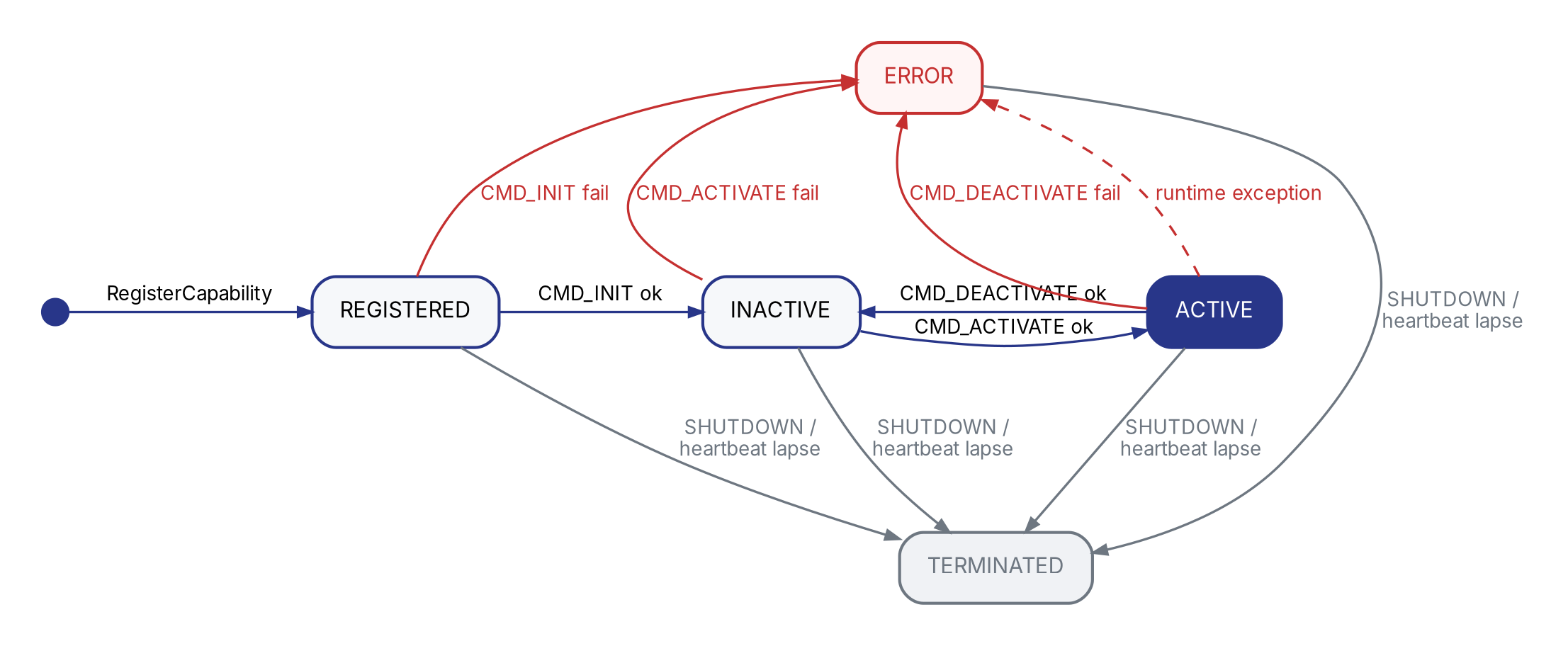 {width=100%}
5.1 状态
| 状态 | 含义 | 可调它的 Capability |
|---|---|---|
REGISTERED | atlas 已建档,但还没初始化 | ✗ |
INACTIVE | 已初始化(参数 / 上游依赖),但热资源未就位 | ✗ |
ACTIVE | 热资源就位,对外服务 | ✓ |
ERROR | handler 返回 Err() 或 raise | ✗ |
TERMINATED | 已退出 / 被驱逐——终态 | ✗ |
5.2 三类能力提供者的状态迁移
| 能力提供者类型 | boot 后停在哪 | 谁推到 ACTIVE |
|---|---|---|
| Primitive | ACTIVE | rbnx boot 紧跟 CMD_INIT 自动续发 CMD_ACTIVATE |
| Service | ACTIVE | 同 primitive |
| Skill | INACTIVE | executor 在 LLM 首次路由到该 skill 时发 CMD_ACTIVATE;idle 后可发 CMD_DEACTIVATE 回 INACTIVE |
通用规则:
- 任意状态下,handler 返
Err()/ raise →ERROR - SIGTERM /
CMD_SHUTDOWN/ 心跳 90s 失联 →TERMINATED
handler 实现见 §14.3。
Part III — 开发
6. 包结构
template_rbnx 里三个包正好覆盖典型差别。
6.1 service 包
my_navigate/
├── package_manifest.yaml 包元数据 + 要 declare 的 contract 清单
├── scripts/
│ ├── build.sh 调 rbnx codegen 生 stubs
│ └── start.sh 起能力提供者的命令(python -m my_navigate.main)
└── my_navigate/ 放源码的目录,robonix 不关心代码目录结构,直接调用 start.sh
├── __init__.py
└── main.py ★ 入口:构造能力提供者 + 装饰器
没有 capabilities/ 子目录——my_navigate 要 declare 的 4 条 robonix/service/navigation/* contract 已经在 robonix 源码的全局 capabilities/ 里定义好了,本包只是实现它们(详见 §6.4)。
6.2 skill 包
say_hello/
├── package_manifest.yaml
├── scripts/{build.sh, start.sh}
├── say_hello_skill/
│ ├── __init__.py
│ └── main.py
└── capabilities/ ★ 包私有 contract 定义
├── lib/say_hello/srv/SayHello.srv ROS IDL 类型
├── say_hello.v1.toml contract 描述(MCP 工具)
└── driver.v1.toml contract 描述(lifecycle 入口)
skill 通常是全新功能,没有现成 contract 可用,所以在自己的 capabilities/ 里定义。
6.3 primitive 包
mock_chassis/
├── package_manifest.yaml
├── scripts/{build.sh, start.sh}
└── mock_chassis/
├── __init__.py
└── main.py
primitive 包的目录形态和 service 一样。怎么把硬件 / 厂商 SDK 装起来由开发者自己定——可以在本地 venv 里跑、也可以让 start.sh 调 docker run 起容器、也可以 ssh 到机器人主机起。框架不关心实现,只看 start.sh 拉起来的进程能不能注册进 atlas。模板里 mock_chassis 给了一个走 docker 的例子,仅供参考(包含 docker/Dockerfile 等额外文件)。
6.4 package_manifest.yaml
以 services/my_navigate/package_manifest.yaml 为例(注释逐行):
manifestVersion: 1
package:
name: com.example.template.my_navigate # 反向域名,发布身份;与运行时 id 是两码事
version: 0.1.0
vendor: example
license: MIT
build: bash scripts/build.sh
start: bash scripts/start.sh
capabilities: # 要 declare 的 contract(全 / 本地都可,codegen 合并搜索)
- name: robonix/service/navigation/driver
- name: robonix/service/navigation/navigate
- name: robonix/service/navigation/status
- name: robonix/service/navigation/cancel
skill 会同时引用全局 lifecycle contract 和自定义 contract——见 skills/say_hello/package_manifest.yaml。
6.5 capabilities/ 目录
整个系统有两种 capabilities/ 目录(robonix 全局只有 1 份;包私有的每个包各 1 份):
| 位置 | 谁维护 | 装什么 |
|---|---|---|
<robonix-repo>/capabilities/ | robonix 上游 | primitive 标准族(chassis/camera/lidar/audio)、所有 system 服务接口、内置共享 service 接口(navigation/map/scene/memory…)、跨包 ROS IDL 类型库(lib/) |
<your-pkg>/capabilities/ | 你自己 | 该包私有的额外 contract(skill 自定义工具最常见) |
rbnx codegen 扫描两种根合并,得到当前包能引用的 contract 全集。合并规则:toml / IDL 同 id 包内覆盖全局(用于本地试改);包内 capabilities/lib/ 的 ROS IDL 也对自己可见。
何时建本地 capabilities/:
| 你要 declare 的 contract | 它在哪 | 要建本地 capabilities/ 吗? |
|---|---|---|
robonix/primitive/chassis/move | robonix 全局 | 不需要 |
robonix/service/navigation/navigate | robonix 全局 | 不需要 |
robonix/skill/say_hello/say(自定义 skill 工具) | 没有,自己定义 | 需要 |
| 自家私有 service 接口(暂不上游) | 没有,自己定义 | 需要 |
7. API 速览
写原语/服务/技能 用的 Python 库就是 robonix_api。下面是后续 §8-§10 所有代码示例里会出现的 API,先有印象就行——完整签名 + 机制 + 多 mode 写法见 §14。
from robonix_api import Service, Ok, Err, ATLAS
from robonix_api.atlas_types import Transport, Channel
from myorg_mcp import Hello_Request, Hello_Response # codegen dataclass
service = Service(id="my_service", namespace="robonix/service/myorg")
# Hot resources — only touched between on_activate / on_deactivate.
chassis_ch: Channel | None = None
@service.on_init
def init(cfg: dict):
# Light: 读 cfg、向 atlas 探活上游;不开连接、不占资源。
if not ATLAS.find_capability(
contract_id="robonix/primitive/chassis/move",
transport=Transport.GRPC,
):
return Err("no chassis candidate online")
return Ok()
@service.on_activate
def activate():
# Heavy: 拿上游 endpoint、起线程、加载模型——只有进入 ACTIVE 时才做。
global chassis_ch
cap_view = ATLAS.find_unique_capability(
contract_id="robonix/primitive/chassis/move",
transport=Transport.GRPC,
)
chassis_ch = service.connect_capability(
cap_view, "robonix/primitive/chassis/move", Transport.GRPC,
)
return Ok()
@service.on_deactivate
def deactivate():
# 对称释放 on_activate 申请的所有资源。
global chassis_ch
if chassis_ch is not None:
chassis_ch.close()
chassis_ch = None
return Ok()
@service.mcp("robonix/service/myorg/hello")
def hello(req: Hello_Request) -> Hello_Response:
"""打招呼。docstring 即工具描述,pilot 喂给 LLM。"""
return Hello_Response(message=f"hello {req.name}")
if __name__ == "__main__":
service.run()
| API | 作用 |
|---|---|
service = Service(id, namespace)(或 primitive = Primitive(...) / skill = Skill(...)) | 在文件顶部构造一个全局能力提供者,承载所有装饰器和方法。三个类按 package 类型选——它们的 lifecycle 语义、可暴露的 contract、executor 调度策略都有差异(详见 §3 / §5)。id 是 atlas 里该能力提供者的唯一 id,namespace 固定了之后所有接口 contract_id 的前缀(如 namespace=robonix/primitive/chassis,则之后声明的接口均以 robonix/primitive/chassis 开头) |
service.run() | 阻塞主循环:注册到 atlas、起 gRPC + MCP server、心跳、等 SIGTERM |
@service.on_init(fn) | 必填,REGISTERED→INACTIVE;输入配置,返回 Result |
@service.on_activate(fn) | INACTIVE→ACTIVE;skill 必填,primitive / service 可省(省时框架自动返 Ok());无输入,返回 Result |
@service.on_deactivate(fn) | ACTIVE→INACTIVE;同 on_activate 的规则;无输入,返回 Result |
@service.on_shutdown(fn) | 任意→TERMINATED;可选;无输入,返回 Result |
@service.mcp(contract_id, *, description="") | 把函数挂成 MCP 工具(LLM 直接调),描述默认取 docstring |
@service.grpc(contract_id, *, description="") | 把函数挂成 gRPC servicer 方法;gRPC 无 docstring 惯例,建议显式传 description |
ATLAS.query(*, kind=, id=, contract_id=, …) | 按条件搜原语/服务/技能记录(kind=UNSPECIFIED 时三类一起返回) |
ATLAS.query_primitives/_services/_skills(...) | query() 的 kind 已固定的快捷形式 |
ATLAS.find_capability(*, contract_id=, transport=, …) | 扁平视角——按 contract 搜,返回 list[Capability](每条 Capability 自带 provider_id / provider_kind) |
ATLAS.find_unique_capability(...) | 同上但断言只有一条;0 或 >1 都 raise(依赖唯一 capability 时用) |
service.connect_capability(cap_view, contract_id, transport) | 用一条 Capability 建一条 consumer→提供方的 Channel |
service.declare_ros2_topic | 把一个 ROS 2 topic publisher 在 atlas 里登记为某能力约定(详见 §14.8) |
service.declare_ros2_service | 把一个 ROS 2 service 在 atlas 里登记为某能力约定(详见 §14.8) |
Ok() / Err("...") | API提供的辅助结果“类型“,能力提供者的 lifecycle handler 返回这两种之一 |
最小可跑的能力提供者长这样——on_init 必填;on_activate / on_deactivate 对 primitive / service 可省(框架自动返 Ok()),skill 必须自己写:
from robonix_api import Service, Ok
service = Service(id="my_service", namespace="robonix/service/myorg")
@service.on_init
def init(cfg: dict):
return Ok()
@service.on_activate
def activate():
return Ok()
@service.on_deactivate
def deactivate():
return Ok()
if __name__ == "__main__":
service.run()
8. 服务
按“先 hello、再加上游探活、再加 connect、再加自定义 contract、最后给完整模板“的渐进式样例展开。每一节增量地解释新引入的 API,最后 §8.6 给可直接 copy 的完整 main.py + package_manifest.yaml。
8.1 最小骨架
四步:
- 复制
template_rbnx/services/my_navigate/到你的部署,改包名 - 改
package_manifest.yaml:package.name/capabilities[](只 declare robonix 全局已有的 contract 就不用建本地capabilities/);改 Python 源里Primitive/Service/Skill(id="...")的 id 跟robonix_manifest.yaml该条目的name:一致 - 写
<pkg>/<pkg>/main.py:按 package 类型构造一个能力提供者(Primitive/Service/Skill)+ lifecycle handlers + 装饰器 bash scripts/build.sh && bash scripts/start.sh
最小 main.py——on_init 必填;on_activate / on_deactivate 对 primitive / service 可省(省时框架自动 Ok()),下面这份模板把它们都写上方便你直接扩展:
from robonix_api import Service, Ok
from myorg_mcp import Hello_Request, Hello_Response # codegen 出来的 dataclass
service = Service(id="my_service", namespace="robonix/service/myorg")
@service.on_init
def init(cfg: dict):
return Ok()
@service.on_activate
def activate():
return Ok()
@service.on_deactivate
def deactivate():
return Ok()
@service.mcp("robonix/service/myorg/hello")
def hello(req: Hello_Request) -> Hello_Response:
return Hello_Response(message=f"hello {req.name}")
if __name__ == "__main__":
service.run()
service.run() 阻塞直到 SIGTERM;中间它做完了:atlas 注册 → declare interfaces → 起 gRPC + MCP server → 起心跳。
验证:
rbnx caps -v | grep my_service
8.2 atlas 探活
写真实 service 时,on_init 一般要先看上游依赖在不在。按 id 取:ATLAS.query(id=...) 返回一个 list(0 条 = 没有):
from robonix_api import Service, Ok, Err, ATLAS
@service.on_init
def init(cfg: dict):
if not ATLAS.query(id="tiago_chassis"):
return Err("chassis not online")
return Ok()
Err("...") 让能力提供者进 ERROR,reason 写入 state_detail,rbnx caps -v 看得到。完整 atlas 发现 API(按 contract 搜 / 多能力提供者处理)见 §14.4 / §14.5。
8.3 上游 connect
on_activate 阶段才做“申请热运行资源“——拿上游 endpoint、起 ROS subscription、加载模型、开线程。按 contract 搜对应的 Capability:ATLAS.find_capability(contract_id=..., transport=...) 返回 list[Capability];service.connect_capability(cap_view, contract_id, transport) 返回一个 Channel,里面 endpoint 是对方实际地址:
from robonix_api.atlas_types import Transport
chassis_endpoint: str | None = None # 模块级缓存
@service.on_activate
def activate():
global chassis_endpoint
cap_view = ATLAS.find_unique_capability(
contract_id="robonix/primitive/chassis/move",
transport=Transport.GRPC,
)
with service.connect_capability(
cap_view,
"robonix/primitive/chassis/move",
Transport.GRPC,
) as ch:
chassis_endpoint = ch.endpoint
return Ok()
with 块退出时自动 Disconnect。find_unique_capability 在 0 或 >1 匹配时 raise——依赖唯一 capability 时用它;多能力提供者场景用 find_capability 拿 list 自己挑。完整 connect 机制见 §14.6。
8.4 资源释放
on_activate 申请的资源必须有对称的 on_deactivate 释放——否则 executor evict 后再 activate 会泄漏:
@service.on_deactivate
def deactivate():
global chassis_endpoint
chassis_endpoint = None
return Ok()
8.5 自定义 contract
到 §8.4 为止你只用了 robonix 全局已有的 contract。如果你的 service 要暴露全新接口(带自己的 IDL),三步:
(1) 写 IDL — 按 ROS IDL(msg / srv 文件)放 <your-pkg>/capabilities/lib/<lib_name>/{msg,srv}/:
# <your-pkg>/capabilities/lib/myorg/srv/Hello.srv
string name
---
string message
<lib_name> 是 lib/ 下第一层子目录名(snake_case,如 myorg / camera / nav_msgs),codegen 生成的 <lib_name>_pb2.py / <lib_name>_mcp.py 模块名沿用。同一 <lib_name> 下并列 msg/ 和 srv/。.srv 中 --- 上方是 request、下方是 response;.msg 无 ---,整文件即字段列表。
⚠️ streaming mode 字段约束:
.srv流方向那一段必须恰 1 个字段(gRPC 一条流只能跑一种 message type);unary 方向不限。topic_*用.msg,整文件即流元素类型。违反 codegen 直接 bail。
mode request 字段数 response 字段数 rpc任意 任意 rpc_server_stream任意 =1 rpc_client_stream=1 任意 rpc_bidirectional_stream=1 =1
(2) 写 toml — 放 <your-pkg>/capabilities/ 任意深度子目录(不能进 lib/):
# <your-pkg>/capabilities/myorg/hello.v1.toml
[contract]
id = "robonix/service/myorg/hello"
version = "1"
kind = "service"
idl = "myorg/srv/Hello.srv" # 相对 lib/ 的路径
[mode]
type = "rpc" # 详见 §4.2
(3) 在代码里 declare — 把 contract_id 和你的实现绑定:
@service.mcp("robonix/service/myorg/hello") # contract_id 必须和 toml 的 [contract] id 一致
def hello(req: Hello_Request) -> Hello_Response:
return Hello_Response(message=f"hi {req.name}")
Codegen 产物:bash scripts/build.sh(包内默认调 rbnx codegen --mcp)扫描两种 capabilities/ 根生成到 <your-pkg>/rbnx-build/codegen/:
rbnx-build/codegen/
├── proto_gen/
│ ├── robonix_contracts.proto 所有 contract 合成的 proto
│ ├── robonix_contracts_pb2_grpc.py ★ 所有 contract 的 Stub / Servicer
│ ├── <lib_name>_pb2.py 每个 lib/ 子目录的 msg 类
│ └── ...
└── robonix_mcp_types/
└── <lib_name>_mcp.py 每个 lib/ 子目录的 dataclass(@service.mcp 用)
名字映射规则:
| 源 | 生成的名字 |
|---|---|
msg 文件:lib/<lib_name>/msg/Foo.msg | gRPC:<lib_name>_pb2.FooMCP: <lib_name>_mcp.Foo |
srv 文件:lib/<lib_name>/srv/Hello.srv | gRPC:<lib_name>_pb2.Hello_Request / Hello_ResponseMCP: <lib_name>_mcp.Hello_Request / Hello_Response |
contract id:robonix/service/myorg/hello(其 toml 引用 myorg/srv/Hello.srv) | gRPC service:RobonixServiceMyorgHelloServicer: robonix_contracts_pb2_grpc.RobonixServiceMyorgHelloServicerStub: robonix_contracts_pb2_grpc.RobonixServiceMyorgHelloStub方法名: Hello(按 IDL srv 文件名去 .srv) |
contract id:mycomp/a/b/c | gRPC service:MycompABC规则一致:每段按 / 切,段内 snake_case 转 PascalCase |
在代码里 import 这些生成产物:from robonix_api import ... 的那一刻,框架自动把 <pkg>/rbnx-build/codegen/proto_gen 和 robonix_mcp_types 加进 sys.path,所以不需要 sys.path.insert——直接和 robonix_api 一起在文件顶部 import:
from robonix_api import Service, Ok, Err, ATLAS
from robonix_api.atlas_types import Transport
from navigation_mcp import ( # MCP dataclass:用作 @service.mcp 函数签名
Navigate_Request, Navigate_Response,
)
import chassis_pb2_grpc # gRPC stub:用作 service.connect 拿到 endpoint 后建 client
import chassis_pb2 # gRPC 消息类
service = Service(id="my_navigate", namespace="robonix/service/navigation")
在 service / skill 里:你消费的 contract 来自上游 Capability → 用 service.connect_capability(...) + 上面 import 的 chassis_pb2_grpc.RobonixPrimitiveChassisMoveStub。你提供的 contract → 用装饰器 @service.mcp(...) / @service.grpc(...),签名里类型注解用 <lib_name>_mcp 里的 dataclass(MCP)或 <lib_name>_pb2 里的消息类(gRPC)。
8.6 完整模板
把 §8.1-§8.5 学到的合在一起——直接对接 robonix 全局的 service/navigation/* contract(不需要写自己的 IDL)。my_navigate/main.py:
# SPDX-License-Identifier: MulanPSL-2.0
"""my_navigate — minimal service.
- 暴露 robonix 全局的 service/navigation/navigate 这条 MCP 工具
- on_init 阶段在 atlas 里查 chassis primitive 是否在线
- on_activate 阶段拿一条 chassis/move 的 gRPC channel 留着发命令用
"""
from __future__ import annotations
import logging
import uuid
from robonix_api import Service, Ok, Err, ATLAS
from robonix_api.atlas_types import Transport
# Navigate_Request / Navigate_Response 是 codegen 从 robonix 全局的
# lib/navigation/srv/Navigate.srv 生成的 dataclass:
# geometry_msgs/PoseStamped goal ← 请求
# ---
# bool accepted ← 响应
# string goal_id
# string status_message
from navigation_mcp import Navigate_Request, Navigate_Response
# (1) 构造能力提供者:id 是 atlas 里该能力提供者的唯一 id,namespace 是要 declare 的 contract 公共前缀
service = Service(
id="my_navigate",
namespace="robonix/service/navigation", # 复用 robonix 全局 navigation 命名空间
)
log = logging.getLogger("my_navigate")
chassis_endpoint: str | None = None # 模块级缓存
# (2) lifecycle: REGISTERED -> INACTIVE
@service.on_init
def init(cfg: dict):
"""解析 config + 验证上游依赖。返回 Ok / Err。"""
log.info("init cfg=%s", cfg)
if not ATLAS.query(id="tiago_chassis"):
return Err("chassis not online")
return Ok()
# (3) lifecycle: INACTIVE -> ACTIVE(申请热资源)
@service.on_activate
def activate():
global chassis_endpoint
cap_view = ATLAS.find_unique_capability(
contract_id="robonix/primitive/chassis/move",
transport=Transport.GRPC,
)
with service.connect_capability(
cap_view,
"robonix/primitive/chassis/move",
Transport.GRPC,
) as ch:
chassis_endpoint = ch.endpoint
return Ok()
# (4) lifecycle: 回到 INACTIVE(释放热资源)
@service.on_deactivate
def deactivate():
global chassis_endpoint
chassis_endpoint = None
return Ok()
# (5) 暴露 MCP 工具——docstring 即工具的自然语言描述,pilot 喂给 LLM。
@service.mcp("robonix/service/navigation/navigate")
def navigate(req: Navigate_Request) -> Navigate_Response:
"""把底盘开到 goal 指定的 map 系位姿。LLM 决定调用时机;返回 goal_id
供后续 query / cancel 用。"""
pos = req.goal.pose.position
goal_id = str(uuid.uuid4())
log.info("navigate accepted goal=%s target=(%.2f, %.2f)", goal_id, pos.x, pos.y)
# 实际规划逻辑:通过 chassis_ch 发 gRPC 命令到底盘 primitive ……
return Navigate_Response(
accepted=True,
goal_id=goal_id,
status_message="stub planner accepted goal",
)
# (6) 阻塞主循环:注册 + declare + listen + heartbeat 全在里面
if __name__ == "__main__":
service.run()
配套 package_manifest.yaml(不需要本地 capabilities/,全用 robonix 全局 contract):
manifestVersion: 1
package:
name: com.org.my_navigate
version: 0.1.0
build: bash scripts/build.sh
start: bash scripts/start.sh
# 全部从 robonix 全局 capabilities/ 引用,自己不再 declare 新 contract
capabilities:
- name: robonix/service/navigation/driver
- name: robonix/service/navigation/navigate
- name: robonix/service/navigation/status
- name: robonix/service/navigation/cancel
每个 API 的详细签名 + 用法见 §14。
9. 原语
primitive 对应一个物理设备(一个相机、一个底盘、一台麦克风)。和 service 大体相同,差别如下:
namespace = "robonix/primitive/<kind>",<kind>∈ {audio,camera,chassis,imu,lidar}(封闭)- “能力提供者 id = device id” 约定:一个设备一个 primitive。3 个相机 → 3 个 primitive 能力提供者(
tiago_camera_front/tiago_camera_left/tiago_camera_right) - 怎么打包(本地 venv / docker / ssh 到机器人主机)由
scripts/start.sh决定——框架只看能力提供者进程能不能注册进 atlas。template_rbnx/primitives/mock_chassis/给了一个 docker 例子。
典型 lifecycle(同 service:on_init 必填,on_activate / on_deactivate 可省。下面这份模板把它们都写上方便扩展硬件资源管理):
primitive = Primitive(id="my_lidar", namespace="robonix/primitive/lidar")
@primitive.on_init
def init(cfg: dict):
# 轻量校验:cfg 字段、上游存在性
return Ok()
@primitive.on_activate
def activate():
# 起 rclpy node、加载模型、打开硬件 fd、起控制线程;同时 primitive.declare_ros2_topic / declare_ros2_service 把
# 暴露的 ROS topic 注册到 atlas(详见 §14.8)
return Ok()
@primitive.on_deactivate
def deactivate():
# 关 rclpy node / 关硬件 fd / 停控制线程;on_activate 申请的所有热资源在这里对称释放
return Ok()
声明 ROS topic 接口的写法见 §8.5 + §14.8。
10. 技能
skill = 一段被 LLM / 状态机触发的复合任务。和 service 不同点:
namespace = "robonix/skill/<x>"- 必须实现
@skill.on_activate+@skill.on_deactivate——它们是 executor 控制资源占用的入口,必然成对(eviction 策略可能反复 cycle) - skill boot 后停在
INACTIVE;首次 LLM 调用时 executor 发CMD_ACTIVATE推到ACTIVE - skill 通常通过
@skill.mcp暴露工具
硬性规定:每个原语 / 服务 / 技能必须有 driver.v1.toml,无例外——lifecycle 入口由这条 contract 描述,缺了 rbnx boot 没法发 CMD_INIT / CMD_ACTIVATE,executor 也没法路由 skill 激活命令。
framework 怎么找 driver:能力提供者启动时按 f"{self.namespace}/driver" 自动向 atlas declare 这条接口(capability.py:698);rbnx boot / executor / atlas 反向查找时只看一条规则——该能力提供者的 interface 列表里 contract_id 以 /driver 结尾的那一条(run_package.rs:722 等多处用 ends_with("/driver"))。也就是说,contract id 的整体格式 robonix 不强制——myorg/aaa/bbb/... 也行;强制的只是“该能力提供者 namespace 下必须有且只有一个 leaf 叫 driver“。
skill 没有现成的 driver contract 可借用,必须自己写一份;最快做法是从任意 primitive / service 的 driver.v1.toml 复制过来,把 [contract].id 改成 <你 skill 的 namespace>/driver——namespace 必须和 Skill(id=..., namespace=...) 里写的完全一致,否则 codegen 算出的 gRPC service name 和 runtime declare 的对不上:
# capabilities/driver.v1.toml
[contract]
id = "<your-namespace>/driver" # ← 必须 = Primitive/Service/Skill(...) 的 namespace + "/driver"
version = "1"
kind = "skill" # ← primitive / service / skill 据实填
idl = "lifecycle/srv/Driver.srv"
[mode]
type = "rpc"
idl 一律指向框架自带的 lifecycle/srv/Driver.srv,不要自创——所有能力提供者共享这一个 lifecycle 接口。kind 字段会被 atlas 用于 rbnx caps 的分类显示和 executor 的策略判断。
标准模式:
skill = Skill(id="myskill", namespace="robonix/skill/myskill")
@skill.on_init
def init(cfg: dict):
caps = ATLAS.find_capability(contract_id="robonix/service/navigation/navigate")
if not caps:
return Err("navigation service not found")
return Ok()
@skill.on_activate
def activate():
# spawn controller thread, load state machine
return Ok()
@skill.on_deactivate
def deactivate():
# release threads, unsubscribe
return Ok()
@skill.mcp("robonix/skill/myskill/run")
def run(req):
...
Part IV — 部署
11. 部署目录
本部分通过
template_rbnx这个最小部署模板把目录、manifest、能力约定的关系讲清。读完你应该能看懂一个部署的所有文件。
template_rbnx 是一个“空部署模板“:enkerewpo/template_rbnx。建议下面的章节边读边对着看真实文件。
template_rbnx/
├── robonix_manifest.yaml ★ 部署入口:rbnx boot 读这个,声明用哪些原语 / 服务 / 技能、各自的包在哪里、启动时的 config 参数(喂给 @service.on_init)
├── primitives/
│ └── mock_chassis/ 一个 primitive 包(能力提供者 id = mock_chassis,由其 main.py 的 Primitive(id=...) 声明)
├── services/
│ └── my_navigate/ 一个 service 包(能力提供者 id = my_navigate)
└── skills/
├── capabilities/
│ ├── lib/ 能力约定的 IDL 文件
│ ├── say_hello.v1.toml 能力约定定义
│ └── driver.v1.toml
└── say_hello/ 一个 skill 包(能力提供者 id = say_hello)
primitives/ / services/ / skills/ 是约定的子目录名,内部必须是若干个标准 Robonix 包的目录,robonix_manifest.yaml 里给每个包写 path: 显式指明所处的目录。
每个包内部长什么样见 §6 包结构。
12. 部署清单
robonix_manifest.yaml 是一个 robonix 部署的入口文件——rbnx boot -f robonix_manifest.yaml 读它来决定起哪些 system 服务、哪些 primitive / service / skill,以及给每个能力提供者喂什么配置。
结构:
manifestVersion: 1
name: my-robot # 部署名(任意)
env: # 可选:部署级 env(一般留空,env 在外层 export)
# ─── system: robonix 自带的系统组件 ───
# key 是固定的 system 服务名(atlas/executor/pilot/liaison/memory/scene/speech),
# value 是它的配置块;保持原样的层级会被 JSON 化喂给能力提供者的 on_init(cfg)。
system:
atlas:
listen: 127.0.0.1:50051
log: info
executor:
listen: 127.0.0.1:50061
log: info
pilot:
listen: 127.0.0.1:50071
log: info
vlm:
upstream: ${VLM_BASE_URL} # ${...} 会在加载时展开成环境变量
api_key: ${VLM_API_KEY}
model: ${VLM_MODEL}
liaison:
listen: 127.0.0.1:50081
log: info
memory:
backend: sqlite
scene:
log: info
# ─── primitive: 设备包列表(每条 = 一个物理设备的 primitive) ───
primitive:
- name: tiago_chassis # 必须等于该包 Python 源里 Primitive/Service/Skill(id="...") 的 id
path: ./primitives/tiago_chassis # 相对部署根的本地路径
config:
can_port: /dev/can0 # 整段 config 会以 JSON 传给 on_init(cfg)
odom_frame: odom
# ─── service: 算法 / 应用层服务 ───
service:
- name: simple_nav # 本地包
path: ./services/simple_nav
config:
max_linear: 0.5
- name: mapping # 远程 git 包:rbnx build 阶段克隆到 rbnx-boot/cache/
url: https://github.com/enkerewpo/mapping_rbnx
branch: main
config:
algo: rtabmap
# ─── skill: LLM/状态机触发的复合任务 ───
skill:
- name: explore
url: https://github.com/enkerewpo/explore_rbnx
branch: main
config:
timeout_s: 600
字段速查见 §16。
13. 启动
rbnx boot -f robonix_manifest.yaml 顺序:
- 加载 manifest,展开
${...}环境变量 - 起
system:下声明的所有 system 服务 - 按
primitive→service→skill顺序起每个用户包:spawn 后 poll atlas 拿到新注册的能力提供者,跟 manifest 该条目name:对账(不一致直接 fail),然后Driver(CMD_INIT, config_json)→on_init(cfg)→ 对 primitive/service 紧跟CMD_ACTIVATE推到ACTIVE(skill 停INACTIVE等 executor) - 全部就绪后阻塞,
Ctrl-C反向 teardown
约定:
- 同一层级内顺序起:service/skill 不解析依赖;要让 mapping 在 simple_nav 之前起就写前面。
- config 直传:yaml 里
config: { max_linear: 0.5 }→on_init(cfg)拿到cfg["max_linear"] == 0.5,嵌套结构原样保留。 name:必须等于 Python 源里Primitive/Service/Skill(id=...)的 id——boot 时 atlas 对账,不一致就退出。
单包调试:跳过 manifest 直接起一个:
rbnx start -p ./services/simple_nav -c local_config.yaml
rbnx start -p ./services/simple_nav -s max_linear=0.3 -s pid_linear=[1,0,0.1]
-c 跟一个 yaml 文件,整段当 config;-s key=value 单字段覆盖。最终都是以 JSON 喂给 on_init(cfg)。
Part V — 参考
14. Python API
robonix_api 是写原语 / 服务 / 技能的核心库——三个类 + 一组装饰器 + Result 类型 + ATLAS 客户端。每个 API 给出签名、参数、返回、机制、示例。
本节是 v0.1 发版前的 API 规划。dev 上已经按这套形态推进,签名 / 命名 / 默认值在正式发版前仍可能微调。
14.0 总表
from robonix_api import Service, Ok, Err, ATLAS # 或 Primitive / Skill
from robonix_api.atlas_types import Transport, Capability
签名里的
*是 keyword-only 标志——*之后的参数必须用name=value传,不能按位置传。
| API | 用途 |
|---|---|
Primitive(id, namespace) / Service(...) / Skill(...) | 构造一个能力提供者(按 package 类型选——三类的 lifecycle / 调度策略 / 可暴露的 contract 都有差异,详见 §3 / §5) |
service.run() | 阻塞主循环;注册 + listen + 心跳 + 等 SIGTERM |
@service.on_init(cfg) -> Result | REGISTERED → INACTIVE,必填 |
@service.on_activate() -> Result | INACTIVE → ACTIVE;skill 必填,primitive / service 可省(省时框架自动 Ok()) |
@service.on_deactivate() -> Result | ACTIVE → INACTIVE;规则同 on_activate |
@service.on_shutdown() -> Result | 任意 → TERMINATED,可选 |
Ok() / Err("reason") | lifecycle handler 返回值 |
ATLAS.query(*, kind=…, id=…, contract_id=…, namespace_prefix=…, transport=…) | 搜能力提供者记录 |
ATLAS.query_primitives/_services/_skills(...) | query() 已固定 kind 的快捷形式 |
ATLAS.find_capability(*, contract_id=…, transport=…, provider_kind=…, provider_id=…, namespace_prefix=…) | 按 contract 搜,返回 list[Capability] |
ATLAS.find_unique_capability(*, contract_id=…, ...) | 同上但断言只有一条;0 或 >1 都 raise |
service.connect_capability(cap_view, contract_id, transport) | 用一条 Capability 建 consumer → 提供方 Channel |
@service.mcp(contract_id, *, description="") | 把函数挂成 MCP 工具(mode=rpc,给 LLM 调);description 默认取 docstring |
@service.grpc(contract_id, *, description="") | 把函数挂成 contract 对应 gRPC 方法;建议显式传 description |
service.declare_ros2_topic / declare_ros2_service | 登记 ROS 2 端点 |
只读属性:service.id / service.namespace / service.state。
14.1 Primitive / Service / Skill
三个类构造签名一致:Primitive(id, namespace) / Service(id, namespace) / Skill(id, namespace)。按 package 类型挑一个——三类的 lifecycle / 调度策略 / 可暴露的 contract 都不同(详见 §3 / §5)。通常在模块顶部构造一个全局能力提供者,再用装饰器挂 handler。
| 参数 | 类型 | 必填 | 说明 |
|---|---|---|---|
id | str | 是 | 能力提供者 id(atlas 里唯一),必须等于 robonix_manifest.yaml 里挂这个包的 name:(两处一致) |
namespace | str | 是 | 该能力提供者所有 contract 的公共前缀,如 robonix/service/myorg。框架要求 contract_id 以 <namespace>/ 开头 |
机制:构造时只做轻量校验(namespace 非空、包根目录定位、<pkg>/rbnx-build/codegen/ 加进 sys.path)。不连接 atlas、不开端口——这些发生在 service.run()。
service = Service(id="my_navigate", namespace="robonix/service/myorg")
14.2 service.run()
阻塞主循环。main.py 最后一行通常就是 service.run(),内部按序:
- 连 atlas + 按 kind 调对应 Register RPC(失败则记 warning 并继续,能力提供者停在 REGISTERED)
- 启 gRPC server(自动选端口),挂
<namespace>/driver生命周期接口 + 所有@service.grpc业务方法 - 每条 gRPC contract 调
DeclareCapability - 有
@service.mcp则起 MCP HTTP server(FastMCP + uvicorn)并 declare - 起心跳线程(约 30s 一次;超 90s 无心跳 atlas 标 TERMINATED)
- 装 SIGTERM/SIGINT handler,触发时
on_shutdown→ 停 server → unregister signal.pause()阻塞
跑完 1-5 后 atlas 里只是 REGISTERED,等 Driver(CMD_INIT) 到达才进 INACTIVE——状态推进由 rbnx boot / executor 异步驱动。
14.3 lifecycle 装饰器
四个装饰器,对应 §5 的状态迁移。所有 handler 必须返回 Result(§14.7)。装饰器只在模块 import 时跑,把 fn 注册到能力提供者的 handler 表里,不包 wrapper、不改 fn 行为——保留可单测性。
| 装饰器 | 签名 | 必填 | 该做什么 |
|---|---|---|---|
@service.on_init | fn(cfg: dict) -> Result | 是 | 解析 cfg、用 ATLAS.query/find_capability 探上游。不申请热资源 |
@service.on_activate | fn() -> Result | skill 是 / primitive·service 否 | 申请热资源——开线程、加载模型、订阅 ROS、打开硬件 fd。必须可重入(skill evict 后会再 activate)。primitive/service 省略时框架自动 Ok() |
@service.on_deactivate | fn() -> Result | 同 on_activate | 对称释放 on_activate 的热资源;config 和 atlas 注册保留 |
@service.on_shutdown | fn() -> Result | 否 | flush 日志、关端口。返回值忽略(能力提供者无论如何都退出) |
cfg 来源:rbnx boot 时取 robonix_manifest.yaml 里该能力提供者的 config: 段;rbnx start -p <pkg> -c local.yaml 时取 -c 文件;都没传则 {}。
@service.on_init
def init(cfg: dict):
if cfg.get("require_camera") and not ATLAS.find_capability(
contract_id="robonix/primitive/camera/rgb"
):
return Err("camera not online")
return Ok()
@service.on_activate
def activate():
global controller
controller = Controller(...)
controller.start()
return Ok()
@service.on_deactivate
def deactivate():
global controller
if controller is not None:
controller.stop()
controller = None
return Ok()
14.4 ATLAS 发现 + connect
ATLAS 两种 API:
ATLAS.query(*, id=…, kind=…, contract_id=…, …)—— 能力提供者视角,按 id / kind / contract 搜能力提供者记录。ATLAS.query_primitives/_services/_skills是固定 kind 的快捷形式。ATLAS.find_capability(*, contract_id=…, transport=…, …)—— 接口视角,返回list[Capability](自带provider_id/provider_kind)。find_unique_capability在 0 或 >1 时 raise,依赖唯一 capability 时用。
service.connect_capability(cap_view, contract_id, transport) 用一条 Capability 开 Channel,ch.endpoint 是对方实际地址。
典型写法:
# 默认:全场唯一一个 provider 提供该 contract
cap_view = ATLAS.find_unique_capability(
contract_id="robonix/primitive/chassis/move",
transport=Transport.GRPC,
)
with service.connect_capability(cap_view, "robonix/primitive/chassis/move",
Transport.GRPC) as ch:
...
# 多 provider 时:按 provider_id 自己挑
capabilities = ATLAS.find_capability(contract_id="robonix/primitive/camera/rgb")
front = next((c for c in capabilities if c.provider_id == "tiago_camera_front"), None)
14.5 atlas-types 数据结构
ATLAS 是 module-level singleton(参照 prometheus_client.REGISTRY 风格),第一次访问时连到 atlas(端口取 ROBONIX_ATLAS,默认 127.0.0.1:50051)。
返回的两个 dataclass 都是 frozen,要新数据就重新 query。
能力提供者记录(ATLAS.query / query_primitives / query_services / query_skills 返回单元):
| 字段 | 类型 | 说明 |
|---|---|---|
id | str | 能力提供者 id(atlas 里唯一) |
kind | Kind | PRIMITIVE / SERVICE / SKILL |
namespace | str | contract 公共前缀 |
state | LifecycleState | §5.1 |
state_detail | str | ERROR 时为 reason,其它可能为空 |
last_heartbeat_ms | int | 上次心跳 unix ms |
capability_md_path | str | 注册时报上来的 CAPABILITY.md 路径 |
capabilities | tuple[Capability, ...] | 该能力提供者已声明的所有 Capability |
Capability(ATLAS.find_capability 返回单元):
| 字段 | 类型 | 说明 |
|---|---|---|
provider_id | str | 暴露这条 capability 的能力提供者 id |
provider_kind | Kind | 该能力提供者的 kind |
contract_id | str | 接口 id |
transport | Transport | gRPC / ROS2 / MCP |
params | GrpcParams | Ros2Params | McpParams | transport-specific(gRPC service+method / ROS 2 qos_profile / MCP description+schema) |
description | str | 来源合并:contract toml + declare 时传入 + 包根 CAPABILITY.md(给 Pilot 看的) |
Transport 是 IntEnum:UNSPECIFIED / GRPC / ROS2 / MCP;Kind 是 IntEnum:UNSPECIFIED / PRIMITIVE / SERVICE / SKILL。
ATLAS.query(*, kind, id, contract_id, namespace_prefix, transport)
[chassis] = ATLAS.query(id="tiago_chassis") # 按 id(0 或 1)
skills = ATLAS.query(kind=Kind.SKILL) # == query_skills()
providers = ATLAS.query(contract_id="robonix/primitive/chassis/move",
transport=Transport.GRPC) # 按 contract
ATLAS.find_capability(*, contract_id, transport, provider_kind, provider_id, namespace_prefix) -> list[Capability]
把所有能力提供者的 capabilities[] 拉平展开,返回所有匹配的 Capability(可能为空)。
on_init 里轻量探活最常用:
@service.on_init
def init(cfg):
if not ATLAS.find_capability(contract_id="robonix/service/map/occupancy_grid"):
return Err("mapping service not online")
return Ok()
ATLAS.find_unique_capability(*, contract_id, ...) -> Capability
同 find_capability,但 0 或 >1 都 raise ValueError,依赖唯一 capability 时用。
14.6 service.connect_capability
签名:service.connect_capability(cap_view, contract_id, transport) -> Channel
打开一条 consumer → 提供方通道,拿到该接口对方的 endpoint。
| 参数 | 类型 | 说明 |
|---|---|---|
cap_view | Capability | 上一步从 ATLAS.find_capability / find_unique_capability 拿到的那条 |
contract_id | str | 要消费的接口 |
transport | Transport | 走 gRPC / ROS2 / MCP |
返回:Channel,关键字段 + 方法:
| 名 | 类型 | 说明 |
|---|---|---|
endpoint | str | 对方实际地址(gRPC host:port / ROS topic 名 / MCP HTTP URL) |
params | transport-specific | gRPC 的 service+method / ROS 2 的 qos_profile / MCP 的 description+schema |
channel_id | str | atlas 给的句柄,框架内部追踪用 |
close() | method | 显式 disconnect(idempotent;多次调用安全) |
__enter__ / __exit__ | context manager | with 块退出时自动 close() |
机制:atlas 端记一条 consumer→提供方边(rbnx channels 审计 + 心跳追踪),框架维护能力提供者本地 channel 表——ch.close() / Channel.__exit__ / 能力提供者 teardown 都会调 atlas 的 DisconnectCapability 删掉对应边。
两种用法:
- 短寿命——
with service.connect_capability(...) as ch:块内用ch.endpoint,退出自动 disconnect。 - 长寿命——
on_activate里chassis_ch = service.connect_capability(...)存到模块级,on_deactivate调chassis_ch.close()释放(§7 速览例已示)。
框架兜底:忘 close() / with,teardown 时遍历内部 channel 表 Disconnect 所有未关。但显式 close 才规范——否则 atlas 端 consumer 边一直挂着,影响 rbnx channels 审计。
14.7 Result 类型
lifecycle handler 必须返回三种之一:
| 构造 | 含义 | 后续行为 |
|---|---|---|
Ok() | 成功 | 推进到下一态(CMD_INIT→INACTIVE 等) |
Err("reason") | 失败 | 进 ERROR,reason 写入 atlas 的 state_detail,rbnx caps -v 能看到 |
Deferred("reason") | 尚未就绪、稍后重试 | 不迁移状态,保持当前态,reason 写入 state_detail |
不返回 Result(例如忘了 return)会被框架视作 Err;handler 内部 raise 也会被捕获转成 Err(含异常类型与信息)。
return Ok()
return Err("device /dev/ttyUSB0 not found")
return Deferred("waiting for upstream map service")
14.8 service.declare_ros2_topic / service.declare_ros2_service
robonix v1 不 wrap rclpy——publisher / subscriber / service / client 直接 rclpy.init() + Node + create_publisher / create_subscription / create_service + spin。robonix 只插一个 declare 点告诉 atlas“我在某个 ROS 端点上提供某 contract“,让 consumer 能通过 ATLAS.find_capability + service.connect_capability(transport=ROS2) 拿到名字 + QoS。
ROS 2 有两类端点,分别对应两个 declare 方法:
| 方法 | 用途 | 对应 contract mode |
|---|---|---|
service.declare_ros2_topic | publish / subscribe 一条 topic | topic_in / topic_out |
service.declare_ros2_service | 提供一个 ROS 2 service(请求 / 响应一对一) | rpc |
ROS 2 action(长任务 + feedback + result)暂不支持。需要的话现在走
rpc_server_stream+ gRPC(feedback 用 server-stream 推),等后续版本补。
完整签名见下文。
declare_ros2_topic
service.declare_ros2_topic(
"robonix/primitive/lidar/lidar3d",
"/scanner_normalized",
qos="best_effort",
description="发布归一化点云(mid360 → robonix lidar3d 能力约定)",
)
| 参数 | 类型 | 说明 |
|---|---|---|
contract_id | str | 这个 publisher 满足的 contract |
topic | str | ROS topic 名 |
qos | str | QoS preset 字符串(见下表,默认 best_effort) |
description | str? | 这条 capability 的自然语言描述。ROS 2 没有 docstring-as-description 的惯例,建议显式传——三源合并规则同 @service.mcp(contract toml + 这里 + CAPABILITY.md) |
QoS preset(字符串)跟 ROS 2 官方 rmw builtin profile 一致:
| 字符串 | reliability / durability / depth | 何时用 |
|---|---|---|
"best_effort" | BEST_EFFORT / VOLATILE / depth=10 | 默认;可丢但要新鲜的流 |
"reliable" | RELIABLE / VOLATILE / depth=10 | 不允许丢的小流(控制命令、状态变更) |
"sensor_data" | BEST_EFFORT / VOLATILE / depth=5 | 高频传感器流(lidar 扫描、相机帧) |
"latched" / "transient_local" | RELIABLE / TRANSIENT_LOCAL / depth=1 | 静态信息(地图、相机外参)——晚来的订阅者也能拿到最近一次值 |
declare_ros2_service
service.declare_ros2_service(
"robonix/service/navigation/navigate",
"/navigate_to_pose",
description="把底盘开到 goal 指定位姿",
)
| 参数 | 类型 | 说明 |
|---|---|---|
contract_id | str | 该 service 满足的 contract(contract toml 必须 mode=rpc) |
service | str | ROS 2 service 名 |
description | str? | 同 declare_ros2_topic |
ROS 2 service 的 QoS 用框架默认(reliable / depth=10),不暴露给开发者。
提供方:rclpy publisher + 一行 declare
import rclpy
from rclpy.node import Node
from sensor_msgs.msg import LaserScan
@service.on_activate
def activate():
global node, pub
rclpy.init()
node = Node("my_lidar_cap")
pub = node.create_publisher(LaserScan, "/scanner_normalized", 10)
service.declare_ros2_topic(
"robonix/primitive/lidar/lidar3d",
"/scanner_normalized",
qos="best_effort",
)
threading.Thread(target=lambda: rclpy.spin(node), daemon=True).start()
return Ok()
# 业务代码里:
pub.publish(scan_msg)
消费方:ATLAS.find_capability + service.connect_capability(transport=ROS2) + rclpy subscription
service.connect_capability(...) 拿到的 Channel.endpoint 就是 topic 名(或 service 名),Channel.params.qos_profile 是 declare 时给的 QoS preset(service 时为空)。
import rclpy
from rclpy.node import Node
from sensor_msgs.msg import LaserScan
@service.on_activate
def activate():
cap_view = ATLAS.find_unique_capability(
contract_id="robonix/primitive/lidar/lidar3d",
transport=Transport.ROS2,
)
ch = service.connect_capability(cap_view,
"robonix/primitive/lidar/lidar3d",
Transport.ROS2)
rclpy.init()
node = Node("my_consumer")
node.create_subscription(LaserScan, ch.endpoint, on_scan,
qos_profile=qos_from_str(ch.params.qos_profile))
threading.Thread(target=lambda: rclpy.spin(node), daemon=True).start()
return Ok()
qos_from_str(...) 是项目里几行的 helper(把字符串映射到 rclpy.qos.QoSProfile),常见做法是:
from rclpy.qos import qos_profile_sensor_data, qos_profile_system_default
def qos_from_str(s):
return {
"best_effort": qos_profile_system_default,
"reliable": qos_profile_system_default,
"sensor_data": qos_profile_sensor_data,
}.get(s, qos_profile_system_default)
为什么不 wrap rclpy:ROS 2 是它自己一整套生命周期管理(Context/Executor/Node),robonix wrap 一层只会让用户在两套模型间切换。declare_ros2_topic / declare_ros2_service 是 robonix 在 ROS 2 路径上唯一的介入——告诉 atlas 端点名 + QoS,仅此而已。
14.9 @service.mcp / @service.grpc
@service.mcp(contract_id, *, description="") — MCP 工具
把一个普通 Python 函数挂成一条 MCP 工具,pilot / 任何 MCP 客户端都能调到。
要求:
- 函数有类型注解——参数类型(
req)+ 返回类型——必须是 codegen 生成的 dataclass(<pkg>/rbnx-build/codegen/robonix_mcp_types/...)。FastMCP 用类型注解生成 JSON Schema 给 LLM。 - contract toml 的
mode必须是rpc(其它 mode 会 raise)。
# myorg_mcp 是 robonix_mcp_types/myorg_mcp.py,能力提供者构造时它的目录已加入 sys.path
from myorg_mcp import Hello_Request, Hello_Response
@service.mcp("robonix/service/myorg/hello")
def hello(req: Hello_Request) -> Hello_Response:
"""打招呼。LLM 任何时候想跟人说话都可以调。"""
return Hello_Response(message=f"hi {req.name}")
description(给 Pilot LLM 看的自然语言)的三源合并:
- contract toml 的
[contract].description(能力约定级默认;同一 contract 所有实现共用) - 装饰器的
description=kwarg;没传就 fallback 到fn.__doc__(MCP 生态惯例:docstring 即 tool description) - 包根的
CAPABILITY.md(能力提供者级长文档,整个包共享)
三个都拼给 LLM。最常用就是 docstring——FastMCP 也认;显式覆盖时写 @service.mcp("...", description="...")。
codegen 生成的 dataclass 命名是 <SrvName>_Request / <SrvName>_Response(按 ROS srv 文件名);msg 文件直接是 <MsgName>。每个能力提供者一个 FastMCP HTTP server(自动选端口),所有 @service.mcp 都挂在同一 server 上。MCP server 端的工具名固定 = contract_id 末段(跟 executor dispatch 那一侧用同一个推导),所以装饰器不暴露 name= kwarg——避免函数名 / 工具名漂移撞 executor。
@service.grpc(contract_id, *, description="") — gRPC 方法 handler
把一个 Python 函数挂成 contract 对应 gRPC servicer 的方法实现。
机制:codegen 给每条带 gRPC transport 的 contract 生成 <PascalContractId>Servicer 抽象类(在 <pkg>/rbnx-build/codegen/proto_gen/robonix_contracts_pb2_grpc.py)。装饰器把你的函数包成这个 servicer 的子类,挂到能力提供者共享的 gRPC server 上。handler 函数的形态由 contract 的 [mode] type 决定——下面这张表列了所有 6 种 mode 对应的 handler 写法。
description:gRPC 生态本身没有“docstring 当工具说明“的惯例,建议在装饰器里显式传 description="..."(不传时框架仍会 fallback 到 fn.__doc__,但 gRPC 调用方一般不读 docstring,最好别赖这个)。三源合并规则同 @service.mcp(contract toml + 装饰器 description= / docstring + CAPABILITY.md,三者拼给 Pilot)。
import chassis_pb2 # codegen 出来的 protobuf 类
@service.grpc("robonix/primitive/chassis/move", description="发底盘速度命令,单位 m/s 与 rad/s")
def execute_move_command(req: chassis_pb2.ExecuteMoveCommand_Request, ctx):
chassis.send_velocity(req.linear_x, req.angular_z)
return chassis_pb2.ExecuteMoveCommand_Response(ok=True)
handler 参数类型——robonix 不重新发明,直接套用 grpc-python 上游惯例:
| 名 | 实际运行时类型 | 用法 |
|---|---|---|
request | codegen 生成的 protobuf 消息类的对象,例如 chassis_pb2.ExecuteMoveCommand_Request——它继承自 google.protobuf.message.Message | 单次请求 mode(rpc / rpc_server_stream / topic_out)。直接 req.field_name 读字段 |
request_iterator | grpc._server._RequestIterator(grpc-python 内部类)——只用到 sync iterator 协议(__iter__ + __next__)。每次 next(request_iterator) 阻塞到下一条消息到达,返回值是 codegen 出的 protobuf 消息类的对象(“流元素类型”,由 IDL 决定,详见 §8.5 streaming mode 约束);客户端关流时 raise StopIteration | 请求流 mode(rpc_client_stream / rpc_bidirectional_stream / topic_in)。规范用法:for chunk in request_iterator: ...,每个 chunk 跟 unary mode 的 request 同 Python 类型,只是逐个到达;循环在客户端关流时自动退出 |
ctx | grpc._server._Context,公开接口 grpc.ServicerContext | 常用:ctx.is_active() 判客户端是否还连着、ctx.cancel() 主动断、ctx.set_trailing_metadata(...) 加 trailer、ctx.peer() 拿调用方地址 |
关于 yield:server-stream / bidi-stream / topic_out 三种 mode 的 handler 用 yield 而不是 return——yield 是 Python 关键字,把函数变成生成器函数(generator function)。区别:
- 普通函数
return x:调用立刻执行到底,返回x。 - 生成器函数
yield x:调用不立刻执行,返回一个生成器对象。每次外部next()才执行到下一个yield把x送出,函数挂起;return或自然结束即迭代终止。
gRPC 框架自动遍历 handler 返回的 generator,把每个 yield 出的对象塞进响应流。这跟 grpc-python 上游一致,详见官方 Basics tutorial service-side 章节。
6 种 mode 的 handler 形态:
import chassis_pb2 # codegen 生成的消息类
import audio_pb2 # 用 audio 流式接口举例
import std_msgs_pb2 # ack 用 Empty
(1) rpc — 一发一收
@service.grpc("robonix/primitive/chassis/move")
def execute_move_command(req, ctx):
chassis.send_velocity(req.linear_x, req.angular_z)
return chassis_pb2.ExecuteMoveCommand_Response(ok=True)
handler (req) 或 (req, ctx);return 一个 Response。框架按 inspect 自适应。
(2) rpc_server_stream — 一收多发
@service.grpc("robonix/system/executor/execute")
def execute(req, ctx):
"""收到 Plan,按 step 流式回 CapabilityCallEvent。"""
for step in req.plan.steps:
yield executor_pb2.CapabilityCallEvent(call_id=step.call_id, result=run_step(step))
if not ctx.is_active():
break
每 yield 一个 Response;return 或函数结束即关流;ctx.is_active() 检查订阅是否还在。
(3) rpc_client_stream — 多收一发
@service.grpc("robonix/primitive/audio/speaker")
def stream(request_iterator, ctx):
for chunk in request_iterator: # 阻塞迭代到客户端 done
speaker.write(chunk.data)
return std_msgs_pb2.Empty()
第一个参数是迭代器(习惯叫 request_iterator),for chunk in ... 阻塞到客户端关流,最后 return 一个 Response。
(4) rpc_bidirectional_stream — 多收多发
@service.grpc("robonix/system/speech/asr_stream")
def asr_stream(request_iterator, ctx):
decoder = StreamingDecoder()
for chunk in request_iterator:
decoder.feed(chunk.data)
if (partial := decoder.peek()):
yield asr_pb2.RecognizeStreamEvent(event_type=asr_pb2.PARTIAL, text=partial)
yield asr_pb2.RecognizeStreamEvent(event_type=asr_pb2.FINAL, text=decoder.finalize())
request_iterator 进、yield 出,两侧独立异步,不需要一对一。
(5) topic_out — 持续 publish
走 gRPC 时 = server streaming:consumer 发 Empty 订阅,能力 while ctx.is_active(): yield frame。形态同 (2),语义是主动持续推。
(6) topic_in — 持续 subscribe
走 gRPC 时 = client streaming:consumer 发流、能力消费。形态同 (3),语义是该能力是 sink。
topic_* 走 ROS 2 transport 时不用 @service.grpc——见 §14.8 service.declare_ros2_topic + 用户自管的 rclpy publisher/subscription。topic_* 只在该 contract 想跨语言或穿 docker 网络时才走 gRPC。
14.10 只读属性
| 属性 | 用途 |
|---|---|
service.id | 构造时给的能力提供者 id |
service.namespace | 构造时给的 namespace |
service.state | 当前 lifecycle 状态(LifecycleState 枚举) |
15. CLI
rbnx build / rbnx clean 在部署根目录(含 robonix_manifest.yaml)和单包目录(含 package_manifest.yaml)下行为不同——参考下面的“工作目录“列。
| 子命令 | 工作目录 | 作用 |
|---|---|---|
rbnx --version | 任意 | 版本 |
rbnx path <key> | 任意 | 查 robonix 子树(root / rust / capabilities / interfaces-lib / runtime-proto / robonix-api) |
rbnx codegen [--mcp] | 单包 | 给当前 package 生 proto stubs / MCP dataclass 到 <pkg>/rbnx-build/codegen/ |
rbnx build | 部署根 | 遍历 manifest 里所有 primitive/service/skill,依次跑各包的 package_manifest.build |
rbnx build | 单包 | 跑当前包的 package_manifest.build |
rbnx clean | 部署根 | 清整套部署的 rbnx-build/ + rbnx-boot/cache/ |
rbnx clean | 单包 | 只清当前包的 rbnx-build/ |
rbnx clean --cache | 部署根 | 同上 + 也清 rbnx-boot/cache/ 里克隆下来的远程包 |
rbnx start -p <pkg> [-c <yaml>] [-s k.v=val] | 任意 | 单包启动(开发用),跳过 manifest |
rbnx boot -f <manifest.yaml> | 部署根 | 起整套部署 |
rbnx shutdown -f <manifest.yaml> | 部署根 | 拆 boot(pkill + docker 清理) |
rbnx caps [-v] | 任意 | 看 atlas 当前能力提供者列表 |
rbnx contracts [-p <prefix>] | 任意 | 看 atlas 已知的 contract registry |
rbnx ask "<prompt>" | 任意 | 单次 LLM 提问(走 pilot) |
rbnx chat | 任意 | 交互式对话(走 liaison) |
16. 配置字段
16.1 package_manifest.yaml
| 字段 | 类型 | 必填 | 说明 |
|---|---|---|---|
manifestVersion | int | 是 | 当前 1 |
package.name | string | 是 | 反向域名 |
package.version | string | 是 | semver |
package.vendor | string | 否 | |
package.license | string | 否 | SPDX |
build | string | 是 | shell 命令 |
start | string | 是 | shell 命令 |
capabilities[] | list | 是 | [{name: "robonix/.../X"}] |
16.2 robonix_manifest.yaml
顶层字段:
| 字段 | 类型 | 说明 |
|---|---|---|
manifestVersion | int | 1 |
name | string | 部署名(任意) |
env | object | 部署级环境变量(一般留空) |
system | map | system 服务的配置块;key 是固定 system 名(atlas/executor/pilot/liaison/memory/scene/speech…),value 透传给该 system 服务的 on_init |
primitive | list | primitive 包列表 |
service | list | service 包列表 |
skill | list | skill 包列表 |
primitive / service / skill 列表中每个条目:
| 字段 | 类型 | 说明 |
|---|---|---|
name | string | 必须等于该包 Python 源里 Primitive/Service/Skill(id="...") 的 id(rbnx boot 用这个对账,不一致会失败) |
path | string | 本地包目录(相对部署根) — 与 url 二选一 |
url | string | 远程 git 仓库;rbnx build 阶段克隆到 rbnx-boot/cache/ |
branch | string | 远程包分支;与 url 配套 |
config | object | 整段以 JSON 化形式喂给该包的 on_init(cfg) |
启动顺序:system 区块先按固定顺序起 → 然后 primitive → service → skill,每段内部按 manifest 写入顺序。当前 dev 不解析跨条目的 depends_on;要让 A 先于 B 起就把 A 写在前面。
16.3 contract toml
| 字段 | 说明 |
|---|---|
[contract] id | 接口 ID,全局唯一 |
[contract] version | 字符串,从 "1" 起 |
[contract] kind | primitive / service / skill |
[contract] idl | 引用 IDL 文件,相对 lib/ 根,例如 chassis/srv/Move.srv 或 nav_msgs/msg/Odometry.msg |
[contract] description | 能力约定级默认描述(自然语言)。declare 时若不另传 / 不写 docstring,consumer 端 fallback 到这条;详见 §14.9 三源合并 |
[mode] type | rpc / rpc_server_stream / rpc_client_stream / rpc_bidirectional_stream / topic_in / topic_out |
Robonix 包与部署配置规范
Robonix 部署分两层 manifest:
| 文件 | 范围 | 谁读 |
|---|---|---|
部署根目录 robonix_manifest.yaml | 部署 | rbnx boot |
每个包内 package_manifest.yaml | 包 | rbnx start |
命令
# 整个栈一键起(读 deploy manifest,依次启动 system + 所有包)
rbnx boot -f robonix_manifest.yaml
# 只起单个包(开发调试)
rbnx start -p ./service/slam_fastlio2
rbnx boot 的流程:
- 展开
${VAR}环境变量 - 起
system:服务(atlas / executor / pilot / liaison 是 Rust 二进制;memory / scene / speech 是 Python 包) - 对每个
primitive/service/skill条目:rbnx start -p <path>拉起包进程,等它在 atlas 上注册完,然后调一次 gRPCDriver(CMD_INIT, config_json=<manifest 里 config 块 JSON 化>)。on_init(cfg: dict)在包里接到这个 dict,没有 env、没有文件 - 日志落到
rbnx-boot/logs/<component>.log - Ctrl-C 统一 kill
config 通过 gRPC
Driver(CMD_INIT)的config_json字段透传——没有 env、没有文件、不依赖 bash 引号 escape。包代码只暴露一个@<provider>.on_init(cfg: dict)入口;同一个包的多个 instance(manifest 里name不同)各自拿到自己的cfg,互不干扰。
Deploy manifest 示例
实例参考:examples/webots/robonix_manifest.yaml。
manifestVersion: 1
name: my-robot-deploy
env:
ROS_DISTRO: humble
# system 服务(atlas / executor / pilot / liaison 是 Rust 二进制;
# memory / scene / speech 是 Python 包)的 config 直接写在 key 下面。
# 每个 key 的 config 是包自己消费的任意字典,rbnx 把它 JSON 序列化后
# 通过 Driver(CMD_INIT, config_json) 透传。
system:
atlas:
listen: 127.0.0.1:50051
log: info
executor:
listen: 127.0.0.1:50061
log: info
pilot:
listen: 127.0.0.1:50071
log: info
# vlm 不是独立 system 服务 —— 它是 pilot 的 upstream 配置,写在 pilot 里。
vlm:
upstream: ${VLM_BASE_URL}
api_key: ${VLM_API_KEY}
model: ${VLM_MODEL}
api_format: openai
memory: { backend: sqlite, log: info }
scene: { log: info }
speech:
log: info
disable_whisper: true # 节省一份 Whisper-large 权重
tts_voice: zh-CN-XiaoxiaoNeural
# 硬件。每个条目是一个 instance(设备)。
primitive:
- name: tiago_chassis
path: ./primitives/tiago_chassis
config:
odom_frame: odom
base_frame: base_link
# 场景服务。path 是本地路径;url 是 git 地址(首次 clone 到 rbnx-boot/cache/)。
service:
- name: mapping
url: https://github.com/enkerewpo/mapping_rbnx
branch: main
config:
algo: rtabmap
sensors: { lidar2d: true, rgbd: true, odom: true }
- name: simple_nav
path: ./services/simple_nav
config:
robot_radius: 0.25
max_linear: 0.5
skill:
- name: explore
url: https://github.com/enkerewpo/explore_rbnx
branch: main
config:
explore_mode: frontier
timeout_s: 600
条目字段
name:instance 名字 / 日志前缀(不是包名)。同一个包用不同name可以起多份。path或url:二选一。path相对 manifest 目录;url是 git,首次 clone 到rbnx-boot/cache/<name>/,可加branch:锁分支。config:任意 YAML 字典,rbnx 序列化为 JSON 后通过Driver(CMD_INIT, config_json)透传给包的 on_init 处理器。
Package manifest 示例
manifestVersion: 1
package:
name: com.robonix.service.slam.fastlio2
version: 0.1.0
vendor: syswonder
description: FASTLIO2 3D LiDAR-Inertial SLAM + PGO
license: MulanPSL-2.0
build: bash scripts/build.sh # build 入口
start: bash bin/start.sh # start 入口
# 提供的能力。name 是 contract id,可选 path 指向包本地 TOML(当你自定义接口时)。
# 不写 path 就去 $(rbnx path capabilities) 找官方 TOML。
capabilities:
- name: robonix/service/map/lio_odom
- name: robonix/service/map/save_map
- name: robonix/service/map/switch_mode
depends: # 库依赖,即需要用到另一个库的代码/数据(如model)
- name: com.robonix.primitive.sensor.lidar3d.mid360
path: ../primitive/sensor_lidar3d_mid360
- name: com.robonix.system.xx
url: https://github.com/syswonder/robonix-xx.git
branch: v0.1
包里读 config
包代码用 @<provider>.on_init 注册一个 handler,框架会把 Driver(CMD_INIT) 带来的 config_json 解析成 dict 再调进来:
from robonix_api import Service, Ok
mapping = Service(id="mapping", namespace="robonix/service/map")
@mapping.on_init
def init(cfg: dict):
algo = cfg.get("algo", "rtabmap")
sensors = cfg.get("sensors", {})
# ...用 cfg 启服务...
return Ok()
没有 env、没有配置文件、不需要 jq。同一个包的多个 instance 各自得到自己的 cfg。rbnx start -p <path> -c local.yaml 单包调试时,-c 的 YAML 也会走同一条路:序列化成 JSON → Driver(CMD_INIT, config_json) → on_init(cfg)。
多实例(同一个包跑多份)
一台车两个 MID360,或者同一个 camera 驱动挂两个摄像头:deploy manifest 里写两条,path 相同 / name 不同 / config 不同。
primitive:
- name: lidar_front
path: ./primitives/mid360
config: { ip: 192.168.1.161, mounted_frame: livox_front, topic_prefix: /lidar_front }
- name: lidar_rear
path: ./primitives/mid360
config: { ip: 192.168.1.162, mounted_frame: livox_rear, topic_prefix: /lidar_rear }
rbnx boot 分别 spawn 两个 rbnx start,给两个 instance 各自下发对应 config。包代码在 on_init(cfg) 里按 cfg["topic_prefix"] 等决定发什么 topic、用什么 id 注册到 atlas(如 Primitive(id="lidar_front", namespace="robonix/primitive/lidar") vs Primitive(id="lidar_rear", ...))——id 通常直接读 cfg,让两份实例分得清楚。
Primitive 的 driver 生命周期
每个抽象硬件类别对应一个 driver contract(如 robonix/primitive/lidar/driver)。Driver 是普通的 RPC capability,按 command 字段区分四个操作 —— 同一组命令 service 和 skill 包也用,区别只在 rbnx 替哪一类自动发哪些。完整状态机见开发者指南的“生命周期”一章。
Driver IDL(共享):capabilities/lib/lifecycle/srv/Driver.srv:
uint8 CMD_INIT = 0 # 解析 config_json、resolve atlas 上的依赖
uint8 CMD_ACTIVATE = 1 # 申请热资源、起线程、订阅 ROS、加载模型
uint8 CMD_DEACTIVATE = 2 # 释放热资源;保留 atlas 注册(skill-only 才有意义)
uint8 CMD_SHUTDOWN = 3 # SIGTERM 之前的优雅退出(可选实现)
uint8 command
string config_json # 从 boot manifest 的 config: 块透传下来
---
bool ok
string state # REGISTERED | INACTIVE | ACTIVE | ERROR | TERMINATED
string error
rbnx boot 对每个 primitive / service 自动发 CMD_INIT → CMD_ACTIVATE,到 ACTIVE 就常驻;对 skill 只发 CMD_INIT,停在 INACTIVE,CMD_ACTIVATE 由 executor 在第一次路由 MCP 调用时按需触发。config_json 永远是 manifest 的 config: 字段透传,包自己解析。
开发自己的包
接口(contract)来源:官方 vs 包内
| 层 | contract 在哪 | 说明 |
|---|---|---|
| primitive | robonix 源码仓库的 capabilities/primitive/ | 官方标准,接入新硬件按已有 contract 实现;缺接口提 PR 新增 |
| service | capabilities/service/(多数)+ 少量包内 | 场景服务大多复用官方 contract(mapping / navigation / scene 等),明确私有的才自定义 |
| system | capabilities/system/ | 仓库内置(atlas / pilot / executor / liaison / memory / scene / speech),不外开 |
| skill | 全部在包内 | skill 是 agent 层,每个包自己定义,不进主仓库 |
Primitive / Service 包:实现官方 contract
capabilities: 里只写 name,不写 path:
capabilities:
- name: robonix/primitive/lidar/lidar
- name: robonix/primitive/lidar/driver
rbnx codegen 去 <robonix-repo>/capabilities/primitive/lidar/lidar.v1.toml 查接口形状,代码按 TOML 里指向的 ROS IDL 实现。下游消费者只看 contract id 就能对接。
Skill 包:contract 写在包里
skill 的接口是 agent 层面的,每个应用都不一样,没有官方标准。把 TOML 放包内 capabilities/,capabilities: 里用 path 指:
capabilities:
- name: robonix/skill/my_stack/weird_thing
path: capabilities/weird_thing.v1.toml
TOML 字段格式跟官方 contract 一致([contract] 内含 idl + [mode]),但 IDL 的路径解析规则不同:
- 官方 TOML(在 robonix 源码仓库
capabilities/里):[contract] idl = "lidar/srv/Foo.srv"→ 去capabilities/lib/lidar/srv/Foo.srv找 - 包内 TOML(在自己 package 的
capabilities/里):[contract] idl = "my_stack/srv/MyRequest.srv"→ 去包的capabilities/lib/my_stack/srv/MyRequest.srv找
典型 skill 包 capabilities/ 布局:
capabilities/
├── weird_thing.v1.toml
└── lib/
└── my_stack/
├── msg/
│ └── MyStructure.msg
└── srv/
└── MyRequest.srv
weird_thing.v1.toml:
[contract]
id = "robonix/skill/my_stack/weird_thing"
version = "1"
kind = "skill"
idl = "my_stack/srv/MyRequest.srv" # 指向包内 capabilities/lib/my_stack/srv/MyRequest.srv
[mode]
type = "rpc"
rbnx codegen 会把包内 capabilities/lib/ 下的 .msg / .srv 一起 codegen 到包的 rbnx-build/codegen/,跟引用官方 contract 时一样 import 使用。
设计不变量 — 包里不能做的事
下面这些不是“建议“,是正确性约束。违反任意一条都会让包失去跨机器人 / 跨仿真 / 跨硬件版本的可移植性,未来 CI 会强制检查。
1. 跨包 topic 名走 atlas,绝不硬编码
如果你的包消费另一个包产出的数据(如导航服务订阅 SLAM 服务的占据栅格),用 ATLAS.find_capability + connect_capability 按对方 contract 查 endpoint。不要把字面 topic 名写在代码里当常量或 default。
理由:同一个 nav service 要做到不改一行即可运行在 webots(/scanner_normalized)、Mid360 真机(/mid360/scan)、turtlebot(/scan)上。任何一个 topic 硬编码,跨机部署即失效,抽象也就不成立。
允许硬编码的例外:
- 包内自用的 topic(如内部同步队列)
- 同一个 primitive 包内的 hardware fix-up(见不变量 §3)
2. manifest 即运行时声明
package_manifest.yaml::capabilities 列出的每条 contract 必须在启动时真正 DeclareCapability。占位条目(例如尚未实现的 save_map)会成为陈旧声明——使 rbnx caps 输出与实际不符,故障被推迟到下游 ConnectCapability 的运行期才暴露,而非部署解析时即被发现。未实现的能力不写进 manifest。
3. 平台相关补丁住在 primitive 包里,不能进通用服务
Webots 的 lidar 发反向角度的 scan、URDF link 名带空格(“Astra rgb”)跟 frame_id 不一致、轮编码器打滑时漂移——所有这类 fix-up 必须在对应的 primitive 包内处理(tiago_lidar/scan_normalize.py、tiago_camera 的静态 TF bridge 等),不要进 mapping / nav。
通用服务绝不能写 “if 跑在 webots 上 do X” 这种代码。primitive 包通过自己的 atlas contract 输出干净的、合规的数据;下游服务信 contract。
4. 多算法 service 共享同一组 contract
一个 service 支持多后端时(mapping 同时有 rtabmap / dlio / fastlio2;nav 未来会有 simple_nav / nav2-wrapper),每个后端必须声明同一组 contract。内部 topic 名可以不同——bridge 负责把 contract 映射到当前算法实际发的 topic。算法天生产不出某条能力约定输出时,launch 文件起一个 adapter 补上。
往 contract 集合里加新条目是包的版本事件——bump package.version + 更新所有后端。不要写 “这条 contract 只在算法 X 上有”——这破坏了消费者赖以为生的算法无关担保。
Package 构建与代码生成
- 第一步:登记 Robonix 源码根(
rbnx setup) - 第二步:生成 package 的 stubs(
rbnx codegen) - 第三步:package 的 build.sh 模板
- 进阶:package 自带 contract / IDL
- 常用命令速查
讲怎么用 rbnx 把一个 package 从源码构建到可运行——登记 Robonix 源码根、生成 stubs、build.sh 模板、package 自带 contract / IDL。
第一步:登记 Robonix 源码根(rbnx setup)
把当前 clone 登记为 robonix 源码根目录,写入 ~/.robonix/config.yaml:
cd /path/to/robonix # 仓库根目录
rbnx setup
rbnx setup 在当前目录及其上级查 Cargo.toml、capabilities、capabilities/lib 三个 marker 都齐了才登记,缺一个直接报错。也支持显式传参 rbnx setup /abs/path/to/robonix。
make install 会自动跑一次 rbnx setup——clone 完只要 cd robonix/rust && make install 即可。
旧配置文件迁移
如果 ~/.robonix/config.yaml 没有 robonix_source_path 字段(老版本留下的),后续 rbnx build / start / validate / install / codegen 会立刻停下并提示:
[rbnx] config is missing robonix_source_path (legacy config from before the `rbnx setup` migration).
Fix: cd /path/to/robonix && rbnx setup
跑一次即可。
第二步:生成 package 的 stubs(rbnx codegen)
rbnx codegen -p /path/to/my_package # 生成 proto + Python stubs
rbnx codegen -p /path/to/my_package --mcp # 同时生成 robonix_mcp_types/(MCP 工具包需要)
rbnx codegen -p /path/to/my_package --ros2 # 同时生成 ros2_idl/(ROS 2 话题/服务需要)
rbnx codegen -p /path/to/my_package --mcp --clean # 先清理旧产物再生成
rbnx codegen -p /path/to/my_package --mcp --out-dir bridge # 产物落到 <pkg>/bridge/ 子目录
三种传输的产物都落在 <pkg>/rbnx-build/codegen/ 下,约定一致:
proto_gen/:gRPC 的 Python stubs(始终生成)robonix_mcp_types/:MCP 的 dataclass(加--mcp)ros2_idl/:ROS 2 的 canonical 消息包(加--ros2)——这是源码,需在 ROS 2 环境里colcon build,再source install/setup.bash;之后节点的消息类型即来自 Robonix 的定义
做的事(全在 rbnx 内部):
- 把 robonix 源码仓库的
capabilities/和 package 自己的capabilities/合并,扫出当前 package 能引用的 contract 全集(同contract_id包内覆盖全局) - 调
robonix-codegen生成 proto 描述 - 若加
--mcp,再生成 MCP dataclass 到<pkg>/rbnx-build/codegen/robonix_mcp_types/ - 调
grpc_tools.protoc把 proto 翻成 Python stubs,落到<pkg>/rbnx-build/codegen/proto_gen/ - 若加
--ros2,生成 ROS 2 canonical 消息包到<pkg>/rbnx-build/codegen/ros2_idl/ - 不需要写
PYTHONPATH——robonix_api第一次 import 时会自动把proto_gen/robonix_mcp_types加进sys.path(ros2_idl由colcon+source接管)
第三步:package 的 build.sh 模板
绝大多数 package 的 build.sh 仅需一行:
#!/usr/bin/env bash
set -euo pipefail
PKG="${RBNX_PACKAGE_ROOT:-$(cd "$(dirname "$0")/.." && pwd)}"
FLAGS=()
[[ "${RBNX_BUILD_CLEAN:-}" == "1" ]] && FLAGS+=(--clean)
# 用了 @<provider>.mcp(...) 的包加上 --mcp
FLAGS+=(--mcp)
rbnx codegen -p "$PKG" "${FLAGS[@]}"
echo "[build] done."
需要额外构建(cargo 编 Rust 库、pip install -e、docker compose build 等)的,加在 rbnx codegen 之后即可。
参考:仓库内现有 build.sh
仓库自带的 webots 例子 + system 服务都遵循上面这套模板:
| Package | 路径 | 额外步骤 |
|---|---|---|
tiago_chassis / tiago_camera / tiago_lidar / audio_driver | examples/webots/primitives/ | 无 |
simple_nav | examples/webots/services/simple_nav | 无 |
scene | system/scene | docker compose build(perception 容器内跑 YOLO-World + MobileSAM) |
memory(memsearch) | services/memsearch | 无 |
speech | services/speech | 无(首次跑会下 FunASR / TTS 权重) |
进阶:package 自带 contract / IDL
如果包要暴露一个官方仓库没有的 contract(典型:skill 包),把能力约定写在包自己的 capabilities/ 下:
my_package/
├── capabilities/ # 包内 contract
│ ├── my_custom.v1.toml
│ └── lib/ # 包内 ROS IDL(msg/ 与 srv/ 在此之下)
│ └── my_custom/
│ └── srv/
├── package_manifest.yaml
└── scripts/build.sh
package_manifest.yaml 里 capabilities: 引用时带 path: 指向包内 TOML:
capabilities:
- name: robonix/skill/my_stack/my_custom
path: capabilities/my_custom.v1.toml
rbnx codegen 扫描两种 capabilities/ 根(robonix 源码 + 包内)合并,包内 contract 跟官方 contract 一样进 stub。无需在 build.sh 里手动 staging。
IDL 路径解析规则:
- 官方 TOML(在 robonix 源码
capabilities/里):[contract] idl = "lidar/srv/Foo.srv"→ 去capabilities/lib/lidar/srv/Foo.srv找 - 包内 TOML(在你 package 的
capabilities/里):[contract] idl = "my_custom/srv/Foo.srv"→ 去包的capabilities/lib/my_custom/srv/Foo.srv找
atlas 对包内 contract id 不强制校验前缀;只要 namespace 跟能力提供者的 namespace 一致(DeclareCapability 会校验),随便用 myorg/... 前缀都行——atlas 只在 contract 注册表里找不到时 log 一条 debug,不影响功能。
常用命令速查
# 一次性初始化
cd /path/to/robonix && rbnx setup # make install 已自动跑
# 改了 contract/IDL 后重生所有 stubs
rbnx codegen -p /path/to/my_package --mcp --clean
# 查询当前配置
rbnx config --show
# 取某个路径(用于自己的脚本)
$(rbnx path root)
$(rbnx path capabilities)
$(rbnx path interfaces-lib)
$(rbnx path robonix-api)
合法 path key:root / rust / capabilities / interfaces-lib / runtime-proto / robonix-api。